Troubleshooting
IfyouhaveanyissuesorqueriesaboutthefunctionsofthisTV,pleasecheckthe
belowtableaswehaveprovidedyouwithFAQstoassistwithanyissuesorvisitour
FAQpageonline–www.grundig.net.au.Ifthistableisnotofassistance,please
contacttheGrundigwarrantyline1800509394.
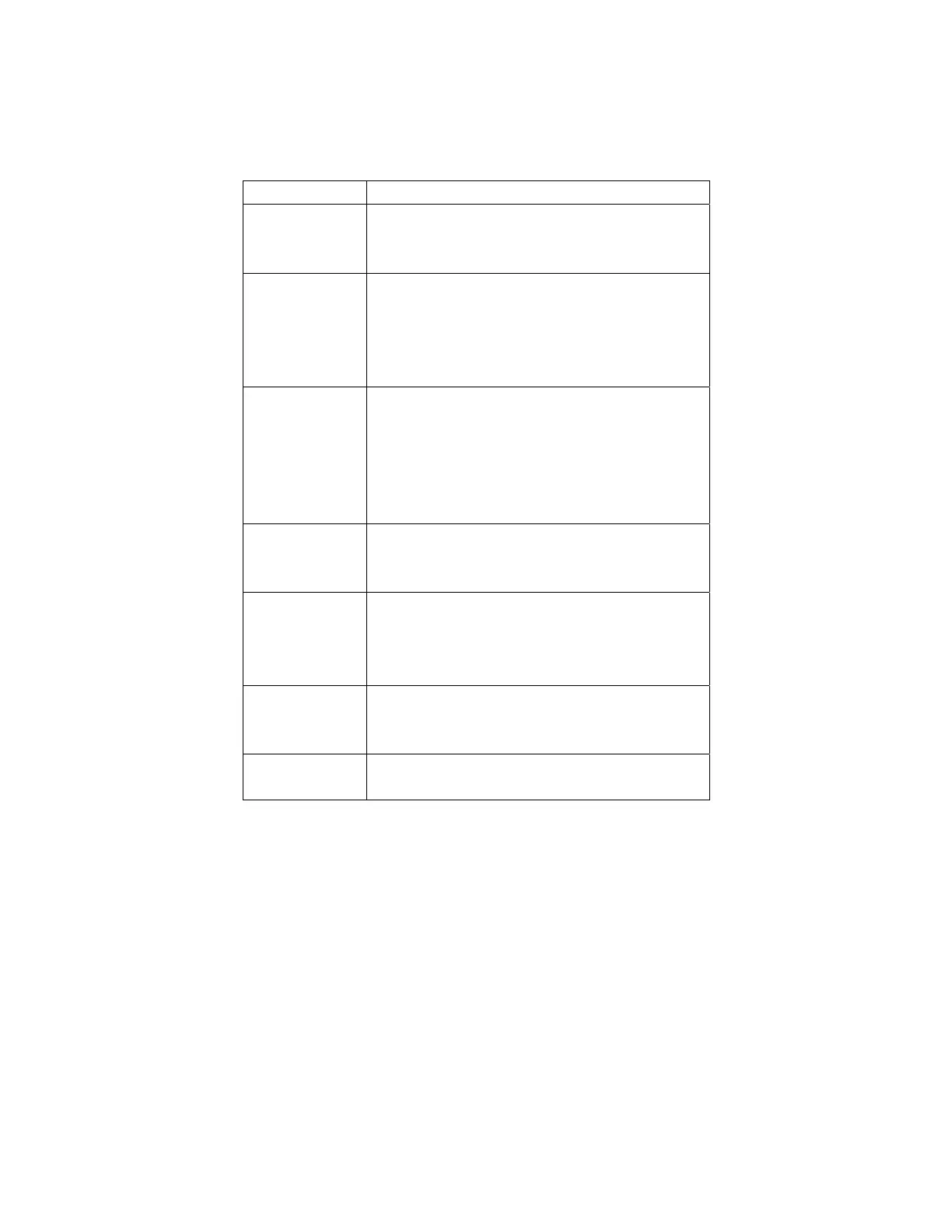
Issue Solution
Nopower Turnofftheunitontheremoteandatthewallsocket.
Pulloutthepowerplug.Wait60secondsandthenplug
thepowercordbackinturnthepowerandunitbackon.
Nopicture Checkthatyourcablesandantennahavebeen
connectedfirmly.
CheckthatyourPictureSettingsarecorrect.
Conductarestoresettingtoreturnsettingsbacktothe
factorydefaultandclearanyincorrectsettings.
Nosound Checkthatyouraudiocableshavebeenconnected
firmly.
CheckthattheMutesettingisnotonandthatyour
AudioSettingsarecorrect.
Conductarestoresettingtoreturnsettingsbacktothe
factorydefaultandclearanyincorrectsetting.
Colourdistortion Ensurethattheequipmentisconnectedproperly.
EnsurethattheAVvideosignalInputisconnected
properly.
Remotecontrolis
notresponding
Makesuretherearenoobstaclesinthewayofthe
remotecontrolandthesensor.
Checkthebatteries,astheymayneedtobechanged.
Moveclosertotheremotesensor.
Screenglittering
underPCmode
Resetthecomputerandenterthesafetymode,then
selecttheappropriatescreentypebyconsultingthePC
operationmanual.
Screentraversed
underPCmode
Thephaseisnotappropriate.EnterthePCsettingand
changetocorrectlevel.
- 31 -




 To Next Page