12
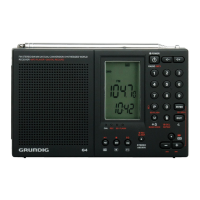
G4 WORLD RECORDER OWNER’S MANUAL
FREQUENCY STORAGE continued
To Recall A Stored Frequency – method 1
1
by pressing ‘P’, then one of buttons 0-9.
2. Recall the frequency by entering the number 00-99, with the
nu
is located.
To Recall A Stored Frequency – method 2
1. Press the MEM button. Notice that MEM appears on the left side
of the display.
2. Press the P button and select the page by pressing one of
buttons 0-9.
3. Press the -+ button sequentially to go from one memory to an-
DELETING ONE MEMORY
1. Tune to the memory page.
2. Tune to the memory number on that page you wish to delete with
the - + buttons.
3. Press and release the DEL button; ‘d’ appears in the display.
4. Press and release the DEL button again.
DELETING THE ENTIRE MEMORY PAGE
1. Tune to the memory page.
2. Do a long press on the DEL button until the page number flashes.
3. Press the DEL button again.


 To Next Page