4
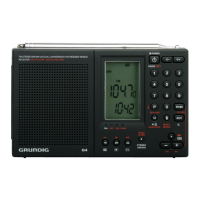
G4 WORLD RECORDER OWNER’S MANUAL
NOTES:
is on/under the button it means that it may need a ‘Long-
Press’.
seconds for it to respond.
1. Long Press: Power On/Off; Press: Change between Radio and
MP3 mode
2. VOL –
3. VOL +
4. 0-9 Digital Button
5. Enter; Confirm
6. Space, Cancel, Mute
7. Delete
8. Function Button
9. MP3: Select the Music; Radio: Frequency+/-
10. Long Press:MP3: Change between Mp3 and Voice
11. Power Off: Charging; MP3: Change between SD Card and
FLASH; Radio: Input the Page No.
12. Power Off: Recording (long press); MP3: A-B Repeat; Radio:
Change between Stereo and Mono, Wide and Narrow Band
13. Radio: SW Band, Meter Band; MP3: Select EQ mode; Power
Off: Set Auto Play MP3 File
14. Radio: MW Band; MP3: Stop Playing; Power Off: Set Auto
Record of the Voice
15. Radio: FM Band; MP3: Play the Music; Power Off: Set Auto
Receive of the Radio
16. Telescopic Antenna
17. Ex
18. DX-NOR.-LO Switch
19. Ea
20. US
21. SD Card Slot



 To Next Page