7
D
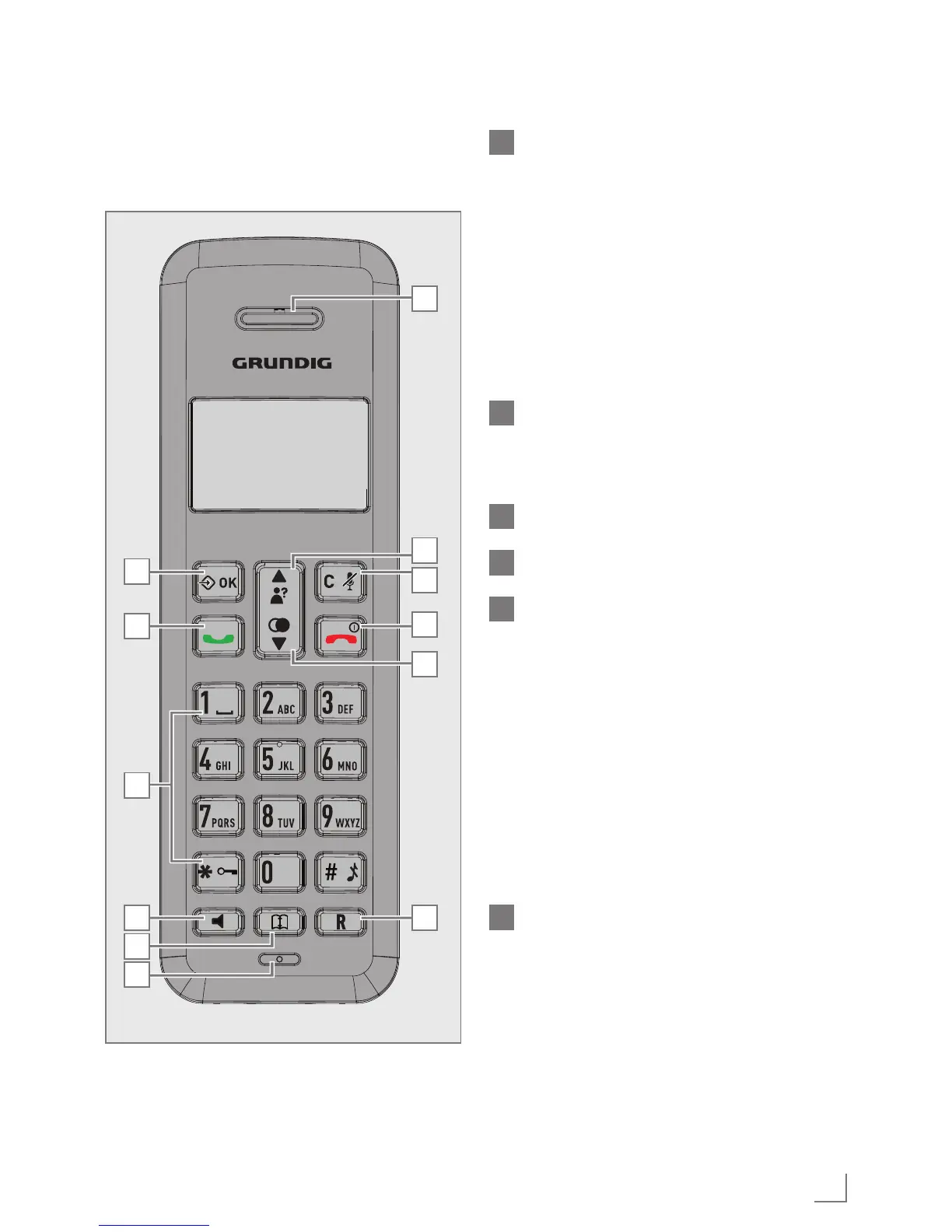
SPEAKERPHONE
During a call: Press to turn on / off
the speakerphone.
In Idle mode / predialing mode /
Redial list / Call List / Phonebook
entry: Press to make a call with
speakerphone.
During ringing: Press to answer a
call with speakerphone.
E
PHONEBOOK
In idle mode: Press to access the
phonebook list.
F
MICROPHONE
G
EARPIECE
H
U P
In idle mode: Press to access the call list
In menu mode: Press to scroll up the
menu items.
In Phonebook list / Redial list / Call
List: Press to scroll up the list.
During a call: Press to increase the
volume.
In ringing: Press to increase the ringer
volume.
I
RIGHT SOFT KEY (CLEAR/
BACK/MUTE/INTERCOM)
In main menu mode: Press to go
back to idle screen.
In sub-menu mode: Press to go back
to previous level.
In sub-menu mode: Press and hold
to go back to idle screen.
A
G
H
I
J
K
L
B
C
D
E
F
GETTING TO KNOW YOUR PHONE
______



 To Next Page