Playing a CD
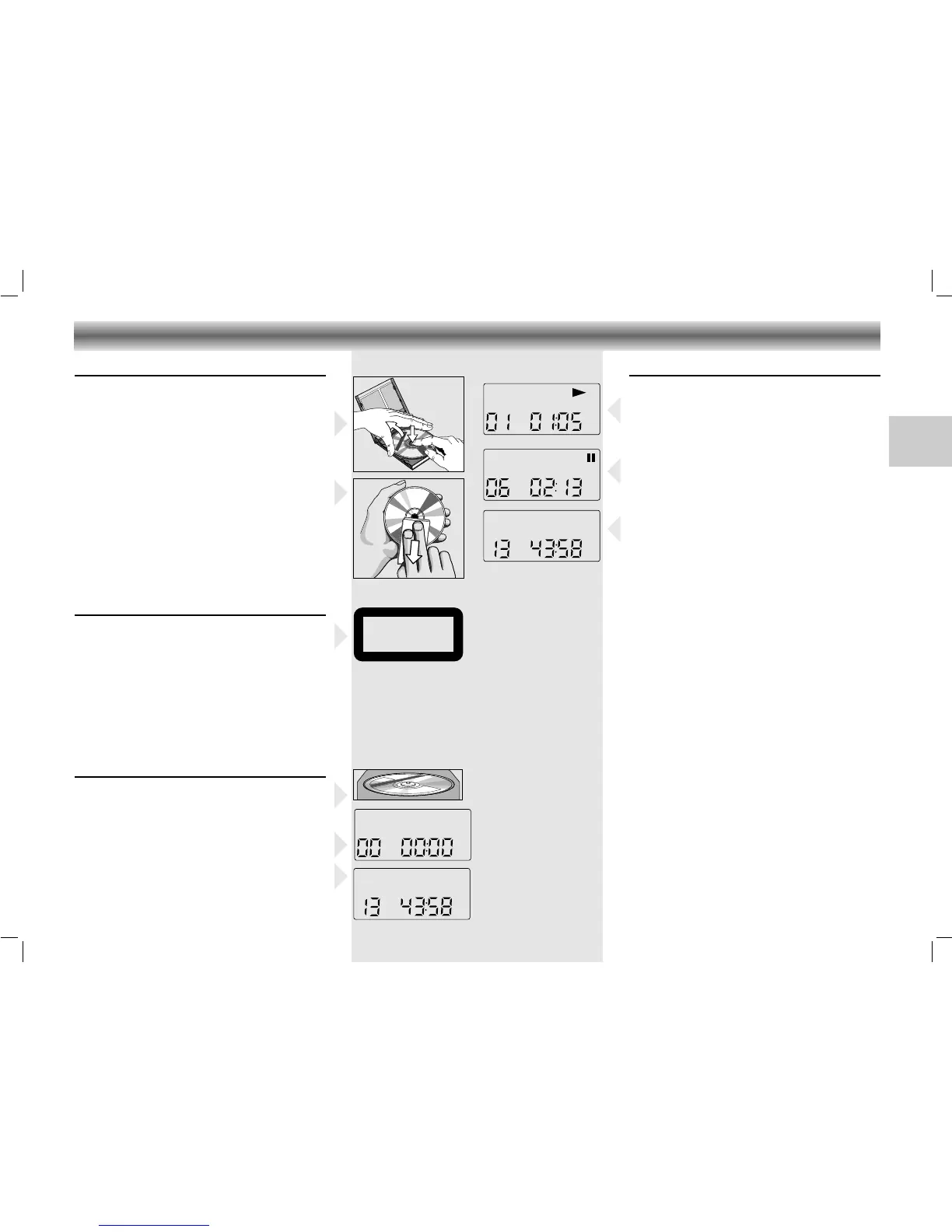
• Press PLAY/PAUSE 2; to start playback.
– The display shows the current track number
and its elapsed playing time.
• Adjust the sound using the VOLUME, DSC and
SURROUND SOUND controls.
• For brief interruptions, press PLAY/PAUSE 2;.
•
To resume playback, press PLAY/PAUSE 2;
again.
• To stop playback, press STOP 9.
– The total playing time and number of
tracks will then appear on the display.
– The CD player also goes to position STOP:
– when the end of the CD is reached;
– if the FUNCTION switch is moved to another
position
– if the batteries run down or if the power sup-
ply is interrupted.
• To take out the CD, open the CD door by
pressing OPEN/CLOSE.
• Open the CD door only if the CD player is in
position STOP.
Selecting another track during play
• Press R-SKIP Q or F-SKIP R until the
required track number appears in the display.
– The selected track begins to play.
Starting with a particular track
• Press R-SKIP Q or F-SKIP R until the
required track number appears in the display.
• Press PLAY/PAUSE 2;.
– Play starts from the selected track.
O
I
O
I
O
I
O
I
O
I
O
I
O
I
O
I
O
I
O
I
O
I
O
I
O
I
O
I
O
I
O
I
O
I
O
I
O
I
O
I
O
I
O
O
O
I
O
I
O
I
O
I
O
I
O
I
O
O
I
O
I
O
I
O
I
O
I
O
O
I
O
O
I
O
I
O
I
CLASS 1
LASER PRODUCT
6
.
O
Y
E
M
I
C
A
N
T
O
(
H
e
a
r
M
y
V
o
i
c
e
)
7
.
D
O
N
'
T
W
A
N
N
A
L
O
S
E
Y
O
U
8
.
G
E
T
O
N
Y
O
U
R
F
E
E
T
9
.
Y
O
U
R
L
O
V
E
I
S
B
E
D
F
O
R
M
E
1
0
.
C
U
T
S
B
O
T
H
W
A
Y
S
1
1
.
O
Y
E
M
I
C
A
N
T
O
(
S
p
a
n
is
h
V
e
r
s
i
o
n
)
1
2
.
S
I
V
O
Y
A
P
E
R
D
E
R
T
E
E
P
C
4
6
5
1
4
5
2
BIE
M/
ST
EM
R
A
S
T
E
R
E
O
A
ll
r
ig
h
t
s
o
f
t
h
e
p
r
o
d
u
c
e
r
a
n
d
o
f
t
h
e
o
w
n
e
r
o
f
t
h
e
r
e
c
o
r
d
e
d
w
o
r
k
r
e
s
e
r
v
e
d
.
U
n
a
u
t
h
o
r
i
s
e
d
c
o
p
y
in
g
,
p
u
b
l
ic
p
e
r
f
o
r
m
a
n
c
e
,
b
r
o
a
d
c
a
s
t
in
g
,
h
ir
i
n
g
o
r
r
e
n
t
a
l
o
f
th
i
s
r
e
c
o
r
d
i
n
g
p
r
o
h
i
b
it
e
d
.
M
a
d
e
i
n
A
u
s
t
r
i
a
1
.
A
Y
,
A
Y
,
I
2
.
H
E
R
E
W
E
A
R
E
3
.
S
A
Y
4
.
T
H
I
N
K
A
B
O
U
T
Y
O
U
N
O
W
5
.
N
O
T
H
IN
'
N
E
W
C
O
M
P
A
C
T
D
I
G
I
T
A
L
A
U
D
I
O
1
2
CD handling
• Use only Digital Audio CDs which have the
symbol
ʀ
.
• To take the CD out of its box easily, press the
centre spindle while lifting the CD.
•
Never write on a CD or attach any sticker to the
CD.
• Always hold the CD at the edge and always
store it in its box after use with the label facing up.
• To remove dust and dirt, breathe on the CD
and wipe it with a soft, lint-free cloth in a
straight line from the center towards the edge.
Cleaning agents may damage the CD.
• Do not expose the CD to rain, moisture, sand,
or to excessive heat. (E.g. from heating equip-
ment or in motor cars parked in the sun).
Warning
CLASS 1 LASER PRODUCT means that the laser´s
construction makes it inherently safe so that the
legally prescribed maximum permissible ratiation
values can never be exceeded.
CAUTION: Using any equipment or devices
other than those described and specified in these
operating instructions, or tampering with the unit
in any
way, can result in dangerous exposure to
radiation.
Inserting a CD
• Set the FUNCTION switch to CD.
• Press OPEN/CLOSE to open the CD door.
• Insert the CD, printed side facing up.
• Close the CD door.
–
The CD player scans the contents list of the CD.
After that, the total number of tracks and the
total playing time appear on the display.
CD PLAYER
19
RR 720/760 CD page 19
GB




 To Next Page