EasyManua.ls Logo

Grundig TK46 - Effect Recording Techniques; Playback Recording Example; Multiple Synchronous Recording

Grundig TK46
40 pages
Print Icon
To Next Page IconTo Next Page
To Previous Page IconTo Previous Page
Loading...
aie.
aces
nS
q
4
Synchronovfnahme
Synchronous
Rec:
Enregistrement
superposé
Wiedergabe
1
Playback
1
Reproduction
3
Wiedergobe
2
Ploybock
2
Reproduction
2
Abb.
2
Fig.2
obhéren
monitoring
écoute
E
Erste
oder
bestehende
cd
Auizeichnung
wird
abgehért,
wahrend
eine
2weite,
dazu
syachrone
Ayfnahme
entsteht
First
recording
is
monitored
while
making
a
second
recording
Premier
enregistrement
est
contréle
par
I'écoute,
en
faisant
le
deuxiéme
enregistrement
3
Synchrone
Nevaufnchme
Synchronous
recording
Enregistrement
superposé
Effektaufnahmen
Alle
Probleme,
weiche
bei
der
Vertonung
von
Filmen
und
Diaserien
ode
méglichst
studiogetreven
Aufnahmen,
z.
B.
von
Amajeur-Kapelien
unc
SGngern
on
Sie
heranireten,
lassen.
sich
mit
dem
TK
46
mit
einiger
bung
meistern.
H
.
Einige
Beispiele
sotlen
Ihnen-nachfolgend
die
Arbeitsweise
bei
Playback-
Maltiplayback-
und
Echooufnahmen
erkléren.
Die
eine
Abbildung
zeigt
Ihnen
jewels,
in
welcher
Reihenfolge
die
Taster
und
Regier
zu
bedienen
sind,
auf
der
anderen
Abbildung
ist
dargestellt
was
auf
den
betreffenden
Spuren
des
Bandes
geschieht.
Beispiel
1:
Playback
.
Ployback-Aufnehmen
nenné
man
synchrone
Aufnahmen
auf
2
Spuren,
die
gelrennt
nocheinander
hergestelli,
jedoch
gleichzeitig
wiedergegeber
werden.
Nehmen
wir
on,
Sie
haben
auf der
Spur
3
die
Aufnahme
einer
instrumental:
gruppe
(markiert
mit
Il
auf
Abb.
2}
und
machten
auf
Spur
3
dezu
singer
(markier}
mit
47}.
Sie
dricken
also
in-
unserem
Beispiel
die
Avfnchmetoste
@®.
Die
Aus-
steverung
erfolgt
bei
einer
kurzen
Probe
vor
dem
Mikrofon.
Weil
Sie
die
Musik
von
Spur
3
héren
woilen,
dricken
Sie
die
Wiedergabetaste
une
dazu-die
Taste
Syn
@.
Sobold
Sie
nun
starten,
héren
Sie
in
den
Laui-
sprechern
die
Musik
von
Spur
1
und
kénnen
synchron
dazu
singen.
Die
Wiedergabelautstdrke
regeln
Sie
mit
dem
Louisfrkeregler
@.
Statt
Gber
die
Lavisprecher
kénnen
Sie
die
Wiedergabe
auch
ther
Kopthorer
abhéren.
Die
zweite
Aufnahme
lait
sich
selbsiverstandlich
beliebig
off
wiederholen,
bis
sie
richtig
,sitzi“,
denn
die
erste
Aufzeichnung
wird
nur
als
Fuhrungs-
spur
abgehért.
ist
dann
die
Zweitaufnahme
gelungen,
so
kénnen
Sie
beide
Aufzeichnungen
Ml
und
4%
gemeinsam
wiedergeben,
wenn
Sie
beide
Wiedergabetasten
durch
leichtes
Dricken
der
nichi
eingerasteien
Taste
cusrasten
und
die
Startiaste
@
driicken,
Rasten
Sie
jedoch
beide
Wiedergabetasten
@
und
@
ein,
wie
bei
Stereo-
wiedergabe,
so
gibt
eine
Endstufe
die
Musik,
die
andere
den
Gesang
wieder,
Eine
weitere
Anwendungsmdglichkeit
des
Playbockverfohrens
ergibt
sich
bei
der
Film-
und
Diavertonung.
Texte
und
Musik
bringen
Sie
auf
getrennten
Spuren
unter,
so
daf
jede
Aufzeichnung
fur
sich
korrigiert
‘oder
ernevert
werden
kann.
Unsere
Skizze
zeigt
der
besseren
Ubersicht
wegen
nur
die
Auizeichnung
der
Spuren
i
und
3.
Nach
Umdrehen
des
Bandes kénnen
selbsiversténdlich
die
Spuren
2
und
4
benutzt
werden.
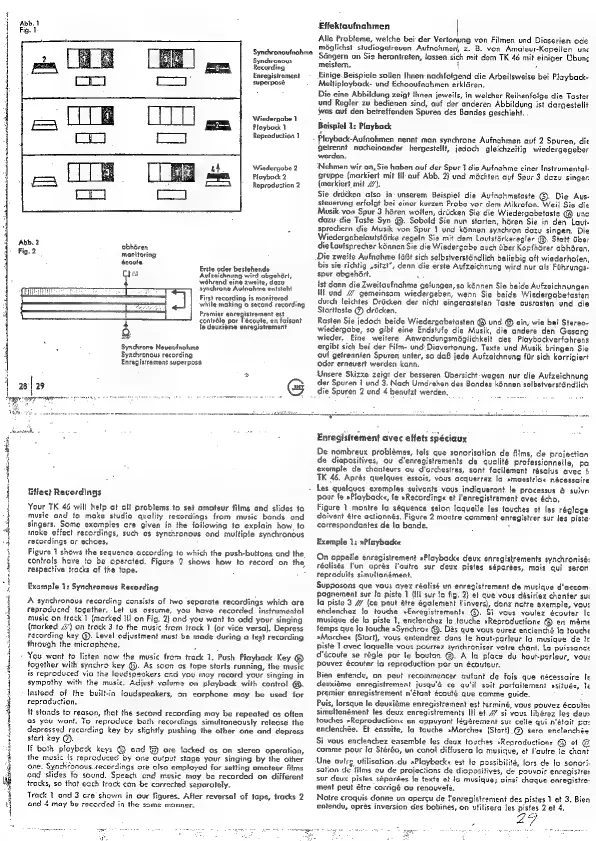
Cliect
Recordings
Your
TK
46
will
help
ot
all
problems.to
set
amateur
films
and
stides
te
music
and
fo
make
studio
quality
recordings
from
music
bends
ond
singers.
Some
examples
cre
given
in
the
following
to
explain
how.
to
toke
effect
recordings,
such
as
synchronous
ond
multipie
synchronous
recordings
or
echoes.
Figure
1
shows
the
sequence
according
te
which
the
push-buttons
ond
the.
controls
have
to
be
operated.
Figure
2
shows
how
to
record
on
the,
respective
tracks
of
the
tape.
Example
1:
Synchronous
Recording
A
synchronous
recording
consists
of
two
seporate
recordings
which
are
reproduced
together.
Let
us
ossume,
you
have
recorded
instrumental
music
on
freck 1
(marked
Ill
on
Fig.
2)
and
you
want
to
odd
your
singing
(marked
#’}
on
trock
3
to
the
music
from
irack
7
{or
vice
versa).
Depress
recording
key
G).
Level
adjustment
mus?
be
made
during
a
test
recording
through
the
microphone.
You
went
to
listen
now
the
music
from
track
1.
Push
Playback
Key
®
together
with
synchro
key
@.
As
soon
es
tape
storis
running,
the
music
is
reproduced
via
th
loudspeakers
and
you
may
record
your
singing
in
sympathy
with
the
music,
Adjust
volume
on
playback
with
contro!
@.
Instead
of
the
built-in
loudspeakers,
on
earphone
may
be
used
for
reproduction.
if
stands
to
reason,
that
the
second
recording
may
be
repeated
as
often
as
you
want.
To
reproduce
bath
recordings
simultaneously
release
the
depressed
recording
key
by
slightly
pushing
the
other
one
and
depress
start
key
@.
If
both
ployback
ki
®
and
are
locked
as
on
stereo
operation,
the
music
is
reproduced
by
one
output
stage
your
singing
by
the
other
‘one.
Synchfonous.recordings
ore
also
employed
for
setting
omateur
Rims
ond
‘slides
fo
sound.
Speech
and
music
may
be
recorded
on
different
tracks,
so
that
each
irack
con
be
corrected
seporotely.
Track
1
and
3
Gre
shown
in
our
figures.
After
reversal
of
tape,
tracks
2
ond
4
may
be
recorded
in
the
some
manner.
Enregistrement
avec
effets
spéciaux
De
nombreux
problémes,
tels
que
sonorisation
de
films,
de
projection
de
diapositives,
ov
d'enregistrements
de
qualité
professionnelle,
pa
exemple
de
chanteurs
ou
d'orchestres,
sont
facilement
résolus
avec
{i
TK
46.
Aprés
quelques
essois,
vous
acquerrez
la
amagestriae
nécessaire
Les
quelques
exemples
suivants
vous
indiqueront.
fe
processus
&
suivri
pour
fe
»Ploybacke,
le
»Recordinge
et
J'enregistrament
avec
écho,
Figure
1_montre
lo
séquence
selon
laquelle
les
touches
et
les
réglage
doivent
étre
actionnés.
Figure
2
montre
comment
enregistrer
sur
les
piste
correspondantes
de
la
bande.
:
Exemple
1:
»Plnybacke
On
oppelle
enregistrement
»Playbacke
deux
enregistrements
synchronisé:
réalisés
I'un
oprés
i'outre
sur
deux
pistes
séparées,
mais
qui
seron
reproduits
simultanément.
Supposons
que
vous
ayez
réalisé
un
enregistrement
de
musique
d'accom
pognement
sur
[a
piste
1
{Ill
sur
to
fig.
2)
ef
que
vous
désiriez
chanter
sui
la
piste
3
{ce
peut
étre
également
I'invers),
dans
notre
exemple,
vou:
enclenchez
lo
touche
»Enregistremenfe
@).
Si
vous
voulez
écouter
Ic
musique
de
lo
piste
1,
enclenchez
la
touche
»Reproductione
@
en
meme
temps
que
la
touche
»Synchroz
@.
Das
que
vous
aurez
enclenché
ja
tauche
»Macchee
(Stort},
vous
entendrez
dans
le
haut-parleur.fo
musique
de
Ic
piste
1
ovec
laquelle
vous
pourrez
synchroniser
votre
chant,
La
puissance
découte
se
régle
por
le
bouton
@.
A
la
ploce
du
hout-parleur,
vou:
pouvez
écouter
io
reproduction
par
un
écouteur,
Bien
entendu,
on
pevt
recommencer
autant
de
fois
que
nécessaire
le
deuxigme
enregistrement
jusqu'é
ce
qu'il
soit
porfaitement
vsifué:,
te
premier
enregistrement
n‘étant
écouté
que
comme
guide.
Puis,
lorsque
le
deuxiéme
enregistrement
est
terminé,
vous
pouvez
écoulet
simultanément
les
deux
enregistrements
Ili
et
//
si
vous
libérez
les
deus
touches
»Reproductionc
en
cppuyant
fégarement
sur
celle
qui
n'était
pa:
enclenchée.
Et
ensuite,
la
touche
»Marchee
(Stori].@
sera
enclenchée
Si
vous
encleachez
ensemble
les
deux
touches
»Reproductions
@
ef
©
comme
pour
ia
Stéréo,
un
canol
diffusera
lo
musique,
et
l'autre
fe
chant
‘Une
outrg
utilisotion
du
»Playback«
est
la
possibilité,
lors
de
fa
sonori-
sation
de
films
ov
de
projections
de
dioposilives,
de
pouvoir
enregisirer
sur
deux
pistes
séparées
fe
texte
et
la
musique;
gins!
chaque
enregistre-
ment
peut
étre
corrigé
ov
renouvelé.
Notre
croquis
donne
un
opercu
de
f'enregistrement
des
pistes
1
et
3.
Bien
eniendy,
oprés
inversion
des
bobines,
on
utilisera
les
pistes
2
et 4.

Related product manuals