EasyManua.ls Logo

Grundig TK46 - Page 31

Grundig TK46
40 pages
Print Icon
To Next Page IconTo Next Page
To Previous Page IconTo Previous Page
Loading...
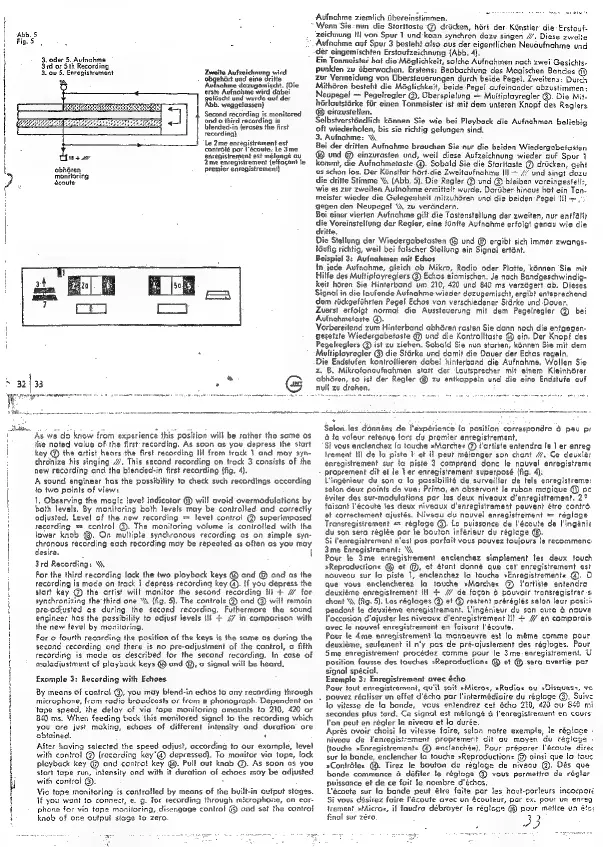
‘Abb.
5
Fig.
5
3.
oder
5.
Avinchme
3rd
or
Sth
Recording
3.
ow
5.
Enregistrement
Zweite
Aufzeichnun;
wisd
geldscht
und
wurde
auf der
Abb.
weggelassen}
Second
recording
is
monitored
‘and
a
third
recording
is
blended-in
(erases
the
Arst
recording)
Le
2me
enregistrement
est
contralé
par
l'écoute.
Le
3me
enregisirement
est
mélangé
au
!
bes
|
‘2me
enregisirement
{effagont
le
obbdren
monitoring
‘écoute
premier
enregistrement}
»
32
|
33
:
|
an
cna
Adfnchme
ziemlich
dbereinstimmen.
“Wenn
Sie-nun
die
Stortioste-@
dricken,
hort
der.
Kinstler
die
-Erstouf:
zeichnung
Hi
von
Spur
1
und-kann
synchron
dazu
singen
//’,
Diese
zweite
Avfnahme
auf
Spur
3
besteht
also
ous
der
eigentlichen
Nevoufnahme
und
der
eingemischten
Erstaufzeichnung
(Abb.
4}.
Ein
Tonmeister
hat
die
Méglichkeit,
solche
Aufnahmen
nach
zwei
Gesichts-
punkien
zu
Gberwachen.
Erstens:
Beobachtung
des
Magischen
Bandes
®
zur
Vermeidung
von
Obersteverungen
durch
beide
Pegel.
Zweitens:
Durch
Mithdren
besteht
die
Méglichkeit,
beide
Pege!
aufeincnder
abzustimmen
Neupegel
=
Pegelregler
@,
Uberspielung
=
Multiplayregler'@.
Die
Mit-
hérloutstGrke
fir
einen
Tonmeister
ist
mit
dem
uateren
Knopf
des
Raglers
®
einzustelien.
Selbstversténdlich
kénnen
Sie
wie
bei
Playback
die
Aufnahmen
beliebig
oft
wiederholen,
bis
sie
richtig
gelungen
sind,
3.
Aufnchme:
Bei
der
dritten
Aufnahme
brauchen
Sie
nur
die
beiden
Wiedergabetasten
®
und
@
einzurasten
und,
weil
diese
Aufzeichnung
wieder
auf
Spur
1
kommt,
die
Aufnahmetaste.@.
Sobald
Sie die
Staritasie
@
dricken,
geht
es
schon
los.
Der
Kinstler
hért.die
Zweitavfnahme
Ill
=
/
und
sinat
dozu
die
dritte
Stimme
\§,
(Abb.
5}.
Die
Regler
@
und
@
bleiben
voreingestell:,
wie
es
zur
zweiten
Avinahme
ermittelt
wurde,
Dariber-hincus
hot ein
Ton-
meister
wieder
die
Gelegenheit
mitzuhéren
und
die
beiden
Pagel
lll
~
,
gegen
den
Neupegel
\\
zu
verdndern,
Bei
einer
vierten
Aufnahme
gilt
die
Tastenstellung
der
zweiten,
nur
entfltr
die
Voreinstellung
der
Regier,
eine
fOntie
Aufnahme
erfolgt
genau
wie
die
ritte.
Die
Stellung
der
Wiedergobetasten
©
und
@
ergibt
sich
immer.
zwangs-
tGufig
richtig,
weil
bei
falscher
Stellung
ein
Signal
ertént.
Beispiel
3:
Aufnahmen
mit
Echos
in
jede
Aufnahme,
gleich
ob
Mikro,
Radio
oder
Platte,
kénnen
Sie
mit
fe
des
Multipiayreglers
@
Echos
einmischen.
Je
nach
Bandgeschwindig-
keil
héren
Sie
Hinterbond
um
210,
420
und
840
ms
verzégert
ab.
Dieses
Signal
in
die
loufende
Avinahme
wieder
dazugemischt,
ergibt
entsprechand
dem
rickgefiihrten
Pegel
Echos
von
verschiedener
Sidrke
und
Dover.
Zuerst
erfoigt
normal
die
Aussteverung
mit
dem
Pegelregler
@
bei
Auinahmetaste
©.
Vorbereitend
zum
Hinterband
abhdren
rasten
Sie
dann
noch
die
entgegen-
gesetzte
Wiedergabetaste
@
und
die
Kentrolltaste
@
ein.
Der
Knopf
des
Pegelreglers
@
ist
zu
ziehen.
Sobald
Sie
nun
storien,
konnen
Sie
mit
dem
Multiployregler
@)
die
Siérke
und
domit
die
Dover
der
Echos
regeln.
Die
Endstufen
kontrollieren
dabei
hinteroand
die
Aufnahme,
Wollen
Sie
z.
B.
Mikrofonaufnchmen
statt
der
Lautsprecher
mit
einem
Kleinhérer
obhéren,
so
ist
der
Regler
@
zu
entkoppeln
und
die
eine
Endstufe
auf
null
zu
drehen,
As
we
do
know
from
experience
this
position
will
be
rather
the
same
as
ihe
noted
vaiue
of
the
first:
recording.
As
soon
as
you
depress
the
start
key
@
the
artist
hears
the
First
recording
lil
from
track
1
and
may
syn-
thronize
his
singing
“7.
This
second
recording
on
track
3
consists
of
the
new
recording
and
the
bleaded-in
first
recording
(fig.
4).
A
sound
engineer
has
the
possibility
to
check
such
recordings
cccording
to
two
points
of
view:
1,
Observing
the
magic
level
indicator
@
will
avoid
overmodulations
by
both
levels.
By
monitoring
both
levels
may
be
controlled.
and
correctly
odjusied.
Level
of
the
new
recor
=
level
control
@
superimposed
recording
==
control
@.
The
monitoring
volume
is
controfled
with
the
lower
knob
@.
On
multiple
synchronous
recording
as
on
simple
sya-
chronous
recording
each
recording
may
be
repeated
as
often
as
you
may
desire.
i
i
3rd
Recording:
\\
:
For
the
third
recording
lock
the
two
ploybock
keys
@
ond
@
ond
as
the
recording
is
mace
on
track
}
depress
recording
key
@).
{f
you
depress
the
start
key
@)
the
artist
will
monitor
the
second
recording
ti
+
4%
for
A
synchronizing
the’
third
one
‘\
(fig.
5}.
The
controls
@
ond
©
will
remain
i
pre-adjusted
as
during
the
second
recording,
Futhermore
the
sound
engineer
has
the
possibility
to
odjust
levels
ill
+
27
in
comporison
with
the
new
level
by
monitoring,
for
@
fourth
recarding
the
position
of
the
keys
is
the
same
as
during
the
second
recording
and
there
is
no
pre-adjustment
of
the
control,
a
fifth
recording
is
mode
as
described
for
the
second
recording.
In
cose
of
maladjustment
of
playback
keys
®
end
@,
«
signa!
will
be
heerd.
Example
3:
Recording
with
Echoes
By
means
of
control
@,
you
may
blend-in
echos
to
any
recording
through
microphone,
from
radio
broadcasts
or
from
a
phonograph.
Dependent
on
tape
speed,
the
delay
of
via
tape
monitoring
omounts
to
210,
420
or
849
ms.
When
feeding
back
this
monitored
signe!
to
the
recording
which
you
are
just
moking,
echoes
of
different
intensity
and
duration
cre
obfained.
Alter
having
ssiected
the
speed
odjust,
according
to
our
example,
level
with
control
@
(recording
key"@
depressed).
To
monitor
via
tape,
lock
ployback
key
@
and
coniro!
key
@.
Pull
out
knob
@.
As
soon
os
you
slert
tape
run,
intensity
ond
with
it
duration
of
echoes
moy
be
adjusted
with
control
@).
:
Vio
tape
monitoring
is
controlled
by
meons
of
the
b:
ovtput
stages.
If
you
want
to
connect,
e.
g.
for
recording
through
microphone,
on
eor-
phone
for
vic
tope
monitoring,
disengage
control
@
and
set
the
control
knob
of
one
outpul
stage
te
zero.
Slaton
es
Selon.les
données
de
lexpérience
la
position
correspondra
6
peu
pr
6
Ia
voleur
retenue
lors
du
premier
encegistrement,
Si
vous
enclenchez
ic
touche
»Marchee
@
t'ortiste
entendra
le
}
er
enreg
teement
Hl
de
la
piste
1
et
il
peut
mélanger
son
chant
47.
Ce
deuxiér
enregistrement
sur
ta
piste
3
comprend
donc
le
nouvel
enregistreme
proprement
dit
et
le
Ter
enregistrement
superposé
(fig.
4):
Uingénieur
du
son
¢
la
possibilité
de.
surveilier
de
tels
enregistreme:
selon
deux
points
de
vwe:
Primo,
en
observont
le
ruban
magique
@
pc
éviter
des
sur-modulations
par
tes
deux
niveaux
d’enregistrement.
foisant
Sécoute
les
deux
niveaux
d'enregisirement
peuvent
étre
contr.
et
correclement
ojustés.
Niveau
du
nouvel
enragistrement
lage
Transregisirement
«=
régluge
@.
Lo
puissonce
de
Sécoute
de
l'inganie
du
son
sera
régiée
par
le
bouton
inférieur
du
réglege
®.
Si
l'enregistrement
n'est
pas
parfait
vous
pouvez
toujours
le
recommenc:
3me
Enregistrement:
\\
Pour
fe
3me
enregistrement
enclenchez
simplement
les
deux
touch
sReproductions
@
et
@,
et
étont
donné
que
cet
enregistrement
est
nouveau
sur
lo
piste
1,
enclenchez
la
touche
»Enregistrements
@.
O
que
vous
enclencherez
fa
fouche
»Marchee
@
artiste
entendra
deuxiéme
enregistrement
Il
+
//
de
fogon
6
pouvoir
transregistrer:s.
chont
\\
ffig.
5).
Les
réglages
@
et
©
cestent
prérégiés
selon
leur
posizi:
pendant
le
deuxiéme
enregisirement.
U'ingénieur
du
son
aura
6
nouve
loccasion
d'ojuster
les
niveoux
d'enregistrement
Ili
+
//
en
comporais:
ovec
le
nouvel
enregistrement
en
faisant
l'écoute,
Pour
le
4me
enregistrement
la
moneeuvre
est
la
mérme
comme
pour
deuxiéme,
seulement
il
n'y
pas
de
pré-ajustement
des
régloges.
Pour
5me
enregistrement
procédez
comme
pour
le
3me-enregistrement.
U
position
fausse
des
touches
»Reproductione
@
et
@.sera
avertie
par
signal
spécial.
Exemple
3:
Enregistrement
avee
écho
Pour
tout
enregistrement,
qu'il
soit
»Microx,
»Radioe
ov
»Disques:,
vo
.
pouvez
récliser
un
effet
d'écho
par
l'intermédiaire
du
régiage
@.
Suive
lo
vitesse
de
!a
bande,
vous
entendrez
cet
Scho
220,
420
ou
8460
mi
secondes
plus
ford.
Ce
signal
est
méfongé
4
f'enregisirement
en
cours
l'on
peut
en
régier
le
niveau
et
lo
durée.
Aprés
ovoir
choisi
la
vifesse
faire,
selon
notre
exemple,
le
régiase
»
niveou
de
Vencegistrement
propremer?
dit
ay
moyen
du
ttouche
»Enregistremente
@
enclenchée).
Pour
préparer
I'écoute
dire
sur
io
bande,
enclencher
la
touche
»Reproductions
@
oins!
que
lo
touc
2Contréles
@.
Tirez
le
bouton
du
réglage
de
niveou
@.
Dés
que
bende
commence
4
défiler
te
régloge
@
vous
permetira
de
régler
puissance
et
de
ce
foit
fe
nombre
d'échos,
Lécavte
sur
le
bande
peut
étre
faite
par
tes
haut-porleurs
incorporé
Si
vous
désirez
faire
I'écoute
avec
un
écouteur,
par
ex.
pour
un
enreg
frement
»Mieroe,
if
faudea
débroyer
fe
réglege
©
pour
metice
un
éto:
final
sur
zéra
me
:
43

Related product manuals