EasyManua.ls Logo

Grundig V 210 - Your Remote Control at a Glance; Remote Control Functions; Battery Replacement

Grundig V 210
24 pages
Print Icon
To Next Page IconTo Next Page
To Previous Page IconTo Previous Page
Loading...
2.
Your
Remote
Control
at
a
Glance
TACT
ute
a
is
“DCC/
DISPLAY
DECK
A
MODE
SYSTEM
GRUADIG
AHV00013
Changing
the
batteries
If
the
range
of
your
infrared
remote
control
seems
to
decrease,
or
if
certain
individual
functions
can
no
longer
be
carried
out,
~
you
should
replace
the
batteries.
Two
mignon
1.5
Volt
LRO3
size
AAA
are
-required.
To
change
the
batteries,
open
the
compartment
on
the
back
of
the
remote
control.
Ensure
that
the
batteries
are
inserted
properly
(note
the
markings
in
the
compartment).
And
in
the
interest
of
the
environment:
Remember
that
batteriés
must
always
be
disposed
of
pro-
perly.
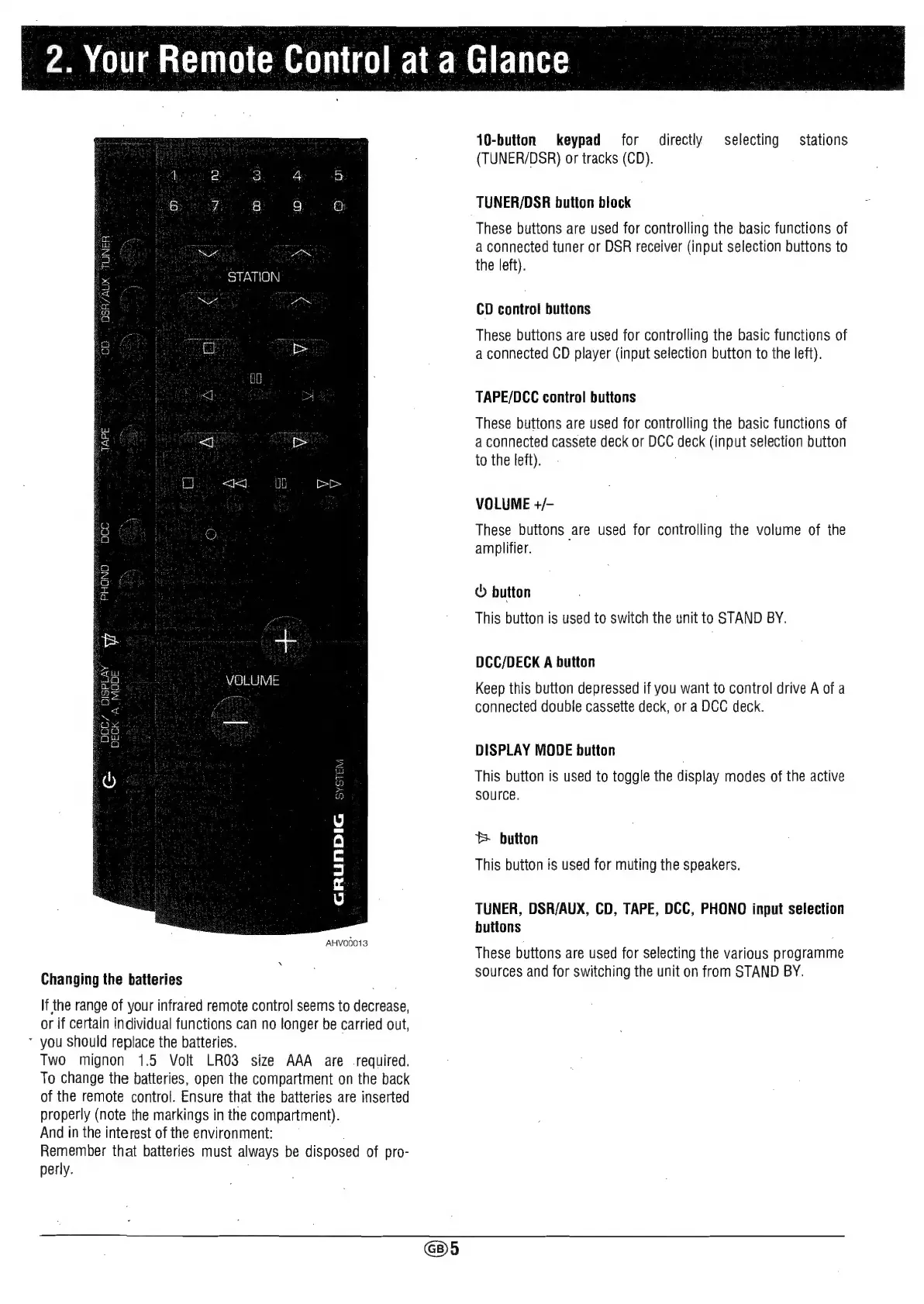
10-button
keypad
for
directly
selecting
stations
(TUNER/DSR)
or
tracks
(CD).
TUNER/DSR
button
block
These
buttons
are
used
for
controlling
the
basic
functions
of
a
connected
tuner
or
DSR
receiver
(input
selection
buttons
to
the
left).
CD
control
buttons
These
buttons
are
used
for
controlling
the
basic
functions
of
a
connected
CD
player
(input
selection
button
to
the
left).
TAPE/DCC
control
buttons
These
buttons
are
used
for
controlling
the
basic
functions
of
a
connected
cassete
deck
or
DCC
deck
(input
selection
button
to
the
left).
VOLUME
+/-
These
buttons
are
used
for
controlling
the
volume
of
the
amplifier.
©
button
This
button
is
used
to
switch
the
unit
to
STAND
BY.
DCC/DECK
A
button
Keep
this
button
depressed
if
you
want
to
control
drive
A
of
a
connected
double
cassette
deck,
or
a
DCC
deck.
DISPLAY
MODE
button
This
button
is
used
to
toggle
the
display
modes
of
the
active
SOUrCe.
®
button
This
button
is
used
for
muting
the
speakers.
TUNER,
DSR/AUX,
CD,
TAPE,
DCC,
PHONO
input
selection
buttons
These
buttons
are
used
for
selecting
the
various
programme
sources
and
for
switching
the
unit
on
from
STAND
BY.