12 13
4. Advanced Sengs
Though your Guardline Driveway Alarm System is factory-set
to the most common uses, somemes your needs may require
a more customized setup.
For example, you may need to:
• Turn on the night mode if you only want to receiver alerts
when it is dark or dimly lit.
• If your sensing area is only a sidewalk-width away and not
across the road, you may want to change the Distance
Sensivity to just 13 (4 m).
4.1 Manufacturer Default Sengs
Our system has been pre-set to the most commonly used
sengs. It is recommended that users test the unit(s) under
the default sengs before adjusng.
NOTE
4.2 Sensor Adjustments
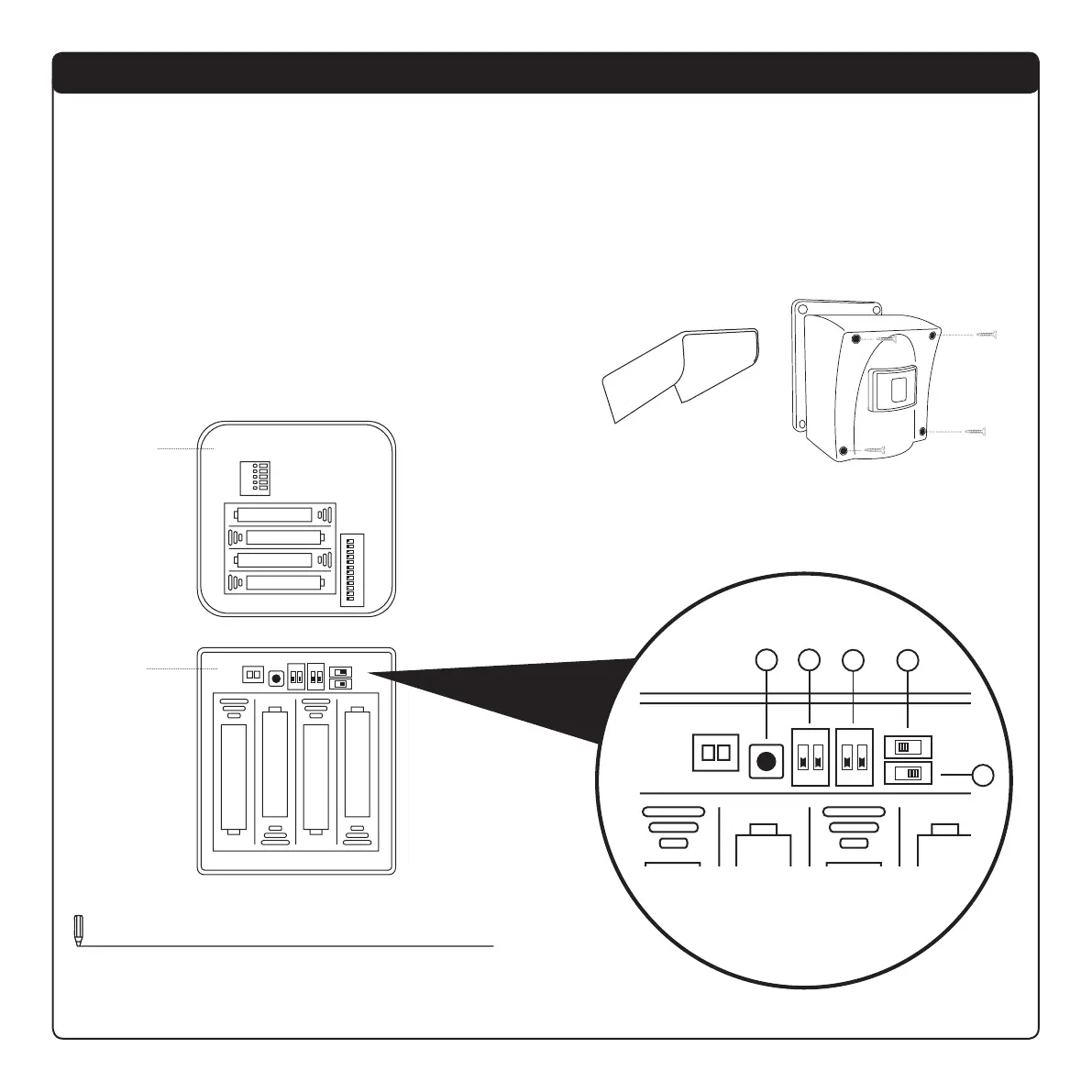
Several switches inside the sensor baery compartment
regulate various sensor funcons including Distance Sensivity,
Night Mode, Delay or Sleep Interval, and Speed Sensivity.
Follow this guide to adjust your unit to the desired seng(s):
1. Remove the sunshade and the four screws holding the
sensor cover in place.
2. Inside the sensor unit is a baery compartment and rows of
switches that control the sensor sengs.
BA
C D
E
Sensor
Receiver


 To Next Page