10
Operating Instructions
Speed Pre-selection
The required speed can be pre-selected with the thumb-wheel (19) (also whilst running).
1 – 2 = low speed
3 – 4 = medium speed
5 – 6 = high speed
The required speed is dependent on the material and can be determined by practical
testing.
After longer periods of working at low speed, allow the tool to cool down by running it for
approx. 3 minutes at maximum speed with no load.
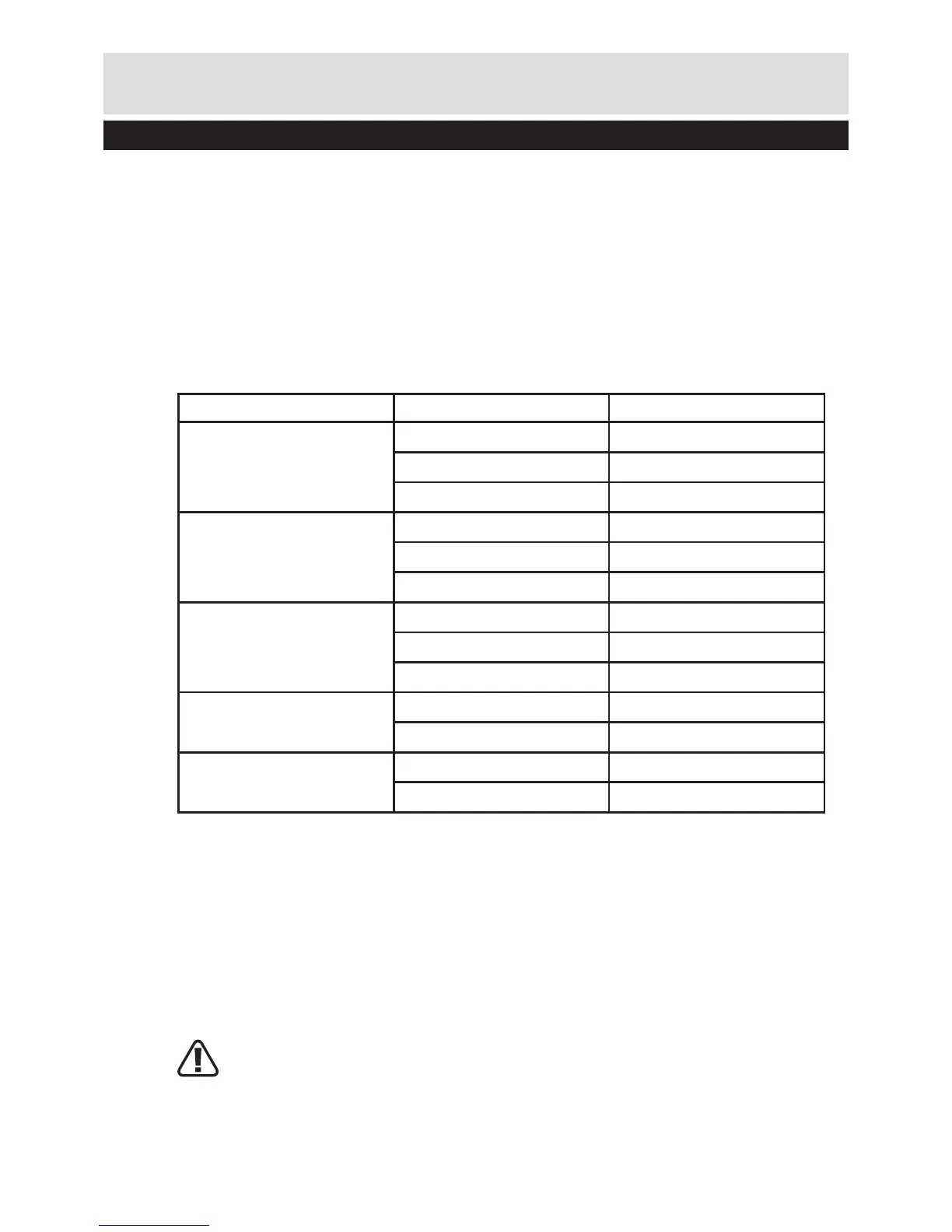
Speed Table
Material Router bit-Ø Speed stages
Hardwood (Beech)
4 – 10mm 5–6
12 – 20mm 3–4
22 – 40mm 1–2
Softwood (Pine)
4 – 10mm 5–6
12 – 20mm 3–6
22 – 40mm 1–3
Particle board
4 – 10mm 3–6
12 – 20mm 2–4
22 – 40mm 1–3
Plastic
4 – 15mm 2–3
16 – 40mm 1–2
Aluminium
4 – 15mm 1–2
16 – 40mm 1
The values shown in the chart are standard values. The necessary speed depends on the
material and the operating conditions, and can be determined by practical testing.
Constant Electronic Control and Soft Start
Constant electronic control maintains the speed constant at no-load and under most
working conditions. Soft start delays the increase in motor speed to reduce the motor
“kick” or torque effect to improve operator comfort and safety.
4. SETTING THE DEPTH-OF-CUT
Depending on the cutting operation, the depth-of cut can be preset in several steps.
WARNING: The adjustment of the depth-of-cut may only be carried out when the
router is switched off.


 To Next Page