9
Operating Instructions
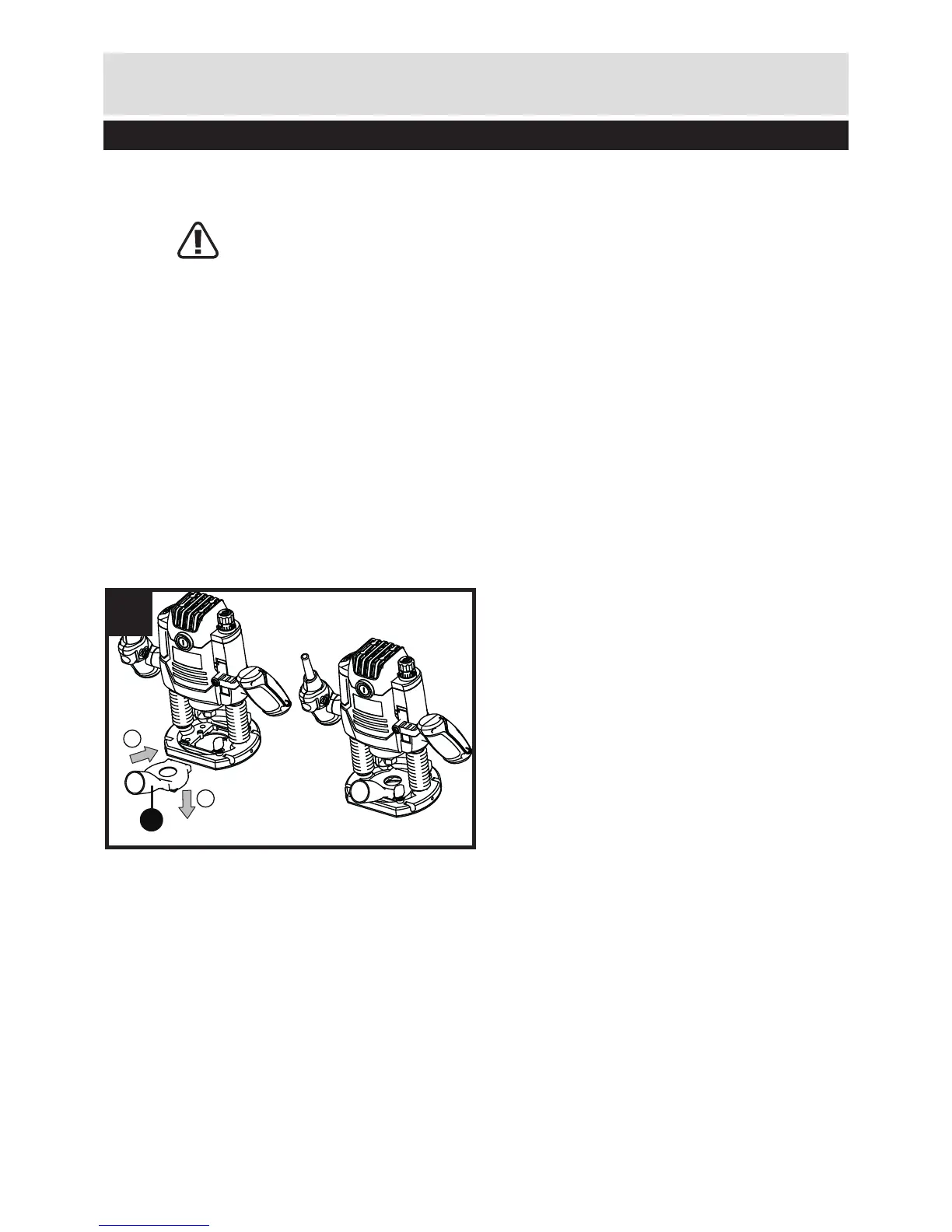
2. MOUNTING THE EXTRACTION ADAPTER (SEE FIG C)
To connect the vacuum cleaner via a suction hose, you can fasten dust adapter (17) to
base plate (9) directly.
WARNING: When mounting the extraction adapter, ensure correct mounting
position!
• For dust extraction, the vacuum hose can be connected directly to the extraction
adapter.
• Clean the dust adapter (17) regularly to ensure optimum dust extraction at all
times.
• The vacuum cleaner must be suitable for the material to be worked.
• When vacuuming dry dust that is especially detrimental to health or carcinogenic,
use a special vacuum cleaner.
3. ON AND OFF SWITCH
LOCK-OFF SWITCH
For starting operation of the tool, actuate the lock-off button (4) first, then press and
hold the On/Off switch (18) afterwards. To switch off the tool, release the On/Off switch
(18).
For safety reasons the On/Off switch of the tool cannot be locked; it must remain
pressed during the entire operation.


 To Next Page