- 8 –
• For each entry of the access code, you may choose one, more than one or ALL of the
buttons on the keypad in combination.
• Be careful in choosing your access code. You’ll want to be sure that you can operate
the unit quickly without making an entry error.
• Example of a valid access code;
Press button one, press button
two, press all four buttons
together.
• Choose an access code which is
easy to use, but try to make it an
access code which is difficult to
guess.
• Your current address or phone
number digits are not good
choices, because the keypad only
has four buttons.
Notes:
• Avoid programming in bright light; it might prevent you from seeing the red/green
LED.
• Look directly down upon the keypad.
• Do not attempt to press the buttons with the safe resting upon a soft surface, such as a
bed, a pillow, or a deep pile carpet.
Programming Your Access Code
Note: There is a soft “beep” sound and a brief light with each keypad entry. Enter the
factory-default code, from left to right: one, two, three, four. The door will open. Leave
the door open.
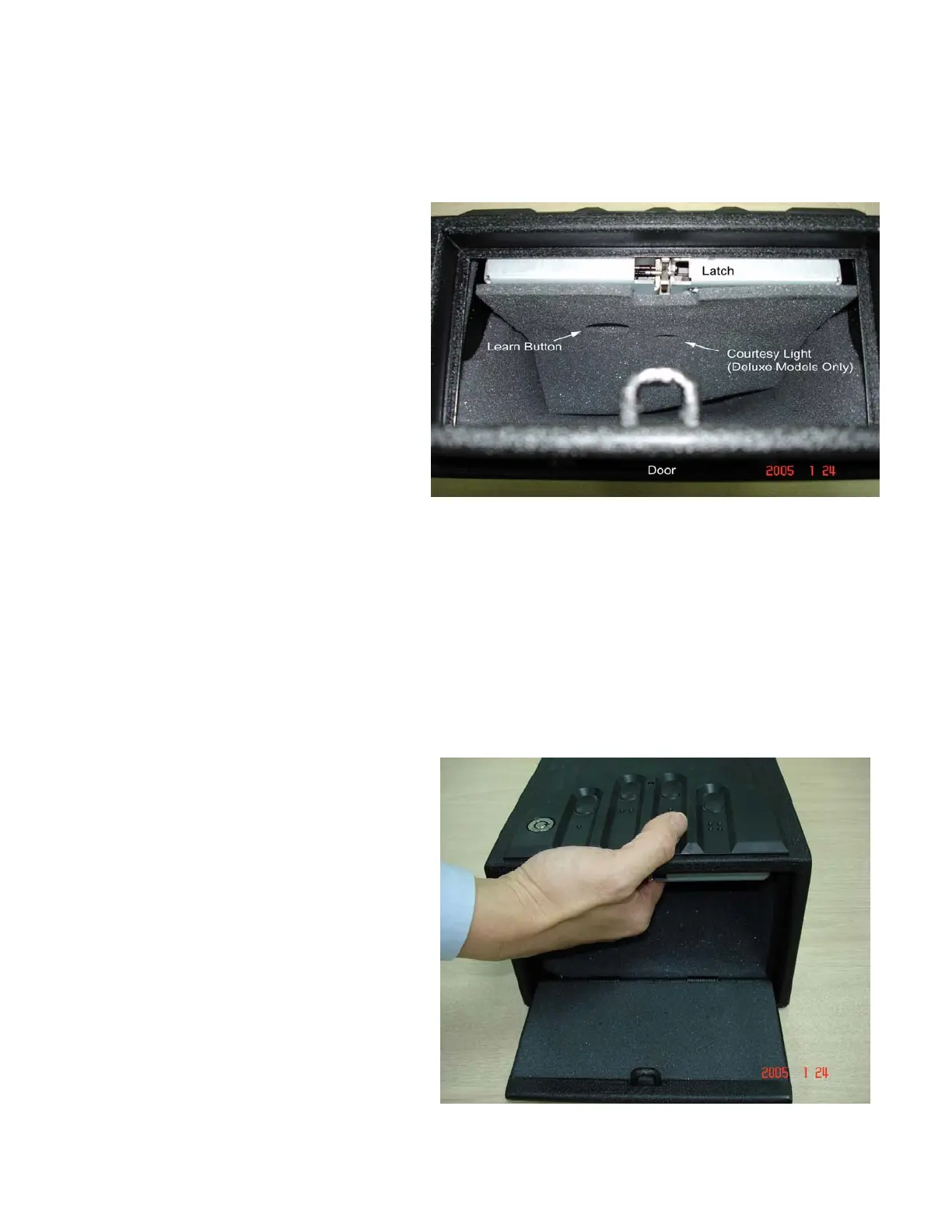
Find the Learn Button (see above).
• Press and hold the Learn Button
for two seconds. You should see
the green light and hear the beep –
the unit is now in “Learn” mode.
• Enter your new code. The light
will remain green.
• Press and hold the Learn button
again for two seconds. The light
will turn red, and you will hear a
beep. Release the Learn Button.
• While the light is red, enter your
new code a second time to
confirm it.



 To Next Page