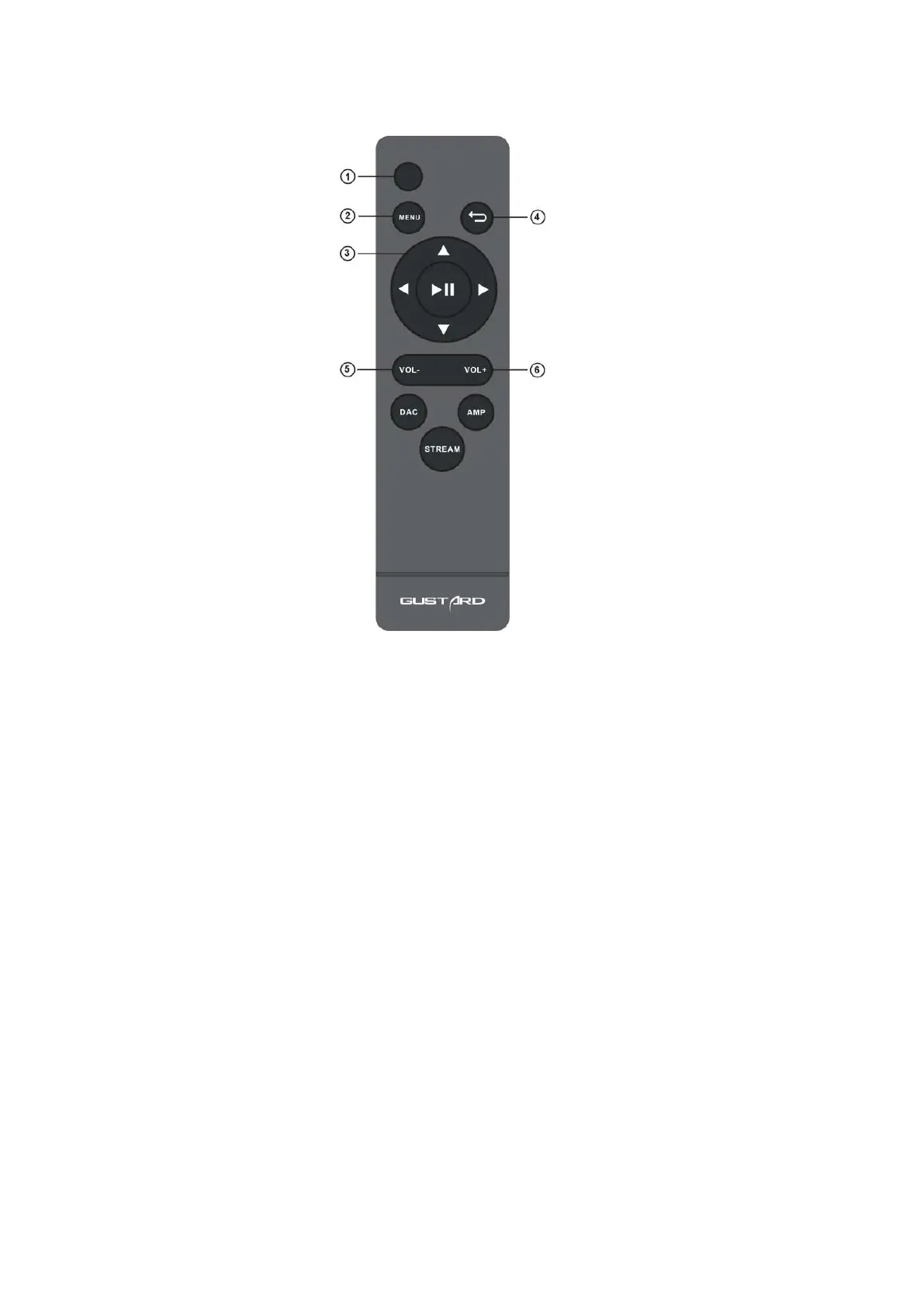
IR remote control
*H16 headphone amplifier uses the new remote control, please press and hold the
AMP button for more than 3 seconds to enter the amp operation mode.
① Mute button: By default, press this button once to enter the mute state of the H16 headphone amplifier; when the H16 headphone amplifier
is in the mute state, press this button to unmute.
② Menu button: Press this button once to enter the function setting menu of the H16 headphone amplifier.
③ Four-dimensional direction button: When entering the menu of the H16 headphone amplifier, adjust the options by left/right.
④ Press the middle button to confirm the adjustment result and return to the main page screen at the same time.
⑤ Back button: Return to the main screen display state.
⑥ Volume down button: When the H16 headphone amplifier is in the main screen display, press this button to decrease the output volume.
⑦ Volume up button: When the H16 headphone amplifier is in the main screen display, press this button to increase the output volume.
Note: ● The operating distance varies depending on the angle. ● If there is something between the remote control
and the IR sensor, it may not operate normally. ● If the remote control will not be used for a long time (one
month or longer), remove the battery. ● If the battery Leaking, please thoroughly clean all the residues in the
battery compartment and install new batteries. ● When using other devices controlled by infrared rays, using
this remote control may operate these devices by mistake.


 To Next Page
 Loading...