en
13
2 Opening / closing the extraction vents
To open the cover panels inside the
extraction vents, press the arrow button.
Press again to close them again.
Observe the safety instructions!
3 Increasing fan power
Press the symbol Increase fan power.
The fan power is increased by one level
each time the field is pressed.
3 Reducing fan power.
Press the symbol Reduce fan power.
The fan power is reduced by one level
each time the field is pressed until level
1 is reached.
4 Intensive level
Maximum fan power is reached by
pressing the button Intensive level. The
fan power switches back by one level
after 5 minutes.
5 Automatic follow-up time
The automatic follow-up time is acti-
vated by pressing the field with the Fol-
low-up time symbol (2
nd
symbol from the
left). The follow-up time symbol lights
up. The extractor hood switches from
level 3 back top level 1 and runs at this
level ~15 minutes before switching off.
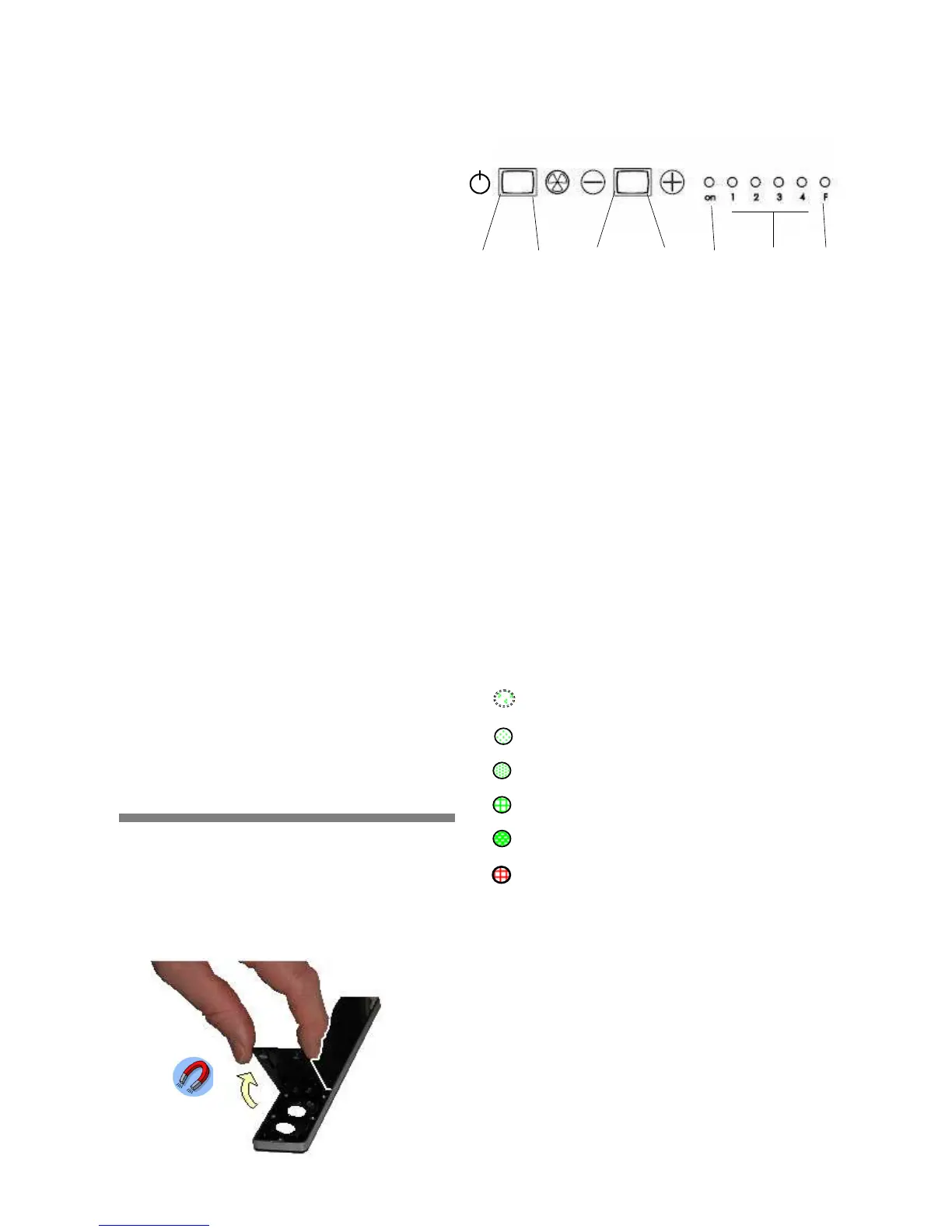
Changing the batteries:
The battery cover is situated on the back
of the remote control. Lift the cover with
thumb and first finger until the magnetic
contact that holds the battery cover re-
leases. Now remove the empty batteries
and replace them with new batteries of
the same type. Caution: Do not dispose
of empty batteries with your normal
household waste!
Technical data
Dimensions: 230 x 34 x 10
Battery: 2 lithium batteries
Type: CR 2032 3 V
Infrared range: max. 2 m
2. Control element: Toggle
switch
1
Press the button for a short time for
motor ON / OFF
2 Fan
/ Grease filter display; reset by
pressing button 2 for approx. 30 sec.
3 Reducing the fan setting
4 Increasing the fan setting
5 LED on: fan in normal operation,
LED flashing: fan follow-on
6 Fan setting display
7 Grease filter display; reset by
pressing button 2 for approx. 30 sec.
LED Indicators
Information regarding the operating con-
ditions of the hood can be read on the
device’s LED indicators:
Display
Follow-up green LED
Level 1 green LED
Level 2 green LED
Level 3 green LED
Intensive level green LED
Filter saturation indicatorred LED
Push the switch to the right for 3 sec:
Activates the automatic follow-up time.
If the red LED lights up, the metal filters
must be cleaned (see the section on
cleaning and care). The filter saturation




 To Next Page