DC IN
BATTERY
OFF
ADAPTER
BRG
MODE
CCT
8
C H :
Rotate
Slave
Master
APP
K
CCT :
1
2
3
5
6
7
4
1
2
3
5
6
4
7
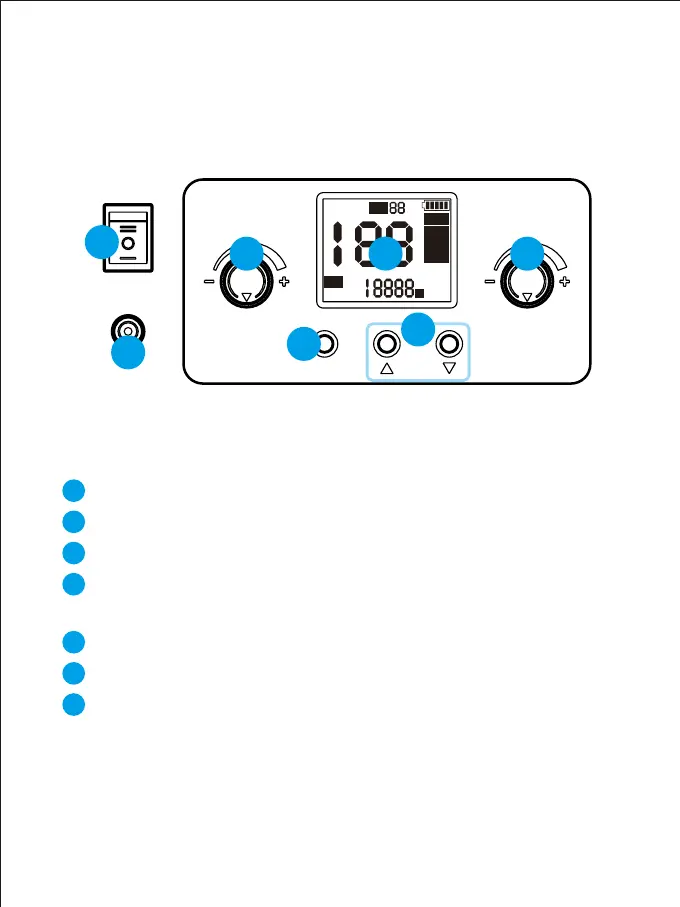
Power input interface
Power switch
Mode control button: Change mode control
Change channel button: When is in master/slave mode, press this button
to select the channel.
Color temperature adjustment button: adjust the color temperature
LCD screen: The screen display the current brightness, control mode,
light mode, light parameters, scene number, channel numerical, and
battery power of the light.
Brightness adjustment button: Adjust the brightness
CARA PENGGUNAAN TOMBOL
PADA PRODUK



 To Next Page