GPT-9000/9000A Series Quick Start Guide
14
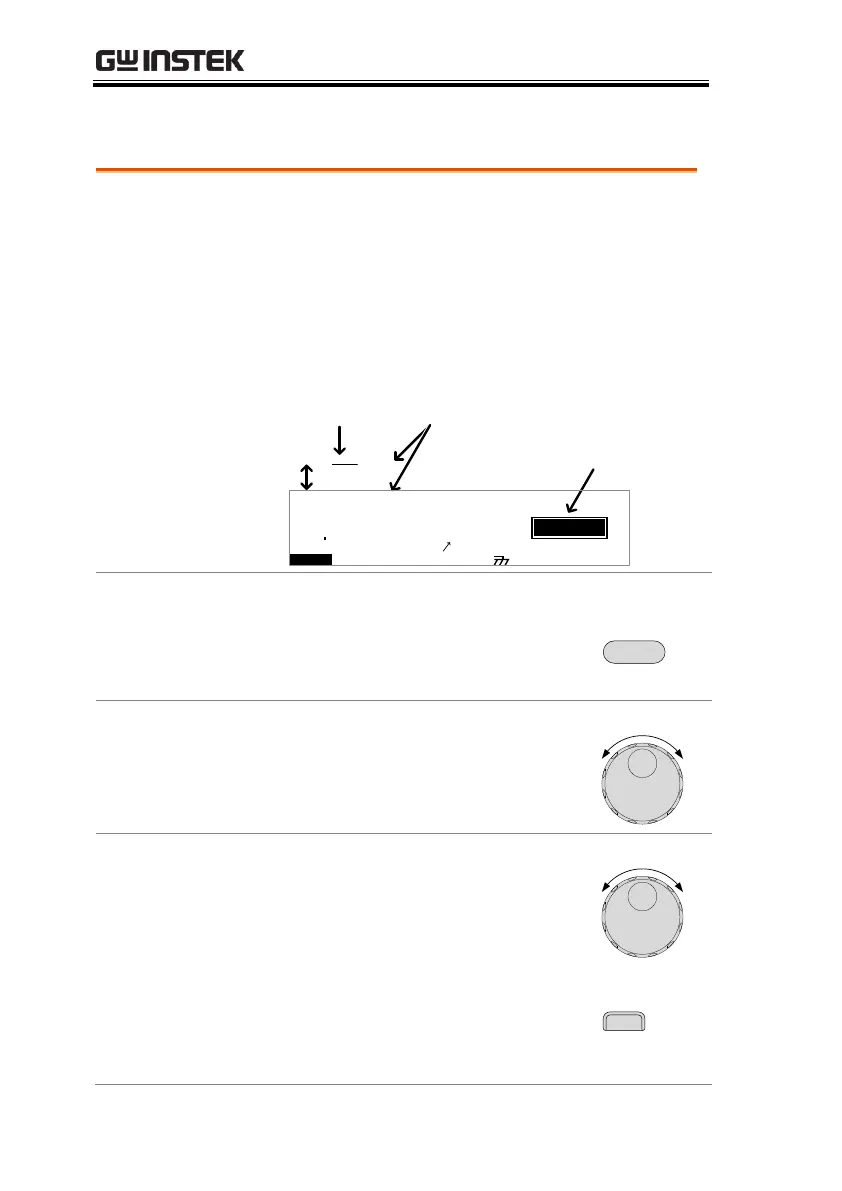
VIEW Status
VIEW status is used to select a manual test in
the MANU mode or an automatic test/step in
AUTO mode. VIEW status will display all the
parameters of the current test.
VIEW status is also used to put the tester into
MANU or AUTO mode.
G B A CW D CW I R
E
F R E Q = 0 H z 6
0
100
k V
EIV
MT I E = 0 0 1 . 0 SR
0 0 m AER F =# 0 .0
1 . 0 0 m AIH ES = 0T
0 0 . 1 S0A M P =R
A U T O = 0 0 1 - 0 0 2
W
VIEW status
MM A UN N A_2M A N U = * * * - 0 0
AUTO number
MANU number
MA U OT N A_
m A
E
Switch Between AUTO/MANU
Press and hold the MANU/AUTO key to switch
between AUTO and MANU when the tester is in
VIEW status.
Choose a MANU Number (MANU mode)
Use the scroll wheel to choose a test number.
Select Special MANU Test Mode (MANU mode)
Use the scroll wheel to choose a test number 000.
Set the Start Time for the Sweep Function
(Special MANU Test Mode)
Press STA.t soft-key when in Special MANU Test
Mode to set the sweep start time for the sweep graph.
This is only available for the GPT-99XX and 99XXA
models.


 To Next Page
 Loading...