EasyManua.ls Logo

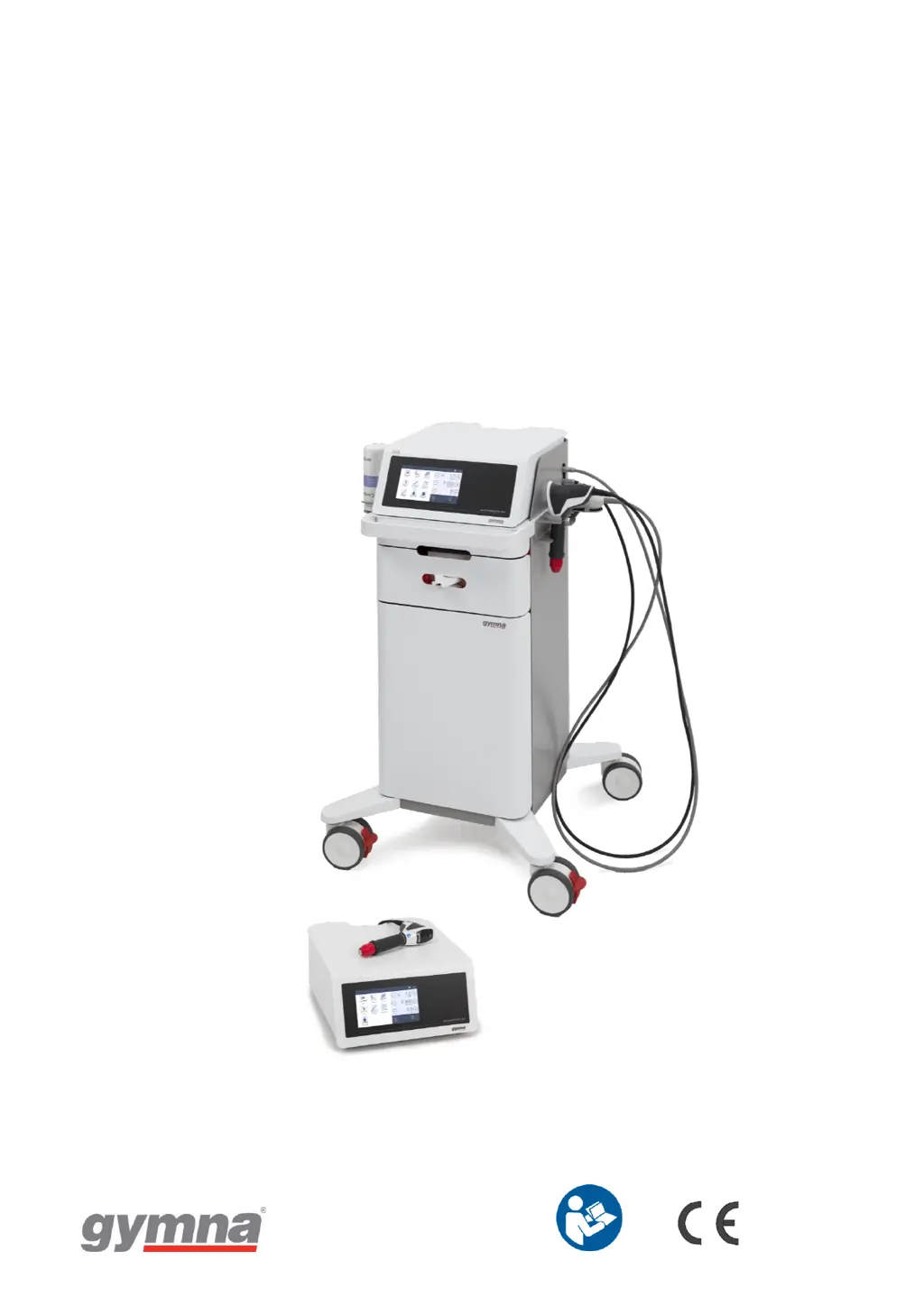
Gymna ShockMaster 500 - User Manual

Gymna ShockMaster 500
91 pages
Print Icon
To Next Page IconTo Next Page
Loading...
é
0344
USER MANUAL
ShockMaster 500 & ShockMaster 300

Table of Contents

Other manuals for Gymna ShockMaster 500

Questions and Answers

  • L
    Lisa Gibbs PhDAug 15, 2025
    What to do if Gymna ShockMaster 500 has no shockwave power output?
    • P
      Philip AllenAug 15, 2025
      If your Gymna Medical Equipment isn't producing shockwaves, there could be several reasons: * Check the compressed air supply, especially if you're using a SHOCKMASTER500. * Inspect the handpiece cable for leaks or connection issues. * Verify the handpiece trigger button is working correctly. * Clean the guide tube and projectile; if necessary, replace them.
  • A
    Albert FrancisAug 18, 2025
    What to do if my Gymna SHOCKMASTER500 Medical Equipment has no compressed air supply?
    • R
      Robert WilliamsAug 18, 2025
      If your Gymna SHOCKMASTER500 Medical Equipment lacks compressed air, ensure the power plugs are correctly installed. The compressor mains plug should be in the trolley's power socket, and the trolley's power cord should be in the main unit's compressor socket. Also, remove the transport protection (red cap) from the compressor air inlet and install the inlet filter.
  • M
    Mr. Joseph LawsonAug 22, 2025
    What to do if the red tap on the air tanks outlet of Gymna ShockMaster 500 is in closed position?
    • R
      Rodney TylerAug 22, 2025
      If the red tap on the air tanks outlet is closed, turn the tap to the open position, aligning it with the airflow. Ensure the compressor main switch is ON. Check the air tube connections at both the compressor and the unit's air entrance, making sure they are correctly fastened with the safety coupling. Finally, inspect the compressor air filter and replace it if it's clogged.
  • J
    Jennifer LewisAug 25, 2025
    How to troubleshoot a Gymna Medical Equipment system that does not work?
    • C
      Chloe CastilloAug 26, 2025
      If your Gymna Medical Equipment system isn't working, the issue might stem from a power supply problem, a defective mains fuse, or a faulty mains cable. Check the power supply first. If that's not the problem, replace the fuses. As a last resort, replace the mains cable. Also ensure that the power plugs are correctly installed.
  • T
    taylorrobertsonAug 28, 2025
    What to do if my Gymna Medical Equipment has no shockwave power output?
    • M
      Mrs. Courtney Butler DVMAug 28, 2025
      If your Gymna Medical Equipment has no shockwave power output, several factors could be responsible. If you are using ShockMaster 500, check the compressed air supply. Inspect the handpiece cable and its connection for any leaks or improper attachment. Verify the handpiece trigger button's functionality. A blocked or worn projectile could also be the cause; in this case, clean the guide tube and projectile, or perform a projectile and tube exchange. If the handpiece is defective, replace it or have it overhauled.
  • T
    tmaddenAug 31, 2025
    Why is there no compressed air supply in my Gymna ShockMaster 500 Medical Equipment?
    • S
      Stephanie BeasleySep 1, 2025
      If your Gymna ShockMaster 500 Medical Equipment has no compressed air supply, start by checking if the transport protection (red cap) is still on the compressor air inlet; if so, remove it and install the inlet filter. Ensure the red tap on the air tanks outlet is in the open position, aligned with the airflow. Verify that the compressor main switch is in the ON position. Also, check the air tube connections at both the compressor and the unit's air entrance to ensure they are correctly fastened with the safety coupling. Finally, inspect the compressor air filter for clogs and replace it if necessary.
  • D
    Daniel NelsonSep 4, 2025
    What to do if I get the error message “Application Updater.exe encountered a serious error and must shut down” on Gymna Medical Equipment?
    • W
      William SanchezSep 4, 2025
      If you encounter the error message “Application Updater.exe encountered a serious error and must shut down” on your Gymna Medical Equipment, it indicates that the files were not correctly written to the memory stick. To resolve this, re-extract the files onto an empty memory stick. Consider trying a different memory stick. Ensure that the file extracting and copying procedure is fully completed. Use the “Safely Remove Hardware” option in Windows before removing the memory stick from its port.
  • D
    David KennedySep 7, 2025
    How to fix a black screen on Gymna Medical Equipment after an update?
    • T
      Teresa JohnsonSep 7, 2025
      To resolve a black screen after updating your Gymna Medical Equipment, ensure you've updated to the latest software version (v6.2.0 or later). If the issue persists, try upgrading in two steps: first, upgrade to version 5.0.2, and then install the newest version.
  • D
    Daniel MendozaSep 12, 2025
    How to fix Gymna Medical Equipment updater when it is not starting?
    • A
      Amanda GallagherSep 12, 2025
      To fix the issue of the updater not starting on your Gymna Medical Equipment, verify that the software is properly installed on the memory stick. If you only see the installer “exe” file, clear the memory stick and “RUN” the installer to unpack the files. After successful unpacking, the USB-stick content should match the description in section 6.2 of the manual. Also, verify that the memory stick is FAT or FAT32 formatted, which you can ensure by formatting the memory stick.

Summary

General Information

Introduction and Overview

Manual contents, warnings, safety, and operating instructions.

Intended Use and Applications

ShockMaster's purpose, device function, and treatment areas.

Contraindications and Side Effects

Conditions where treatment is not advised and potential adverse effects.

Operator and Training Requirements

Qualifications and training needed for operating the ShockMaster safely.

General Safety Information

Safety Precautions and Warnings

Crucial safety measures, warnings, and precautions for ShockMaster operation.

Installation

Unpacking and Scope of Delivery

Procedures for unpacking, checking contents, and retaining packaging.

Electrostatic Discharge Protection

Measures to prevent damage from electrostatic discharge during installation.

Compressor Installation

Step-by-step instructions for installing the ShockMaster 500 compressor.

Device Connections

Instructions for connecting control unit and hand piece to the device.

Operation

Functional Check and Start-up

Procedures for system checks, starting up, and standard settings.

Treatment Procedure

Guidance on performing treatments with the ShockMaster device.

The User Interface

Software Interface Overview

Introduction to the Shockmaster software, including screens and buttons.

Home Screen and Treatment Menu

Navigation of home screen, treatment menu, and parameter adjustments.

Applications Menu Navigation

Navigating and selecting pre-programmed treatment applications.

Patient Management and System Settings

Managing patient data and configuring device settings.

Cleaning, Maintenance, Disposal, and Repair

Cleaning Procedures

Instructions for regular cleaning of the ShockMaster main unit and trolley.

General Maintenance Guidelines

Recommendations for regular maintenance checks and services.

ShockMaster 500 Specific Maintenance

Specific maintenance tasks for the ShockMaster 500, including bottle emptying.

Decommissioning, Disposal, and Repair

Guidelines for safely decommissioning, disposing, and repairing the device.

Status Messages and Troubleshooting

Status Messages

List and explanation of status messages displayed by the device.

Trouble Shooting Guide

Guide to resolving common problems and faults with the ShockMaster.

Accessories and Spare Parts

ShockMaster 500 Accessories

Details of accessories and spare parts for the ShockMaster 500.

ShockMaster 300 Accessories

Details of accessories and spare parts for the ShockMaster 300.

Coupling Gel and Documentation

Information on coupling gel and available user documentation.

Technical Specifications

ShockMaster 500 Technical Data

Specifications for the ShockMaster 500, including operating modes and power.

ShockMaster 300 Technical Data

Specifications for the ShockMaster 300, including operating modes and power.

Conformity with Directives and Standards

Compliance with EU directives and medical electrical equipment standards.

EMC Guidance

Electromagnetic compatibility (EMC) guidance and emissions test results.

Warranty and Service

Warranty Information

Details of the warranty period, coverage, and conditions.

Service and Support

Contact information and procedures for obtaining service and support.

Attachment

Symbol Explanations

Explanation of symbols used in the manual and on the device.

Gymna ShockMaster 500 Specifications

General IconGeneral
ChannelsSingle channel
Pressure1 to 5 bar
Frequency1 to 21 Hz
DisplayColor touchscreen
Applicationsports medicine
Frequency Range1-21 Hz
Intensity LevelsAdjustable

Related product manuals