62 63
OPERATION TROUBLESHOOTING GUIDE
Automatic sequences
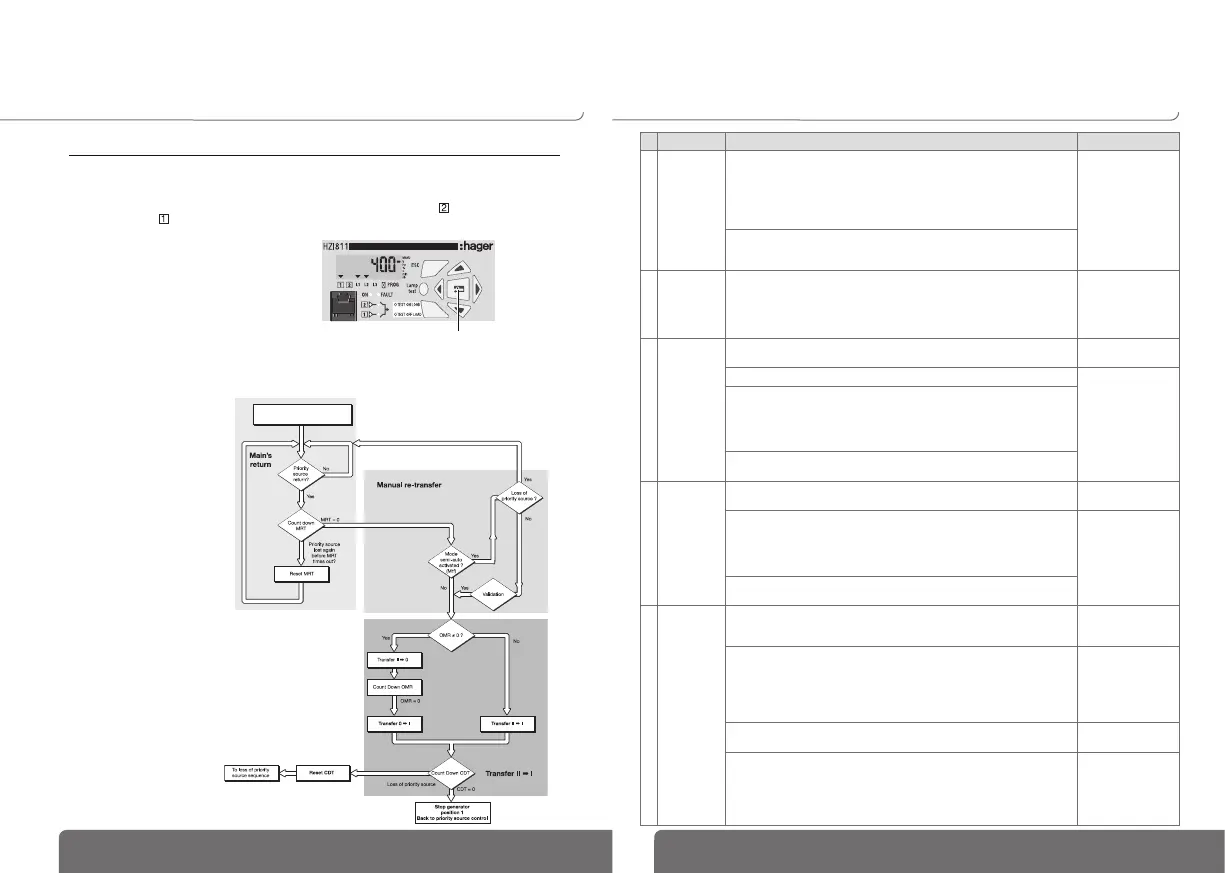
RETURN TO PRIORITY SOURCE
This sequence is activated as soon as the changeover-
switch is in automatic mode and in emergency position
(position II) :
• the priority source is not available
• the changeover switch is in emergency position
(ex: genset)
• the emergency source is available.
>
Specific feature: manual re-transfer
• When priority source comes back, it can be required
not to automatically retransfer and wait for a more
adequate moment.
• It is possible, validating manual retransfer feature
(referto programming), to block the re-transfer.
It is initiated from:
• Validation push button localy or on remote interface
• Via a programming input if MTF option is selected.
>
Sequence description
Manual retransfer = validation press
OR
optional input activation, Mtf feature
Problem Action to be performed Expected results
1
Product is
OFF (display
and LEDs are
off).
Check that the connections are as indicated in the technical documentation
provided with the product.
Specic case: Single-phase application:
- Connect the incoming supply cables to terminals 104 (Neutral) and 106 (Phase).
- Bridge terminals 103 and 104.
- Congure the network type to 1BL in the SETUP menu.
Controller is on:
“ON” LED is lit. If
the product is still
OFF it should be
returned to
Directly check that voltage is present across the terminals with a voltmeter:
- Voltage presence on Priority source ➡ terminals 104 – 106 (U>100Vac)
- Voltage presence on Emergency source ➡ terminals 203 – 205 (U>100Vac)
2
Product is
faulty (fault is
active) FT1,
FT2, FT3,
FT4
• Disconnect power supply to try to reset the fault
• In case of programming inputs FT1 or FT2, verify if external fault is not
active (atomatic reset).
• In case of programming inputs FT3 or FT4, verify if external fault is not
active. The fault must be reset or keypad (validation push button)
Default out
3
“SOURCE 1
availability”
LED is off.
Press the “Lamp test” button. The display and all
LEDs are on.
Message “PROT1” is shown ➡ reverse terminals 104 and 105.
“SOURCE 1
availability” LED
is on.
Check the following parameters in the SETUP menu (programming mode):
- network type ➡ NETWORK : 4NBL, 2NBL, 2BL, 1BL, 3NBL….
- nominal voltage ➡ Un : voltage across the terminals should be veried with
a multimeter.
- frequency ➡ Fn : 50 or 60 Hz
Check the threshold and hysteresis of the nominal voltage and frequency in
the VOLT and FREQUENCY menus and adjust if necessary.
4
“SOURCE 2
availability”
LED is off.
Press the “Lamp Test” button The display and all
LEDs are on.
Note: An unloaded generator can produce a voltage and frequency > than
its nominal values:
- Check threshold and hysteresis settings for the nominal voltage (VOLT menu).
- Check threshold and hysteresis settings for the nominal frequency
(FREQUENCY menu).
“SOURCE 2
availability” LED
is on.
Check parameter Un in the SETUP menu (programming mode). This setting should
correspond to the value measured across terminals 203 & 205 with a multimeter.
5
Retransfer is
not achieved
after the
priority
source
has been
restored.
Check the status of the “SOURCE 1 availability” LED. If this LED is not on,
refer to the appropriate section above (“SOURCE 1 availability” LED is off).
Item 3
“SOURCE 1
availability” LED
is on.
Check that the product is in automatic mode:
- Auto mode on controller must not be inhibited. Check that a programmable
input, if congured, has not been activated (verify that the MANU indicator
is not displayed).
- When utilising with change over switch verify the handle has been removed
and that the selector is in the automatic position.
Automatic mode is
selected.
Check status of source 1 stability timer (Mrt). Priority source is not
considered available until this timer has nished counting down.
Retransfer is achieved
after Mrt delay.
Check to see whether “MtF” (manual retransfer) has been activated in the
SETUP menu (YES = enabled).
“MtF” = NO (manual
retransfer disabled).
If “MtF” = YES,
Conrm retransfer.
Automatic transfer is
achieved.
Priority source unavailable
Generator running (emergency source) &
Switch in position II


 To Next Page