hager
Fitting, electrical connection and operation
Seite 12 von 130
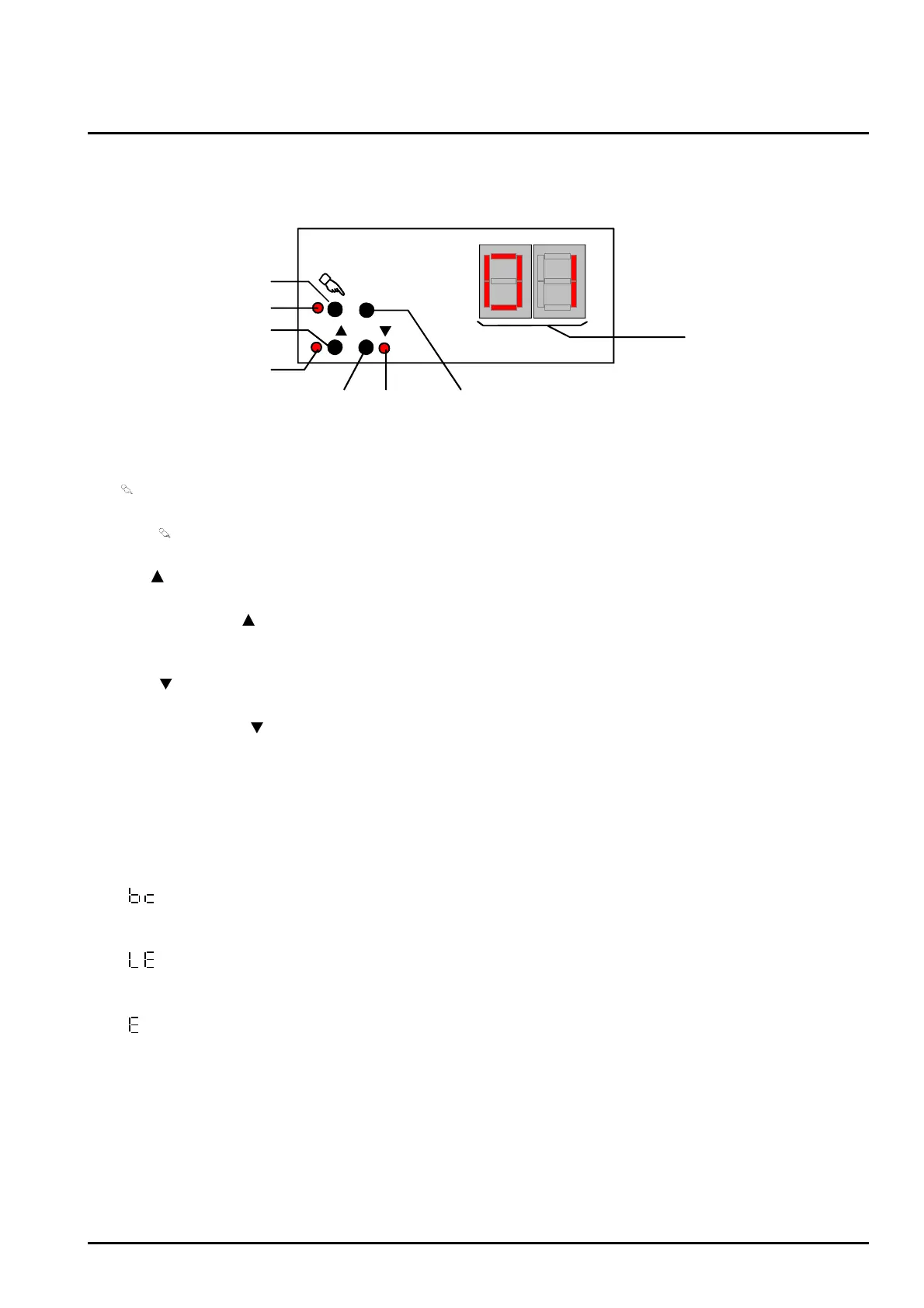
Controls and indicators for manual control
ALL OFF
(8)
(1)
(2)
(3)
(4)
(5)
(6)
(7)
ON/ OFF/
Fig. 4: Controls and indicators for manual control
(1)
key:
Activates / deactivates manual control
(2) LED
:
LED ON indicates permanent manual control.
(3) ON/
key
Short press: Group ON / Long press: increases brightness of group.
(4) Status LED ON/
:
Indicates a group that is switched on (brightness: 1...100%) when LED ON in manual control
mode ).
(5) OFF/
key:
Short press: Group OFF / Long press: reduces brightness of group.
(6) Status LED OFF/
:
Indicates a group that is switched off (brightness: 0%) when LED ON in manual control mode.
(7) ALL OFF key:
All groups off (only in permanent manual control mode).
(8) 7-segment display::
Indicates the selected DALI group for the manual control
("01"..."32" /blinking = group disabled). In addition, the following information can be displayed
during a manual control...
"
": Manual control in unprogrammed state (broadcast mode). In this case, the DALI Gateway
collectively controls all DALI devices present in the system via a broadcast command as there
have been no group assignments yet (requires ETS commissioning).
"
": Indicates the automatic device replacement. The display duration depends on the number
of connected DALI devices. The display will extinguish, if the device replacement could be
completed without error.
"
": Indicates an error that occurred during the automatic device replacement. The device
replacement could not be carried out. The display will automatically extinguish after 3 seconds.


 To Next Page