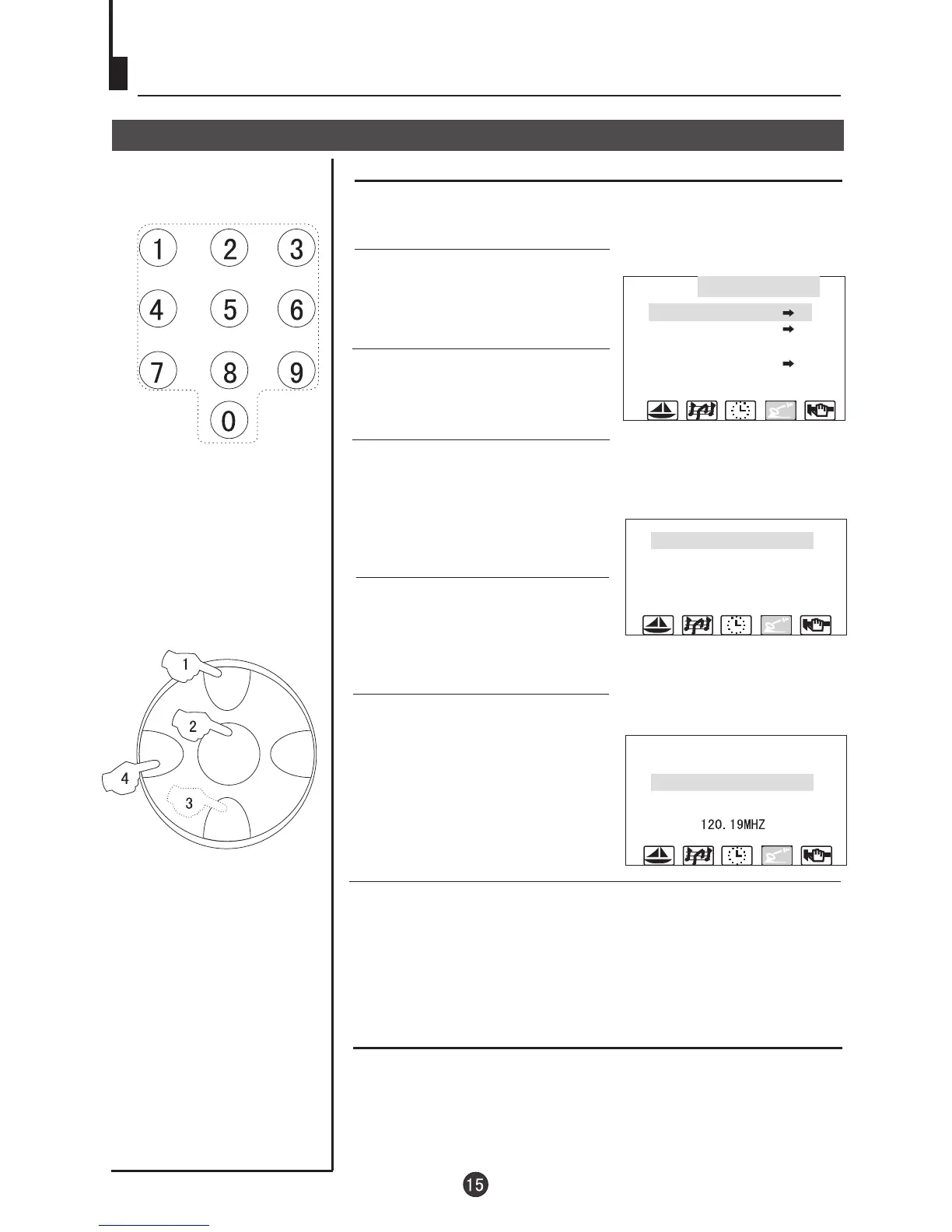
MENU
CH+
CH-
VOL- VOL+
Tuning(continued)
Skip
After the programs are presetted, you can skip some
programs to select your favorite channels only.
1. Press MENU button
continuously, until select
TUNING menu.
4. Press CH+/- button and move
the indicator to SKIP.
Skip
5. Press VOL+/- button to set it
ON.
6. Press MENU button to close the menu. When you select
channels with CH+/- button, this channel will be skipped.
However, you can also use the Direct-digit Choosing button
and Digit Select button on the remote control to select this
channel directly.
If you want to recover the skipped channel
1. Use Direct-digit Choosing button to select the number of the
channel to be recovered.
2. Do the above steps again.
3. Press VOL+/- button to set SKIP OFF.
Direct-digit Choosing
Button
2. Press CH+/- button to select
POS EDIT and VOL+ to enter.
3.Press CH+/- button to select
POSITION and VOL+/- to select
the channel(Take channel 1 for
example)
TUNING
POS. EDIT
POS. EX.
SEARCH UP
AUTO MEMORY
POSITION 1
BAND VL
SKIP ON
MFT UP
POSITION 1
BAND VL
SKIP ON
MFT UP
120.19MHZ


 To Next Page