INTRODUCTION TO SPARE PARTS
7
Hints
LO
MID
HI AUTO
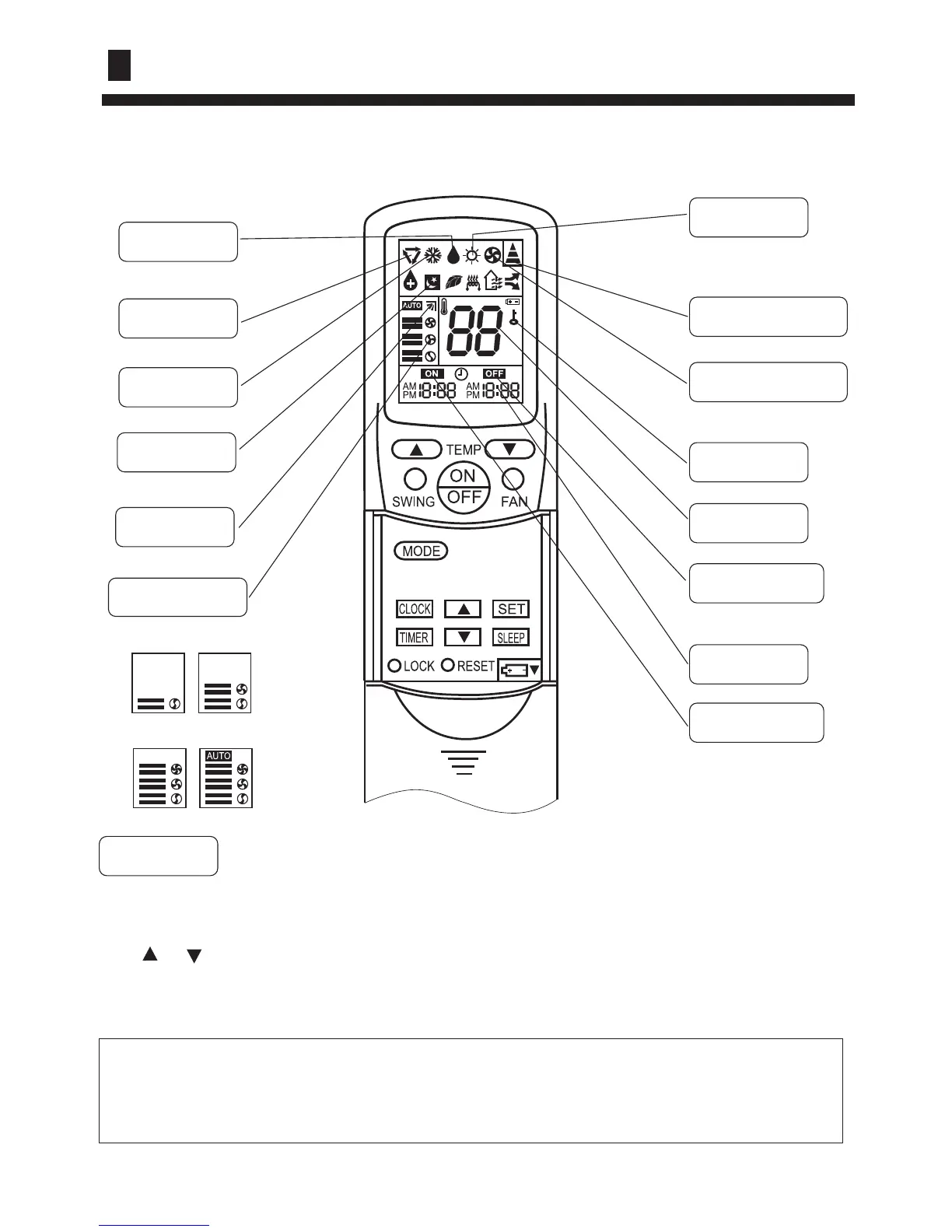
Buttons and display of the remote controller.
Operation
DRY
COOL
AUTO
SWING
FAN SPEED
SLEEP
Clock set
TIMER ON
TIMER OFF
LOCK
CLOCK
TEMP.
SIGNAL SENDING
FAN OPERATION
HEAT
When unit is started for the first time and after replacing batteries in remote controller,
clock should be adjusted as follows:
Press CLOCK button, "AM" or "PM" flashes.
Press or to set correct time. Each press will increase or decrease 1min. If the
button is kept depressed, time will change quickly.
After time setting is confirmed, press SET, "AM "and "PM" stop flashing, while clock
starts working.
After replacing with new batteries, remote controller will conduct self-check, displaying
all information on LCD. Then, it will become normal.



 To Next Page