EasyManua.ls Logo

Haier HBS01 - User Manual

Haier HBS01
2 pages
Print Icon
To Next Page IconTo Next Page
Loading...
HBS01 REMOTE CONTROLLER OPERATION MANUAL
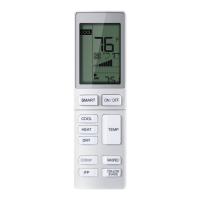
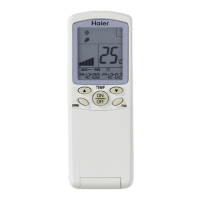
External View of Remote Controller
Loading of the battery
1. Remove the battery cover;
2. Insert AAA batteries (included) loading is in
line with the “+”/ “-”;.
3. Replace cover
<1> <2> <3>
Functional description
1. Power-up and Show All: After inserting the batteries the display
will show all symbols for 3 seconds. The remote will then enter clock
set mode. Use “+/-“ to adjust the clock. Press “Conrm” when done.
If no action is taken within 10 seconds then the remote will exit set
mode. See section 22 for clock setting instruction.
2. ON/OFF Button: Press the ON/OFF button on the remote control
to start the unit.
3. SMART Button:
(1) In SMART mode the air conditioner will automatically switch
between Cool, Heat, or Fan to maintain set temperature.
(2) When the fan is set to AUTO the air conditioner automatically
adjusts the fan speed according to room temperature.
(3) The SMART button also works to power the unit on and off.
4. COOL Button, HEAT Button and DRY Button
(1) In COOL mode ,the unit operates in cooling. When FAN is set
to AUTO,the air conditioner automatically adjusts the fan speed
according to room temperature. COOL will be displayed during COOL
mode.
(2) In HEAT mode ,warm air will blow out after a short period of
the time due to cold-air prevention function. When FAN is set to
AUTO,the air conditioner automatically adjusts the fan speed
according to room temperature. HEAT will be displayed during HEAT
mode.
(3) DRY mode is used to reduce humidity.In DRY mode, when room
temperature becomes lower than temp. setting+2
°F
,unit will run
intermittently at LOW speed regardless of FAN setting. DRY will be
displayed during DRY mode.
Mode SMART HEAT COOL DRY FAN
Initial TEMP.
24°C
(75°F)
24°C
(75°F)
24°C
(75°F)
24°C
(75°F)
Setting temperature
is not showed.
Mode SMART HEAT COOL DRY FAN
Initial Fan Speed AUTO LOW HI AUTO LOW
5. FAN SPEED Button:
Fan speed selection
Press FAN SPEED button. For each press,fan speed changes as
follows:
The air conditioner fan will run according to the displayed fan speed.
When FAN is set to AUTO,the air conditioner automatically adjusts
the fan speed according to room temperature.
6. TEMP. +/- Buttons:
Temp+ Every time the button is pressed,the temperature setting
increases.
Temp- Every time the button is pressed,temperature setting decreas
-
es.
The operating temperature range is 60°F -86°F (16°C-30°C).
7. Quadrant Control
(Available for some models):
This setting allows the vertical airow to be adjusted individually on
each side of the unit.
(1) Initial default positions.
SMART HEAT COOL DRY FAN
Selected
Quadrant
Show all Show all Show all Show all Show all
Vertical
SWING Angle
Position 3 Position 5 Position 3 Position 3 Position 3
(2) Press the Quadrant Control button to select the quadrant. Each
button press will select as shown bellow:
(3) Once desired quadrant is selected then use the Vertical Swing
button to set the direction of airow. See section 9.
LOW, MED and HIGH
indicator cycles.
LOW MED HI AUTO FAN SPEED
Question and Answer IconNeed help?

Do you have a question about the Haier HBS01 and is the answer not in the manual?

Summary

Functional Description

Power-up and Show All

Remote displays all symbols for 3 seconds, then enters clock set mode.

ON;OFF Button

Press the ON/OFF button on the remote to start or stop the unit.

SMART Button

Unit automatically switches between Cool, Heat, or Fan modes based on temperature.

COOL, HEAT, and DRY Buttons

Operates the unit in cooling, heating, or humidity reduction modes.

FAN SPEED Button

Allows selection of fan speed: LOW, MED, HI, or AUTO.

TEMP. +;- Buttons

Increases or decreases the temperature setting within the operating range.

Quadrant Control

Adjusts vertical airflow direction individually for each side of the unit.

Vertical SWING Button

Air Flow Direction Adjustment

Chooses the position for the vertical airflow louvers.

Horizontal SWING Button

Status display of air flow

Shows the status display of horizontal airflow.

HEALTH AIRFLOW

Health Airflow function

Stirs the air in the room and cycles through quadrants.

Sleep Operation Mode

SLEEP mode during COOL, DRY modes

Temperature rises by 2°F after 1 hour, then another 2°F, turning off after 6 hours.

SLEEP mode during HEAT mode

Temperature decreases 4°F after 1 hour, then another 4°F, then rises 2°F.

In SMART mode

Operates in a sleep mode adapted to the automatically selected operation mode.

HEALTH Function

HEALTH function

Activates a mode to stir air, displaying an icon and potentially staying active.

ECO Function

ECO function

Saves energy and is memorized across mode switches and power cycles.

Turbo;Quiet Functions

TURBO function

Sets fan to SUPER high for fast heating or cooling.

QUIET button

Sets fan to BREEZE for quiet operation.

Motion Sensor Features

Smart Focal Point (iFP)

Unit operates at set point only when the room is occupied.

Evade;Follow

Airflow can be set to follow or evade occupants when iFP sensor is installed.

FRESH Function

FRESH function

Enters Fan mode with low speed, displaying an icon.

Temperature Unit Function

°C;°F function

Toggles display between Fahrenheit and Celsius, and enables low temp heating.

HEATER Function

HEATER function

Cancels or sets the HEATER function in HEAT or Auto mode.

Timer Operations

ON-OFF Operation

Sets or cancels the timer for the unit to turn off.

Button +;-

Increases or decreases time by 1 minute when setting timers or clock.

Clock

Sets the current time on the remote control.

Other Functions

LIGHT

Turns the indoor unit's display on and off.

RESET

Resets the remote control to its default settings if malfunctioning.

LOCK

Locks or unlocks the buttons and LCD display on the remote.

Summary

Functional Description

Power-up and Show All

Remote displays all symbols for 3 seconds, then enters clock set mode.

ON;OFF Button

Press the ON/OFF button on the remote to start or stop the unit.

SMART Button

Unit automatically switches between Cool, Heat, or Fan modes based on temperature.

COOL, HEAT, and DRY Buttons

Operates the unit in cooling, heating, or humidity reduction modes.

FAN SPEED Button

Allows selection of fan speed: LOW, MED, HI, or AUTO.

TEMP. +;- Buttons

Increases or decreases the temperature setting within the operating range.

Quadrant Control

Adjusts vertical airflow direction individually for each side of the unit.

Vertical SWING Button

Air Flow Direction Adjustment

Chooses the position for the vertical airflow louvers.

Horizontal SWING Button

Status display of air flow

Shows the status display of horizontal airflow.

HEALTH AIRFLOW

Health Airflow function

Stirs the air in the room and cycles through quadrants.

Sleep Operation Mode

SLEEP mode during COOL, DRY modes

Temperature rises by 2°F after 1 hour, then another 2°F, turning off after 6 hours.

SLEEP mode during HEAT mode

Temperature decreases 4°F after 1 hour, then another 4°F, then rises 2°F.

In SMART mode

Operates in a sleep mode adapted to the automatically selected operation mode.

HEALTH Function

HEALTH function

Activates a mode to stir air, displaying an icon and potentially staying active.

ECO Function

ECO function

Saves energy and is memorized across mode switches and power cycles.

Turbo;Quiet Functions

TURBO function

Sets fan to SUPER high for fast heating or cooling.

QUIET button

Sets fan to BREEZE for quiet operation.

Motion Sensor Features

Smart Focal Point (iFP)

Unit operates at set point only when the room is occupied.

Evade;Follow

Airflow can be set to follow or evade occupants when iFP sensor is installed.

FRESH Function

FRESH function

Enters Fan mode with low speed, displaying an icon.

Temperature Unit Function

°C;°F function

Toggles display between Fahrenheit and Celsius, and enables low temp heating.

HEATER Function

HEATER function

Cancels or sets the HEATER function in HEAT or Auto mode.

Timer Operations

ON-OFF Operation

Sets or cancels the timer for the unit to turn off.

Button +;-

Increases or decreases time by 1 minute when setting timers or clock.

Clock

Sets the current time on the remote control.

Other Functions

LIGHT

Turns the indoor unit's display on and off.

RESET

Resets the remote control to its default settings if malfunctioning.

LOCK

Locks or unlocks the buttons and LCD display on the remote.

Haier HBS01 Specifications

General IconGeneral
BrandHaier
ModelHBS01
CategoryRemote Control
Power Source2 x AAA Batteries
Operating RangeUp to 8 meters
CompatibilityHaier Air Conditioner
FunctionsTemperature control, Mode selection, Fan speed, Timer, Swing

Related product manuals