EasyManua.ls Logo

Haier YR-HD - User Manual

Haier YR-HD
2 pages
Print Icon
To Next Page IconTo Next Page
Loading...
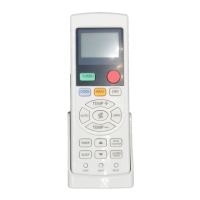
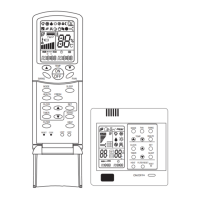
YR-HD REMOTE CONTROLLER OPERATION MANUAL
Remote controller
Parts and Functions
1
18
19
20
21
23
24
25
22
11
10
12
13
14
15
16
17
2
3
4
5
6
7
8
9
1. Mode display
Operation mode AUTO COOL DRY
Remote controller
Operation mode HEAT FAN
Remote controller
2. Signal sending display
3. SWING display
4. FAN SPEED display
LO MED HI AUTO
Display
circulated
5. LOCK display
6. TIMER OFF display
TIMER ON display
7. TEMP display
8. Additional functions display
Operation
mode
QUITE SLEEP TURBO FRESH
Remote
controller
Operation
mode
ELECTRICAL
HEATING
HEALTH
Remote
controller
9. QUIET button
10. HEAT button
11. COOL button
12. AUTO button
13. FAN SPEED button
14. TIMER button
15. HEALTH button
16. LOCK button
Used to lock buttons and LCD display.
17. LIGHT button (This model has not
this function.)
Control the lightening and extinguishing
of the indoor LED display board.
18. POWER ON/OFF button
19. DRY button
20. TEMP button
21. SWING button
22. Timer adjust button
23. EXTRA FUNCTION button
Function: Fan only function, health
airow upwards and downwards
sending function, sleep function, Fresh
function, Fahrenheit Celsius conversion,
Power setting function, left and right
swing function, 10°C heating function,
B code, Electrical Heating function.
24.CANCEL/CONFIRM button
Function: Setting and cancel to the
timer and other additional functions.
25. RESET button
When the remote controller appears
abnormal, use a sharp pointed article
to press this button to reset the remote.
Loading of the battery
1. Remove the battery cover;
2. Load the batteries as illustrated. 2
R-03 batteries, resetting key (cylinder);
3. Be sure that the loading is in line with
the " + "/"-";
4. Load the battery,then put on the cover
again.
Note:
The distance between the signal transmission head and the receiver
hole should be within 7m without any obstacle as well.
When electronic-started type uorescent lamp or change-over type
uorescent lamp or wireless telephone is installed in the room, the
receiver is apt to be disturbed in receiving the signals, so the distance
to the indoor unit should be shorter.
Full display or unclear display during operation indicates the batteries
have been used up. Please change batteries.
If the remote controller can't run normally during operation, please
remove the batteries and reload several minutes later.
Hint: Remove the batteries in case won't be in use for a long period. If
there is any display after taking-out, just press reset key.
Operation
Base Operation
1
3
2
4
1. Unit start
Press ON/OFF on the remote controller, unit starts.
2. Select operation mode
COOL button:Cooling mode; HEAT button: Heating mode; DRY button: Dehumidify mode
3. Select temp.setting
Press
/ button
Every time the button is pressed, temp.setting increase 1°C, if kept depressed,
it will increase rapidly.
Every time the button is pressed, temp.setting decrease 1°C, if kept depressed,
it will decrease rapidly.
Select a desired temperature.
4. Fan speed selection
Press FAN button. For each press, fan speed changes as follows:
Remote controller:
LO MED HI AUTO
Display
circulated
Air conditioner is running under displayed fan speed. When FAN is set to AUTO, the air
conditioner automatically adjusts the fan speed according to room temperature.
NO. 0150520000


Other manuals for Haier YR-HD

Question and Answer IconNeed help?

Do you have a question about the Haier YR-HD and is the answer not in the manual?

Summary

Parts and Functions of the Remote Controller

Remote Controller Overview and Components

Details all buttons, displays, and indicators on the remote controller for various functions.

Battery Loading Procedure

Step-by-step instructions for correctly inserting batteries into the remote controller.

Base Operation Guide

Covers starting the unit, selecting operation modes, setting temperature, and fan speed.

Detailed Operation Modes

Operation Mode Descriptions

Explains the function and behavior of AUTO, COOL, DRY, HEAT, and FAN modes.

Air Flow Direction Adjustment

Instructions for controlling the horizontal and vertical air flow direction.

Timer On;Off Operation

Guide to setting and cancelling timer functions for unit operation.

Sleep Operation Mode

Details how to activate and the effects of the sleep function on temperature.

POWER;QUIET Operation

Enables rapid cooling/heating (POWER) or quiet operation for rest.

Healthy Airflow Operation

Features for setting comfortable airflow positions and health-related functions.

Summary

Parts and Functions of the Remote Controller

Remote Controller Overview and Components

Details all buttons, displays, and indicators on the remote controller for various functions.

Battery Loading Procedure

Step-by-step instructions for correctly inserting batteries into the remote controller.

Base Operation Guide

Covers starting the unit, selecting operation modes, setting temperature, and fan speed.

Detailed Operation Modes

Operation Mode Descriptions

Explains the function and behavior of AUTO, COOL, DRY, HEAT, and FAN modes.

Air Flow Direction Adjustment

Instructions for controlling the horizontal and vertical air flow direction.

Timer On;Off Operation

Guide to setting and cancelling timer functions for unit operation.

Sleep Operation Mode

Details how to activate and the effects of the sleep function on temperature.

POWER;QUIET Operation

Enables rapid cooling/heating (POWER) or quiet operation for rest.

Healthy Airflow Operation

Features for setting comfortable airflow positions and health-related functions.

Overview

This document describes the YR-HD Remote Controller, an interface for controlling an air conditioning unit. It details the various parts of the remote, their functions, and how to operate the air conditioner through different modes and settings.

Remote Controller Parts and Functions

The remote controller features an LCD display and a series of buttons for various operations.

Display Indicators:

  • Mode display: Shows the current operation mode (AUTO, COOL, DRY, HEAT, FAN).
  • Signal sending display: Indicates when a signal is being transmitted.
  • SWING display: Shows the status of the swing function.
  • FAN SPEED display: Displays the current fan speed (LO, MED, HI, AUTO, circulated).
  • LOCK display: Indicates if the remote controller buttons are locked.
  • TIMER OFF/ON display: Shows the status of the timer function.
  • TEMP display: Displays the set temperature.
  • Additional functions display: Indicates active additional functions like QUIET, SLEEP, TURBO, FRESH, ELECTRICAL HEATING.

Buttons:

  • FAN SPEED button (13): Adjusts the fan speed.
  • TIMER button (14): Used for setting the timer.
  • HEALTH button (15): Activates the healthy airflow function.
  • LOCK button (16): Locks the buttons and LCD display to prevent accidental changes.
  • LIGHT button (17): Controls the indoor LED display board (not available on all models).
  • POWER ON/OFF button (18): Turns the air conditioner on or off.
  • DRY button (19): Selects dehumidify mode.
  • TEMP buttons (20): Adjusts the temperature up (+) or down (-).
  • SWING button (21): Activates the swing function.
  • Timer adjust button (22): Used to set timer values.
  • EXTRA FUNCTION button (23): Accesses various additional functions including fan only, health airflow, sleep, fresh function, Fahrenheit/Celsius conversion, power setting, left/right swing, 10°C heating, B code, and electrical heating.
  • CANCEL/CONFIRM button (24): Used to set and cancel timer and other additional functions.
  • RESET button (25): Resets the remote controller in case of abnormal operation. Requires a sharp pointed article to press.
  • QUIET button (9): Activates quiet operation.
  • HEAT button (10): Selects heating mode.
  • COOL button (11): Selects cooling mode.
  • AUTO button (12): Selects auto operation mode.

Usage Features

Battery Loading:

  • Remove the battery cover.
  • Load two R-03 batteries, ensuring correct polarity (+/-).
  • Replace the cover.
  • Note: If there is any display after taking out batteries, press the reset key.

Basic Operation:

  1. Unit Start: Press the ON/OFF button.
  2. Select Operation Mode: Press COOL, HEAT, or DRY button.
    • COOL: Cooling mode.
    • HEAT: Heating mode.
    • DRY: Dehumidify mode.
    • AUTO: The air conditioner automatically selects Cool/Heat/Fan based on room temperature. When FAN is AUTO, the fan speed adjusts automatically.
    • FAN: Operates only in fan mode; COOL/HEAT modes are not available, temperature setting is disabled, and sleep operation is not available.
  3. Select Temperature: Use TEMP+ to increase temperature by 1°C per press (rapid increase if held) and TEMP- to decrease temperature by 1°C per press (rapid decrease if held).
  4. Fan Speed Selection: Press the FAN button to cycle through LO, MED, HI, and AUTO. In AUTO, the fan speed adjusts automatically based on room temperature.

Air Flow Direction Adjustment:

  • The display shows the current airflow direction (e.g., →→→y→→ for COOL/DRY, →→→ for HEAT).
  • The remote also allows for left and right airflow adjustment, with an initial state displayed.

Timer On/Off Operation:

  1. Select the desired operation mode.
  2. Press the TIMER button to cycle through TIMER modes: ON, OFF, ON-OFF, OFF-ON, BLANK.
  3. Use TEMP+ or TEMP- buttons to set the time.
    • Time increases/decreases by 0.5 hour for the first 12 hours, then by 1 hour after 12 hours.
    • Adjustable within 24 hours.
  4. Press CANCEL/CONFIRM to confirm the timer setting.
  5. To cancel, press the TIMER button until the time display is eliminated, or press CANCEL/CONFIRM.
  • Hint: After battery replacement or power failure, time settings need to be reset.

Sleep Operation:

  1. Press EXTRA FUNCTION until the sleep icon flashes, then press CANCEL/CONFIRM to enter sleep function.
  2. COOL/DRY Mode: After 1 hour, temperature increases by 1°C, then another 1°C after another hour. The unit runs for 6 hours, then stops.
  3. HEAT Mode: After 1 hour, temperature decreases by 2°C, then another 2°C after another hour. After 3 more hours, temperature rises by 1°C. The unit runs for 3 hours, then stops.
  4. AUTO Mode: The unit operates in the corresponding sleep mode adapted to the automatically selected operation mode.
  5. FAN Mode: No sleep function.
  • Note: Sleep function cannot be set if TIMER function is active. If sleep is set, resetting TIMER cancels sleep.

POWER/QUIET Operation:

  1. POWER Operation (Rapid Heating/Cooling): Press EXTRA FUNCTION until the power icon flashes, then press CANCEL/CONFIRM. To cancel, repeat the process.
  2. QUIET Operation: Press the QUIET button. The remote will show the quiet icon, and the unit will enter quiet function. Press again to cancel.
  • Note: During POWER operation, rapid HEAT or COOL mode may result in uneven temperature distribution. Long QUIET operation may not achieve optimal cooling/warming.

Healthy Airflow Operation:

  1. Press the HEALTH button to start.
  2. Press EXTRA FUNCTION repeatedly to cycle through healthy airflow positions (upwarder, downwarder, left/right swing, present position).
  3. Press CANCEL/CONFIRM to confirm the desired swing location.
  4. To cancel, repeat the process and press CANCEL/CONFIRM.
  • Note: After setting, the position grill is fixed. In heating, the upwarder mode is better. In cooling, the downwarder mode is better. In high humidity, condensation may occur at the grille during long-term cooling/dry operation.

Important Technical Specifications

  • Signal Transmission Range: Within 7m without obstacles.
  • Interference: Electronic-started fluorescent lamps, change-over type fluorescent lamps, or wireless telephones may interfere with signal reception, reducing the effective distance to the indoor unit.
  • Battery Type: R-03 batteries (x2).

Maintenance Features

  • Battery Replacement: Full or unclear display indicates low batteries. Replace batteries promptly.
  • Remote Controller Reset: If the remote controller malfunctions, use a sharp pointed article to press the RESET button.
  • Long-Term Storage: Remove batteries if the remote controller will not be used for an extended period.

Haier YR-HD Specifications

General IconGeneral
BrandHaier
ModelYR-HD
CategoryRemote Control
LanguageEnglish

Related product manuals