English
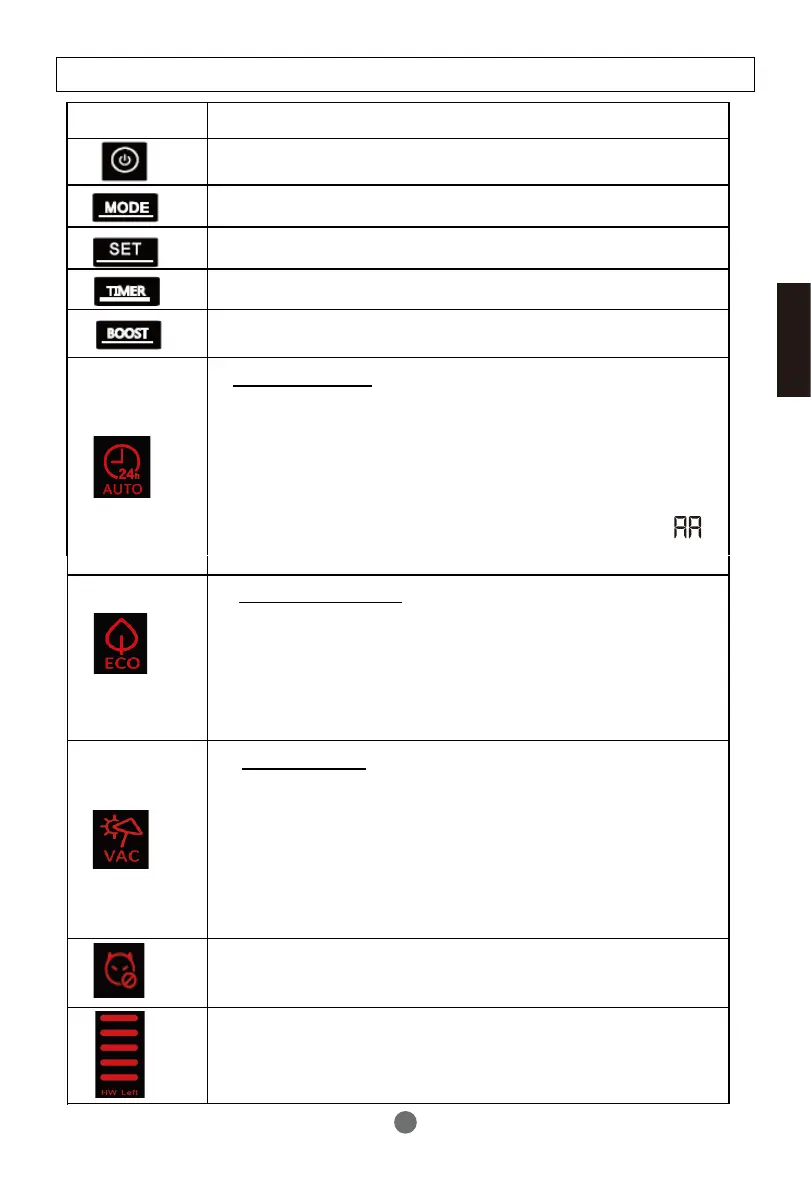
- According to the vacation dates in advance to prepare
hot water;
- For example, you leave home for vacation on January 1st and
return home on January 5th. The date shall be set as
(5-1) =4 days, and corresponding temperature shall also be set.
The heat pump will start heating on 00:00 o’clock of January
4th automatically.
Holiday mode
- Anti-legionella
Hot water volume display
- In this mode ,priority using heat pump;
- In two ways using heat pump,should set in the installer
settings;
1- timer refer to LP parameter;
2-switch signals by power companies.
ECO (off-peak) mode
Symbol
Description
Timer adjust
Boost mode. Heat pump and auxiliary power are
activated at the same time.
Power ON/OFF switch
Working mode selection
Confirm button
Auto mode
-Optimised management of the heat pump and the electrics
for guaranteed comfort;
- Prior using heat pump;
- If compressor works more than the default 8 hours , start
the auxiliary power;
- The compressor maximum continuous working time( )
can be adjust in the installer settings.
Description of the pictograms
- Anti-legionella function will be activated every 7 days to
heat the tank to 65°C automatically .
25


 To Next Page