11
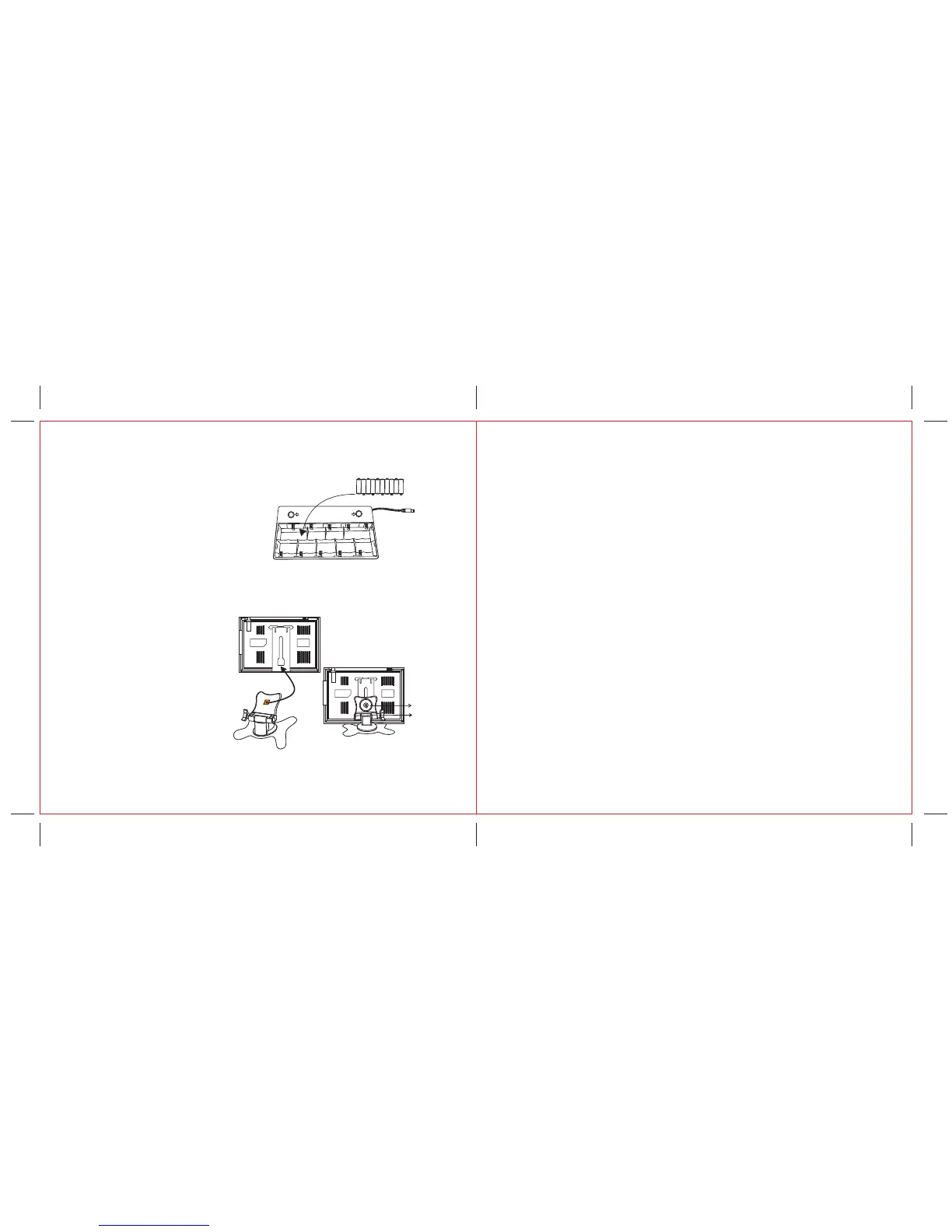
6. Battery Installation( Optional):
Open and remove the battery door located on
the bottom of the battery compartment stand
and pulling firmly outwards. Insert 10 "AA"
x (UM-3) batteriesinto thebatterycompartment
(see right picture). Be sure the polarity (+and-)
matches,as made inside thebattery compartment.
Closethe battery door and connect the power cord
ofthe battery compartment to the power source
input jack of the unit.
NOTE:
Met
al
w
ashe
r
7. Stand Fixture(Optional)
Screw1
Screw2
3-1
3-2
3-3
- Release the metal washer on the top of
the stand but should not separate it from
the stand (see picture 3-1).
- Insert the metal washer with the stand
into a hollow at the back of the unit and
move the stand up to a suitable height
(see picture 3-2).
- Tighten the screw 1 (see picture 3-3) up
on the stand to fix the stand with the unit.
- Control the unit direction by controlling
the screw 2 (see picture 3-3).
- Weak or dead batteries may leak or corrode the set. Always remove batteries
when the set will not be used for a long period of time.
- When the battery box is being charged, forbid the battery box to connect
with a machine, watch TV.
+ – + – + – + – + –
+ – + – + – + – + –
12
1. Description: Portable 7” TFT LCD Color TV Set
2. TV System: NTSC 3.58 System
3. AV System: NTSC 3.58
4. Audio System: M
5. Display device: Color TFT-LCD
6. Display Screen Size: 7 inches
7. Video Input: 1Vp-p
8. Audio Output: O250mW (MAX)
9. Power Consumption: o11w
10. Resolution: 1440 (H)*234 (V)
11. Dots Distance: 0.107(H) X 0.372(V)mm
12. Visible Range: 154.08(H) X 87.05(V)mm
13. Power Source: AC adaptor or car adaptor (normal: DC 12V)
14. Measurement: 195 (L) X 135 (W) X 30(D) inches
15. Weight: Approx. 490 lbs
16. Connection terminals:
1. Antenna Jack
2. AV Input Jack
3. Headphone Jack
4. External Power Source Input Jack
8. General Specification:



 To Next Page