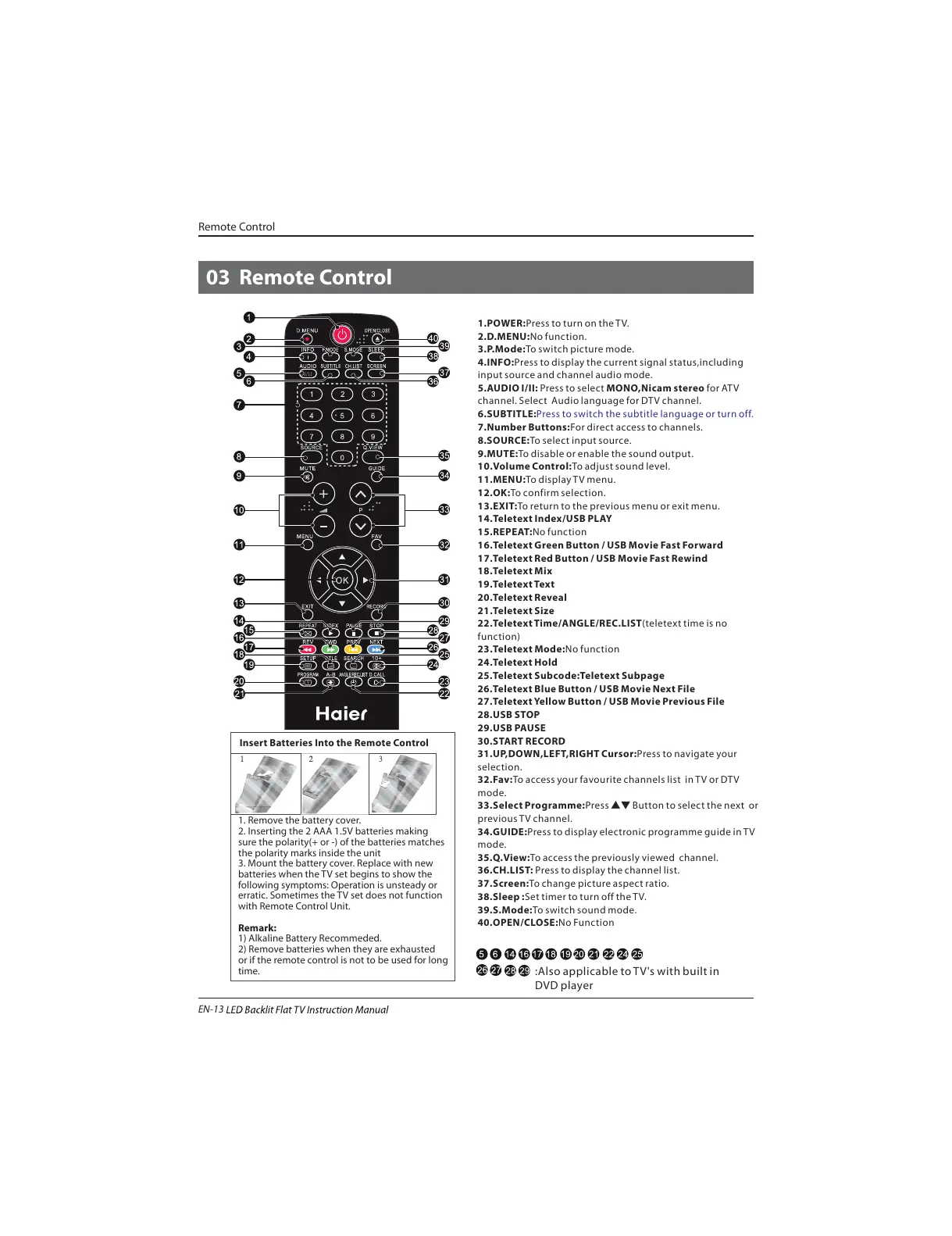
1.POWER:Press to turn on the TV.
2.D.MENU:No function.
3.P.Mode:To switch picture mode.
4.INFO:Press to display the current signal status,including
input source and channel audio mode.
5.AUDIO I/II: Press to select MONO,Nicam stereo for ATV
channel. Select Audio language for DTV channel.
6.SUBTITLE:
7.Number Buttons:For direct access to channels.
8.SOURCE:To select input source.
9.MUTE:To disable or enable the sound output.
10.Volume Control:To adjust sound level.
11.MENU:To display TV menu.
12.OK:To confirm selection.
13.EXIT:To return to the previous menu or exit menu.
14.Teletext Index/USB PLAY
15.REPEAT:No function
16.Teletext Green Button / USB Movie Fast Forward
17.Teletext Red Button / USB Movie Fast Rewind
18.Teletext Mix
19.Teletext Text
20.Teletext Reveal
21.Teletext Size
22.Teletext Time/ANGLE/REC.LIST(teletext time is no
function)
23.Teletext Mode:No function
24.Teletext Hold
25.Teletext Subcode:Teletext Subpage
26.Teletext Blue Button / USB Movie Next File
27.Teletext Yellow Button / USB Movie Previous File
28.USB STOP
29.USB PAUSE
30.START RECORD
31.UP,DOWN,LEFT,RIGHT Cursor:Press to navigate your
selection.
32.Fav:To access your favourite channels list in TV or DTV
mode.
33.Select Programme:Press
▲▼ Button to select the next or
previous TV channel.
34.GUIDE:Press to display electronic programme guide in TV
mode.
35.Q.View:To access the previously viewed channel.
36.CH.LIST: Press to display the channel list.
37.Screen:To change picture aspect ratio.
38.Sleep :Set timer to turn off the TV.
39.S.Mode:To switch sound mode.
40.OPEN/CLOSE:No Function
Press to switch the subtitle language or turn off.
:Also applicable to TV's with built in
DVD player
Remote Control
03 Remote Control
Insert Batteries Into the Remote Control
1. Remove the battery cover.
2. Inserting the 2 AAA 1.5V batteries making
sure the polarity(+ or -) of the batteries matches
the polarity marks inside the unit
3. Mount the battery cover. Replace with new
batteries when the TV set begins to show the
following symptoms: Operation is unsteady or
erratic. Sometimes the TV set does not function
with Remote Control Unit.
Remark:
1) Alkaline Battery Recommeded.
2) Remove batteries when they are exhausted
or if the remote control is not to be used for long
time.
EN-13


 To Next Page