Introduction
TV LED-TFT Owner’s Manual EN-5
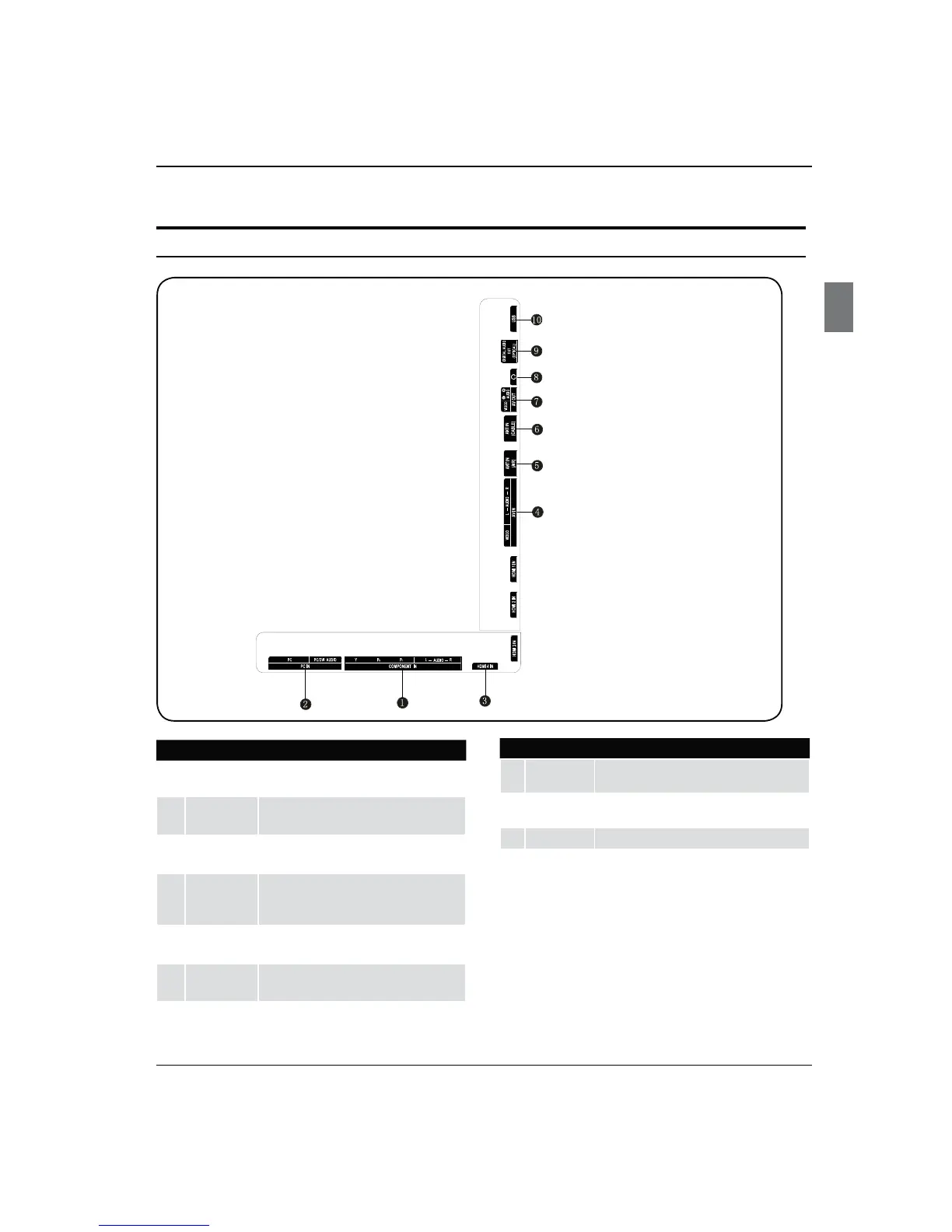
1
Component
IN
Connect a component Video/Audio device to
these jacks.
2
PC IN
Connect a video cable from a computer to this
jack.
3
HDMI IN
Connect a HDMI device to receive digital audio
and uncompressed digital video.
4
AV IN
Connect Video/Audio out from an Video/Audio
device to these jacks.
5
ANT IN(AIR)
Connect cable or antenna signal to the TV, either
directly or through your cable box.
6
ANT
IN(CABLE)
Connect cable or antenna signal to the TV, either
directly or through your cable box.
7
AV OUT Video/Audio output terminal.
8
Headphone
jack
Headphone audio output terminal.
9
DIGIAL AUDIO
OUT(OPTICAL)
Connect various types of digital audio equipment.
0
USB jack
Connect USB storage device to this jack.
Connection Options
TV Terminals



 To Next Page