Installation
TV LED-TFT Owner’s Manual EN-9
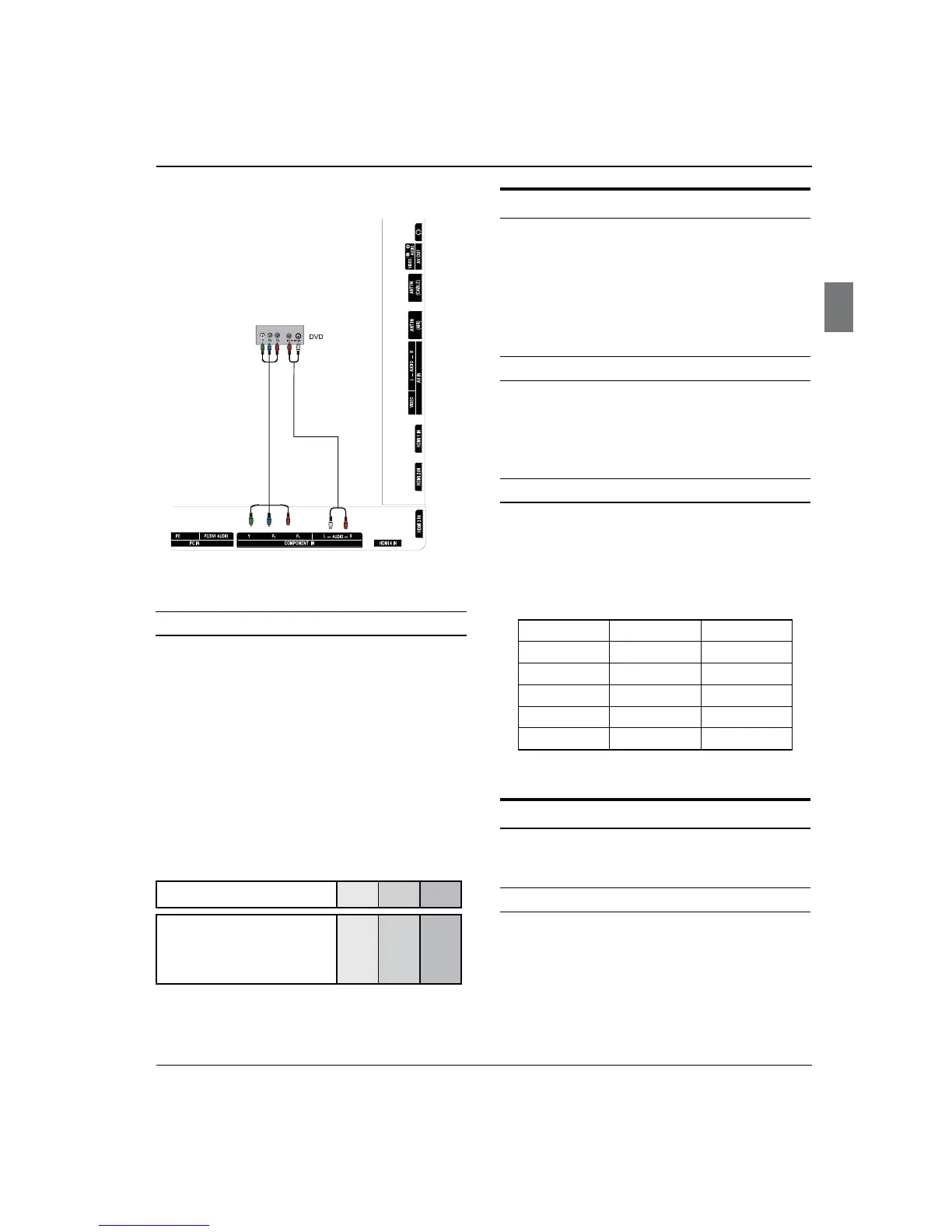
as shown in the figure.
How to use
Turn on the DVD player, insert a DVD disc.A
Use B INPUT button on the remote control to select
component mode.
Press
C PLAY button on external equipment for
program play.
Refer to the DVD player’s manual for operating
D
instructions.
Component Input ports ■
To get better picture quality, connect a DVD player to
the component input ports as shown below.
Component ports on the TV Y Pb Pr
Video output ports on DVD
player
Y
Y
Y
Y
Pb
B-Y
Cb
PB
Pr
R-Y
Cr
P
R
Connecting a DTV (digital TV)
This TV can receive Digital Over-the-air/Cable signals
without an external digital set-top box. However, if you do
receive Digital signals from a digital set-top box or other
digital external device, refer to the figure as shown below.
This TV supports HDCP (High-bandwidth Digital
Contents Protection) protocol for Digital Contents
(480p,720p,1080i).
How to connect
Use the TV’s COMPONENT, HDMI jack for video •
connections, depending on your set-top box
connector. Then, make the corresponding audio
connections.
How to use
Turn on the digital set-top box. (Refer to the owner’s A
manual for the digital set-top box.)
Use INPUT on the remote control to select
B
COMPONENT, HDMI source.
Signal COMPONENT HDMI
480i Yes Yes
480p Yes Yes
720p Yes Yes
1080i Yes Yes
1080p Yes Yes
Connecting a digital audio output
Send the TV’s audio to external audio equipment (stereo
system) via the Digital Audio Output (Optical) port.
How to connect
Connect one end of an optical cable to the TV Digital A
Audio (Optical) Output port.
Connect the other end of the optical cable to the
B
digital audio (optical) input on the audio equipment.
See the external audio equipment instruction
manual for operation.



 To Next Page