20
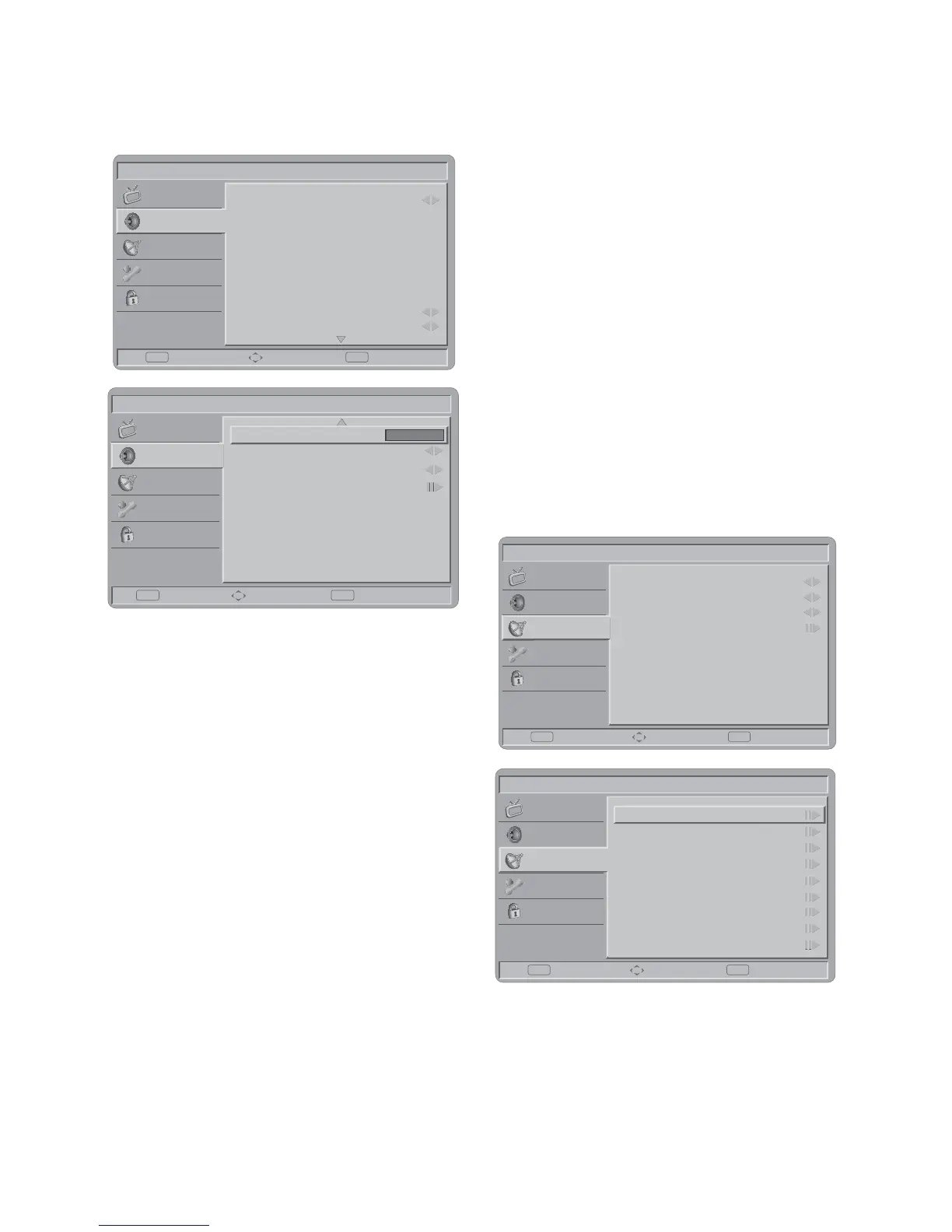
SOUND MENU
The Sound menu provides audio adjustment
for user to modify the audio setting.
Picture
Sound Mode
Equalizer 120Hz
Equalizer 500Hz
Equalizer 5KHz
Equalizer 1.5KHz
Equalizer 10KHz
Balance
Virtual Surround
Digital Audio Out
Personal
0
0
0
0
0
0
On
PCM
Enter Select Exit
EXITOK
Sound
TV
Features
Parental
Picture
SPDIF Delay 0
Select Back
EXIT
Adjust
OK
Sound
AVL
Type
Audio Description
Off
Normal
TV
Features
Parental
1. Sound Mode: To set the TV to a
predefined sound setting from Personal,
Music, or Speech.
2. Balance: To adjust the balance between
left and right channels.
3. Virtual Surround: To add greater depth
and dimension to the TV sound.
4. Digital Audio Out: To select the Digital
Audio Out from Off or PCM.
5. SPDIF Delay: SPDIF Delay function will
affect SCART/Line out audio also delay
at that time. The NorDig HD IRD shall
support the possibility to adjust the audio-
delay on the SPDIF output (if available) up
to 250 ms and it should be adjustable in
10ms steps, as the IRD may have several
different user set-ups, resulting in different
a/v delays; e.g. the IRD may be connected
to several types of external audio-
amplifiers and the STB may be connected
to several types of external screens.
6. AVL: Choose On or Off to adjust volume
to be consistent across programmes and
channels automatically.
The following functions are only available
for digital channels with audio signals.
7. Type: (Not all models) This function
enables you to choose the type of the
additional narration during the TV watching
from Normal, Hard of Hearing, or Audio
Description.
Hard of Hearing: This function provides
narration to deaf and hard of hearing
viewers.
8. Audio description: (Not all models)
When the Type is set to “Audio
Description”, you can adjust the volume of
the audio description.
TV MENU
Picture
Country
1st Audio
2nd Audio
Channels
Germany
English
English
Enter Select Exit
EXITOK
Sound
TV
Features
Parental
Picture
Channel Scan
Update Scan
Single RF Scan
Channel Skip
Analog Manual Scan
Channel Sort
Channel Edit
Decoder
Analog Ch Fine Tune
Scan Select Back
EXITOK
Sound
TV
Features
Parental
1. Country: To select the relevant country.
This is the country you are in, or the
country whose channels you want to
receive if you live near its borders.
2. Audio Carrier (ATV only): Select
Stereo, Dual 1, Dual 2, or Mono for ATV



 To Next Page