EasyManua.ls Logo

HaiLin Controls HL2023 Series - User Manual

HaiLin Controls HL2023 Series
3 pages
Print Icon
To Next Page IconTo Next Page
Loading...
HaiLin Controls
Beijing HaiLin Auto Controls Equipment Co., Ltd. Page 1 of 3 Tel: +86 10 52816666
International Information Industry Basement, HuilongguanNorth, Changping District, Beijing www.hailin.com
HL2023 Series Thermostat User Manual
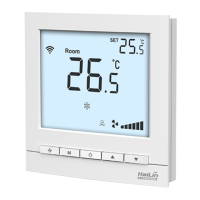
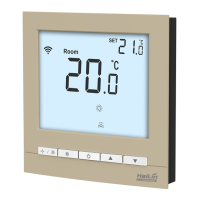
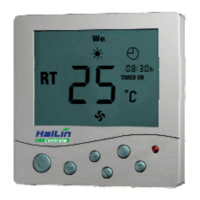
HL2023 Series Touch Pad fan coil unit thermostats are designed to control the room
temperature in air-conditioning fan coil unit system or dust pipe channel system. HL2023
series thermostats with microprocessor and big LCD display. It shows the following items:
working status (cool, heat or ventilation), fan speed, room temperature, set-point
temperature etc. Keys include on/off (
),mode ( ),fan speed ( ) and temperature
adjustment ( S
T ).
BASIC FEATURES
LCD Display
Room temperature setting
Manual or auto 3-speed changeover
Defrost (low temperature protection)
Blue back light ( -L, Optional )
Key lock ( Optional )
Auto-restart ( Optional )
Working Status: Cooling
, Heating or Ventilation
Fan SpeedLow Med High or AUTO
FCU valve status
Room temperature display
Temperature setting display
SPECIFICATIONS
Sensing element: NTC
Accuracy: ± 1
Set-point range: 5 to 35℃℃
Display range: 055
Operation environment: 045
Operating Humidity: 5 90%RH
(non-condensing)
Key
: soft touch
Power supply:
AC 85260V, 50/60Hz
Wirings: Accepting 2 × 1.5 mm
2
or 1 x 2.5mm
2
wires
Switch current rating: Resistive: 2 A, Inductive: 1 A
Housing: PC + ABS Fire Retardant
Dimensions: 90×88×15.5 mm ( W × H × D )
Hole pitch: 60 mm ( Standard )
Protection Class: IP30
Rated Power: < 1W
M
ODEL DESCRIPTION
HL2023 -
L blue backlit. Blank is invalid.
Y Control damper to open or close
DA/DA2DA: Control 2-wire valve; DA2: Control 3-wire valve,
When the temperature reaches the set-point, it will
close the valve with the fan still running.
DB/DB2: DB:Control 2-wire valve; DB2: Control 3-wire
valve ,When the temperature reaches the set-point,
it will close both the valve and fan.
FCV2 Control 4 pipe fan coil units, Control heating and
cooling valves and 3-speed fan, when the
temperature reaches the set-point, it will close the
valves with the fan still running
E auto-restart (Restart the working status of
last 6 seconds before power off). Blank is
invalid.
Question and Answer IconNeed help?

Do you have a question about the HaiLin Controls HL2023 Series and is the answer not in the manual?

Summary

Model Description

Model Designations

Explains specific model codes (Y, DA, DB, FCV) and their functions for valve control and fan operation.

Display Features

Details optional blue backlight (L) and auto-restart (E) functions shown on the LCD.

Features and Specifications

Basic Operational Features

Lists main operational capabilities and optional features like temperature setting and fan speed control.

LCD Display Content

Outlines the information presented on the thermostat's LCD screen, including status and temperatures.

Technical Specifications

Provides a comprehensive list of the thermostat's technical and physical specifications.

Operation

Basic Controls

Details how to turn the thermostat on/off, set temperature, and select operating modes (cool, heat, ventilation).

Fan Speed Control

Explains fan speed selection for HL2023Y models and auto fan speed logic based on temperature differences.

Valve and Damper Control

Describes how motorized valves and dampers operate in cooling/heating modes based on temperature.

Keyboard Lock Function

Explains the automatic keypad lock after inactivity and how to unlock it.

Low Temperature Protection

Details the function that turns off the thermostat when room temp drops below 5°C and its setting.

Temperature Adjustment

Explains how to adjust the temperature set-point, typically a range of ±5°C.

Alarm and Wiring Diagrams

Alarm Indicators

Explains alarm messages like 'E1'/'E2' for sensor failure and 'HI'/'LO' for temperature extremes.

Wiring Configurations

Provides wiring diagrams for different HL2023 model series (DA, DB, Y, FCV).

Installation Steps

Outlines the procedure for installing the thermostat, including opening the cover and mounting.

Overview

The HL2023 Series Thermostat is a touch-pad fan coil unit thermostat designed to control room temperature in air-conditioning fan coil unit systems or dust pipe channel systems. These thermostats feature a microprocessor and a large LCD display, showing working status (cool, heat, or ventilation), fan speed, room temperature, and set-point temperature. The device includes keys for on/off, mode, fan speed, and temperature adjustment.

Function Description:

The thermostat controls the room temperature by managing the fan coil unit. It offers various models with specific control functionalities:

  • Y: Controls a damper to open or close.
  • DA/DA2: Controls a 2-wire (DA) or 3-wire (DA2) valve. When the temperature reaches the set-point, the valve closes, but the fan continues to run.
  • DB/DB2: Controls a 2-wire (DB) or 3-wire (DB2) valve. When the temperature reaches the set-point, both the valve and the fan close.
  • FCV2: Controls 4-pipe fan coil units, managing both heating and cooling valves and a 3-speed fan. When the temperature reaches the set-point, the valves close.

Basic Features:

  • Room temperature setting: Allows users to set their desired room temperature.
  • Manual or auto 3-speed changeover: Provides flexibility to manually select fan speed or let the thermostat automatically adjust it.
  • Defrost (low temperature protection): Protects the system from freezing by activating the fan and valve if the room temperature drops too low.
  • Blue backlight (-L, Optional): Enhances visibility of the display in low-light conditions.
  • Key lock (Optional): Prevents unauthorized operation of the thermostat.
  • Auto-restart (Optional): Restores the working status from the last 6 seconds before a power off.

Usage Features:

  • On/Off: Press the power button to turn the thermostat on or off.
  • Setting Temperature: Use the up and down arrows to adjust the set-point temperature in 1°C increments.
  • Mode Selection: Press the "M" button to cycle through cooling, heating, or ventilation modes. The corresponding icon will flash. (Ventilation is not valid for HL2023Y/YE models).
  • Fan Speed Selection (not for HL2023Y): Press the "S" button to change fan speed among High, Medium, Low, or AUTO.
    • In AUTO mode, the fan speed adjusts automatically based on the difference between room temperature and set-point:
      • LOW speed: 1°C difference.
      • MED speed: 2°C difference.
      • HI speed: 3°C difference.
  • Control Motorized-Damper (HL2023Y/YE): In cooling mode, the damper opens if the room temperature is 1°C higher than the set-point. In heating mode, it opens if the room temperature is 1°C lower than the set-point. Otherwise, the damper closes.
  • Control Motorized Valve (2-pipe configuration, not for HL2023Y/YE): If the differential temperature between room temperature and set-point exceeds 1°C, the FCU valve opens. If they are equal, HL2023DA/DAE/DA2/DA2E models close the FCU valve with the fan still running, while HL2023DB/DBE/DB2/DB2E models close both the valve and fan.
  • Control FCU Valve (4-pipe configuration, HL2023FCV2/FCV2E):
    • In cooling, the cooling valve opens if the room temperature is higher than the set-point; otherwise, it closes. The heating valve remains closed.
    • In heating, the heating valve opens if the room temperature is lower than the set-point; otherwise, it closes. The cooling valve remains closed.
  • Keyboard Lock Function: The keypad automatically locks after 30 seconds of inactivity to prevent unintended operation. To unlock, press the "S" button for 5 seconds.
  • Low Temperature Protection Function:
    • Turn off: If the room temperature drops below 5°C, the thermostat automatically turns on the fan and valve, displaying the snowflake icon. When the temperature reaches 7°C, the output automatically closes.
    • Setting: To enable/disable low temperature protection, turn off the thermostat, then press and hold "M" for 3 seconds. The display will show "OF" (invalid) or "ON" (valid). Use the up/down arrows to adjust. The default is "OF".
  • Temperature Adjustment (±5°C): To adjust the temperature value, turn off the thermostat, then press and hold "M" and "S" for 3 seconds. The display will show "XX °C". Use the up/down arrows to adjust the value, which will be automatically confirmed after 6 seconds.

Important Technical Specifications:

  • Sensing element: NTC
  • Accuracy: ± 1°C
  • Set-point range: 5°C to 35°C
  • Display range: 0~55°C
  • Operation environment: 0~45°C
  • Operating Humidity: 5~90%RH (non-condensing)
  • Key: Soft touch
  • Power supply: AC 85~260V, 50/60Hz
  • Wirings: Accepting 2 × 1.5 mm² or 1 x 2.5mm² wires
  • Switch current rating: Resistive: 2 A, Inductive: 1 A
  • Housing: PC + ABS Fire Retardant
  • Dimensions: 90 × 88 × 15.5 mm (W × H × D)
  • Hole pitch: 60 mm (Standard)
  • Protection Class: IP30
  • Rated Power: < 1W

Maintenance Features (Alarm System):

The thermostat includes an alarm system to indicate sensor failures or extreme temperatures:

  • E1: Sensor in short circuit alarm.
  • E2: Sensor in open circuit alarm.
  • HI: Displays when the temperature is higher than 55°C.
  • LO: Displays when the temperature is lower than 0°C.

When a sensor fails (E1 or E2), the thermostat will close the fan and valve.

Installation:

  1. Insert a 3.5mm width screwdriver into the slot.
  2. Open the face cover.
  3. Remove the cables from the control board.
  4. Connect wires to terminals according to the wiring diagram.
  5. Fix the installation backboard to the wall with two bolts.
  6. Connect the cables on the control board.
  7. Hang up the two hooks at a 30-degree angle.
  8. Press down both sides to fix the cover and complete the installation.

Important Note for Installation: Ensure all wires are connected according to the wiring diagrams and kept away from water, mud, and other materials to prevent damage to the unit.

HaiLin Controls HL2023 Series Specifications

General IconGeneral
BrandHaiLin Controls
ModelHL2023 Series
CategoryThermostat
LanguageEnglish

Related product manuals