EasyManua.ls Logo

HaiLin Controls HL8102 Series - User Manual

HaiLin Controls HL8102 Series
4 pages
Print Icon
To Next Page IconTo Next Page
Loading...
HaiLin Controls
Beijing HaiLin Auto Controls Equipment Co., Ltd. Page 1 of 4 Tel: +86 10 8070 2235
Shahe Industrial Zone, Changping District www.hilin.com
HL8102 Series Digital Thermostat Manual
HL8102 series thermostats are used to control room temperature in industrial, commercial
and residential environment via controlling electric modulating valve with 0-10VDC (4-20mA)
control signal or floating control as well as damper actuator of VAV system.
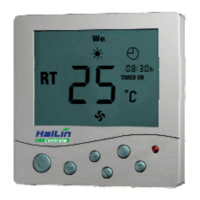
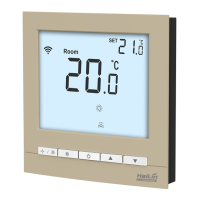
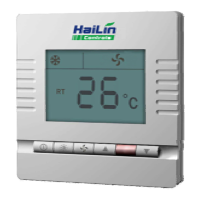
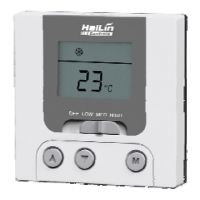
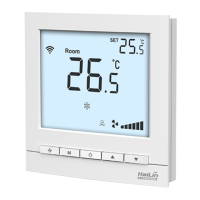
Electronic control technology is adopted, with green backlit LCD display of: working mode
(cooling “
, heating , ventilating , auto ); fan speed (low ”, med ”, high ”,
auto
”); room temperature; setting temperature etc. push button: On/Off ; mode
changeover ; fan speed choose and temperature adjustment and ”.
Shell: PC + ABS retardant material.
Function :
Detect and Display room temperature
Room temperature setting
Fahrenheit or Celsius degree display
Timing sleep
Control On/Off of cooling and heating equipment
Selectable single speed or three speed fan control
Order Guide:
Model
Output signal
Fan
(Single/3-speed)
RS485
Network
Input
Control
Remote
Sensor
Floating
Modulation
HL8102A
Cooling/Heating
HL8102AN
Cooling/Heating
HL8102B
Cooling/Heating
HL8102BN
Cooling/Heating
HL8102C
Cooling/Heating
HL8102CN
Cooling/Heating
HL8102D
Cooling/Heating
HL8102DN
Cooling/Heating
HL8102E
Cooling
Heating
HL8102EN
Cooling Heating
HL8102F
Heating
Cooling
HL8102FN
Heating Cooling
HL8102I
Cooling&Heating
HL8102IN
Cooling&Heating
HL8102K
Cooling&Heating
HL8102KN
Cooling&Heating
Fan: thermostat with fan functions, can be selected with single speed fan or three speed fan by setting parameter.
Remote Control: input signal can be selected by setting parameter.
Specification :
Set temperature range: 0 - 99.5 adjustable
Accuracy displayed:
0.1
Accuracy: ±0.5
Rated Power: < 1 W
Sensor type:
NTC
Display: LCD
Power:
AC 24V±10, 50Hz/60Hz
Output signal:
AC 24V×2 (0.5A resistive) ,
0 - 10VDC(5mA) / 4 - 20mA (600Ω)
Input signal: dry contact (NO)
Dimensions: 86×86×23mm (W×H×D)
Fixing screw width : 60mm (Standard)
All manuals and user guides at all-guides.com
all-guides.com
Question and Answer IconNeed help?

Do you have a question about the HaiLin Controls HL8102 Series and is the answer not in the manual?

Summary

Function

Detect and Display room temperature

Shows current room temperature.

Room temperature setting

Allows users to set desired room temperature.

Fahrenheit or Celsius degree display

Option to display temperature in °C or °F.

Timing sleep

Feature for setting sleep timer for the thermostat.

Control On;Off of cooling and heating equipment

Manages operation of HVAC systems.

Order Guide

Specifications

Set Parameters

Switch

Mounting

Wiring Diagram

Overview

The HaiLin HL8102 Series Digital Thermostat is designed for controlling room temperature in industrial, commercial, and residential environments. It achieves this by managing electric modulating valves with 0-10VDC (or 4-20mA) control signals, floating control, and damper actuators in VAV systems.

Function Description:

The thermostat utilizes electronic control technology and features a green backlit LCD display. This display shows key information such as:

  • Working Mode: Cooling (snowflake icon), Heating (sun icon), Ventilating (fan icon), and Auto (A icon).
  • Fan Speed: Low (single fan blade icon), Medium (two fan blades icon), High (three fan blades icon), and Auto (four fan blades icon).
  • Temperature: Current room temperature and the user-set temperature.

Control is managed via several push buttons:

  • On/Off Button: For powering the device on and off.
  • Mode Changeover Button (M): To switch between different working modes.
  • Fan Speed Choose Button (S): To select the desired fan speed.
  • Temperature Adjustment Buttons (up and down arrows): For increasing or decreasing the set temperature.

The device's shell is constructed from PC + ABS retardant material, ensuring durability and safety.

Key Functions:

  • Temperature Detection and Display: Accurately measures and shows the current room temperature.
  • Temperature Setting: Allows users to set their desired room temperature.
  • Temperature Unit Display: Supports display in both Fahrenheit and Celsius degrees.
  • Timing Sleep Function: Enables programming the thermostat to enter a sleep mode.
  • Equipment Control: Manages the On/Off status of cooling and heating equipment.
  • Fan Control: Offers selectable single-speed or three-speed fan control.

Important Technical Specifications:

  • Set Temperature Range: Adjustable from 0 to 99.5°C.
  • Displayed Accuracy: 0.1°C.
  • Overall Accuracy: ±0.5°C.
  • Rated Power: Less than 1 W.
  • Sensor Type: NTC (Negative Temperature Coefficient).
  • Display Type: LCD.
  • Power Supply: AC 24V ±10%, 50Hz/60Hz.
  • Output Signal:
    • AC 24V × 2 (0.5A resistive) for On/Off control.
    • 0-10VDC (5mA) / 4-20mA (600Ω) for modulating control.
  • Input Signal: Dry contact (NO - Normally Open).
  • Dimensions: 86 × 86 × 23mm (Width × Height × Depth).
  • Fixing Screw Width: 60mm (Standard).

Usage Features:

On/Off:

  • Press the "up" or "down" button to turn on.
  • Press the "On/Off" button again to turn off.

Setpoint:

  • With the thermostat on, use the "down" arrow to reduce the setpoint and the "up" arrow to increase it.
  • The setpoint step is 0.5°C.
  • The setpoint is confirmed automatically after 5 seconds, returning to the display status.
  • Press "up" or "down" to check the setpoint.

Mode Selection:

  • With the thermostat on, press the "M" button to cycle through working modes: Cooling, Heating, Ventilating, and Auto.
  • The Auto mode is available for models HL8102E to HL8102K.

Fan Speed Selection:

  • With the thermostat on, press the "S" button to select the desired fan speed: Low, Medium, High, or Auto.
  • If only a single-speed fan is available, only Medium speed is selectable.
  • Auto Speed Fan Logic:
    • Low speed: Room temperature is 1°C different from the setpoint.
    • Medium speed: Room temperature is 2°C different from the setpoint.
    • High speed: Room temperature is 3°C different from the setpoint.

Sleep Function:

  • The thermostat can enter a sleep function after programming. The set temperature will be adjusted during sleep.
  • To Set Sleep: Press the "M" button for 3 seconds until a "moon" icon appears. A countdown number will be shown. Use "up" or "down" to adjust the sleep time (maximum 48 hours). The thermostat will return to working status after 5 seconds, with the "moon" icon flashing to indicate counting down. The setpoint will be replaced by the sleep setpoint.
  • To Quit Sleep: When the "moon" icon is flashing, press "up" or "down" to exit.

Keypad Lock:

  • Press "up" and "down" simultaneously for 10 seconds until a "lock" icon appears to activate. All keypads are locked.
  • Press "up" and "down" simultaneously for 10 seconds until the "lock" icon disappears to quit the function.

Parameter Settings:

  • With the thermostat off, press "M" for 10 seconds to enter the menu and set parameters. The parameter table provides detailed options for:
    • Power on status (Off, On, Hold).
    • Fan speed type (Single Speed, Three Speed).
    • Fan mode (DA, DB).
    • Sensor selection (Internal, Remote).
    • Temperature format (Celsius, Fahrenheit).
    • Temperature calibration.
    • Minimum and maximum setpoints.
    • Dead band.
    • Heating & Auto sleep setpoint.
    • Cooling sleep setpoint.
    • Communication number (for HL8102XN models).
    • Input Signal Mode (Invalid, Changeover, Sleep without input signal, Off without input signal).
    • Heating and Cooling reset times.
    • Ports mode (Modulation & Floating, On/Off).
    • Valve status as turn off (Close, Hold, Open).
    • Port1 Modulation direction (10V Open, 10V Close).
    • Port1/Port2 Modulation minimum signal and proportional settings.
    • Port1/Port2 Floating minimum and maximum times.
    • Disable/Enable bypass PID control and override output values.
    • Input signal management (Input valid, Override Input: open/close).
    • Display room temperature or set-point.
    • Configuration external sensor (B values for NTC sensors).
    • Start and Stop temperatures for Low temperature protection.
  • Settings are confirmed 20 seconds later and the device returns to the Off state.

Switch Settings (on PCB):

A 5-pole switch on the PCB allows configuration of hardware settings:

  • Location 1: ON for 120 ohm Resistance between AB wires (for RS485 network termination), OFF for no resistance.
  • Location 2: ON for Port 1 Modulation 0-20mA, OFF for Off.
  • Location 3: ON for Port 1 Modulation 0-10VDC, OFF for Off.
  • Location 4: ON for Port 2 Modulation 0-20mA, OFF for Off.
  • Location 5: ON for Port 3 Modulation 0-10VDC, OFF for Off.

Maintenance Features:

Mounting:

  1. Open the back panel with a screwdriver.
  2. Connect the wires according to the provided diagram.
  3. Fix the base to the wall with screws.
  4. Fix the front panel to the base to complete the installation.

Wiring Diagram Note:

  • It is crucial to connect all wires strictly according to the wiring diagrams.
  • Keep the unit away from water, mud, and other materials to prevent damage and ensure proper functioning.

HaiLin Controls HL8102 Series Specifications

General IconGeneral
BrandHaiLin Controls
ModelHL8102 Series
CategoryThermostat
LanguageEnglish

Related product manuals