Charging Your Personal Electronic Device
iPhone 4, 4s, iPod Classic, iPod Nano and
Earlier iPhone/iPod Models
1. Using the provided Standard USB-Micro USB cable,
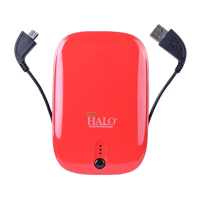
plug the Standard USB end into the USB OUT port of your
HALO charger.
2. Connect the provided 30-pin tip into the Micro USB end
of the provided Standard USB-Micro USB cable.
3. Plug your personal electronic device into the 30-pin tip
and your device will automatically begin charging. If your
HALO charger does not power on automatically, please
manually depress the power button.
4. Your HALO charger is also compatible with the charging
cable provided with your personal electronic device. To
use, plug the Standard USB end of the cable into the
Standard USB OUT port of your HALO charger.
iPhone 5, 5c, 5s iPod Nano w/Multi-Touch
and Retina Displays
1. Using the provided Standard USB- 8-pin cable, plug the
Standard USB end into the USB OUT port of your HALO
charger.
2. Plug your personal electronic device into the
8-pin end of the provided Standard USB- 8-pin cable. Your
device will automatically begin charging. If your HALO
charger does not power on automatically, please manually
depress the power button.
3. Your HALO charger is also compatible with the charging
cable provided with your personal electronic device. To
use, plug the Standard USB end of the cable into the
Standard USB OUT port of your HALO charger.
Android, Samsung and Windows Phones/Tablets
1. Using the provided Standard USB-Micro USB cable,
plug the Standard USB end into the USB OUT port of the
HALO charger.


 To Next Page