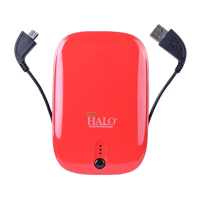
2. Plug your personal electronic device into the Micro USB
end of the provided Standard USB-Micro USB cable. Your
device will automatically begin charging. If your HALO
charger does not power on automatically, please manually
depress the power button.
3. Your HALO charger is also compatible with the charging
cable provided with your personal electronic device. To
use, plug the Standard USB end of the cable into the
Standard USB OUT port of your HALO charger.
Other Personal Electronic Devices
Certain electronic devices (such as Nook Color, Nook HD,
Samsung Galaxy Tab 2 & 3) have special connectors. If
your personal electronic device does not accept one of
the provided connectors, please use the cable provided
with your device for charging. Plug the Standard USB end
of the cable that came with your personal electronic
device into the Standard USB OUT port of your HALO
charger. Plug your personal electronic device into the
other end of the cable and your device will automatically
begin charging. If your HALO charger does not power on
automatically, please manually depress the power button.
Compatible with:
Mobile phones, Tablets, PSP, NDS, MP3, MP4, MP5,
Bluetooth, GPS, Cameras and more
Example of Charging Your Personal
Electronic Device:
100
75
50
25
h
Plug appropriate tip
into your personal
electronic device


 To Next Page