EasyManua.ls Logo

Hama BASIC L42A - 6. Troubleshooting

Hama BASIC L42A
78 pages
Print Icon
To Next Page IconTo Next Page
To Previous Page IconTo Previous Page
Loading...
8
Basic L42A
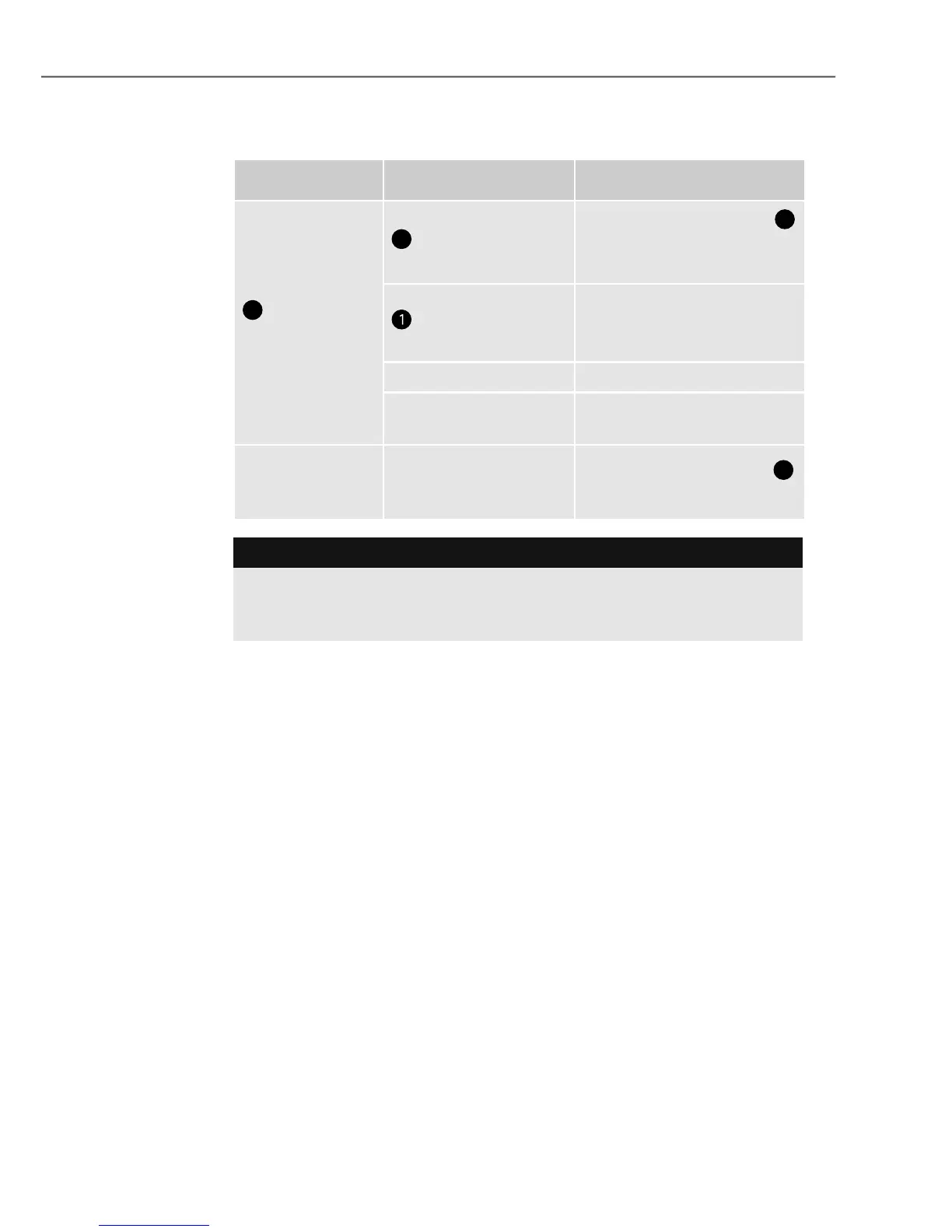
G
 
   
The ready lamp
2
does not
ash or is not
solid green.
The on/off switch
3
was not pressed
correctly.
Press the on/off switch
3
to switch on the device.
The power cable
is not connected
correctly.
Ensure that the plug is
connected to the electri-
cal socket.
No mains power.Check your fuse box.
Device is faulty.
Inform our customer
service department.
Pouches are
not laminated
properly.
The required tem-
perature has not yet
been reached.
Wait for the ready light
2
to become solid green.

Contact our customer service department if the problem re-
mains after you have taken the steps detailed above.

Table of Contents