10
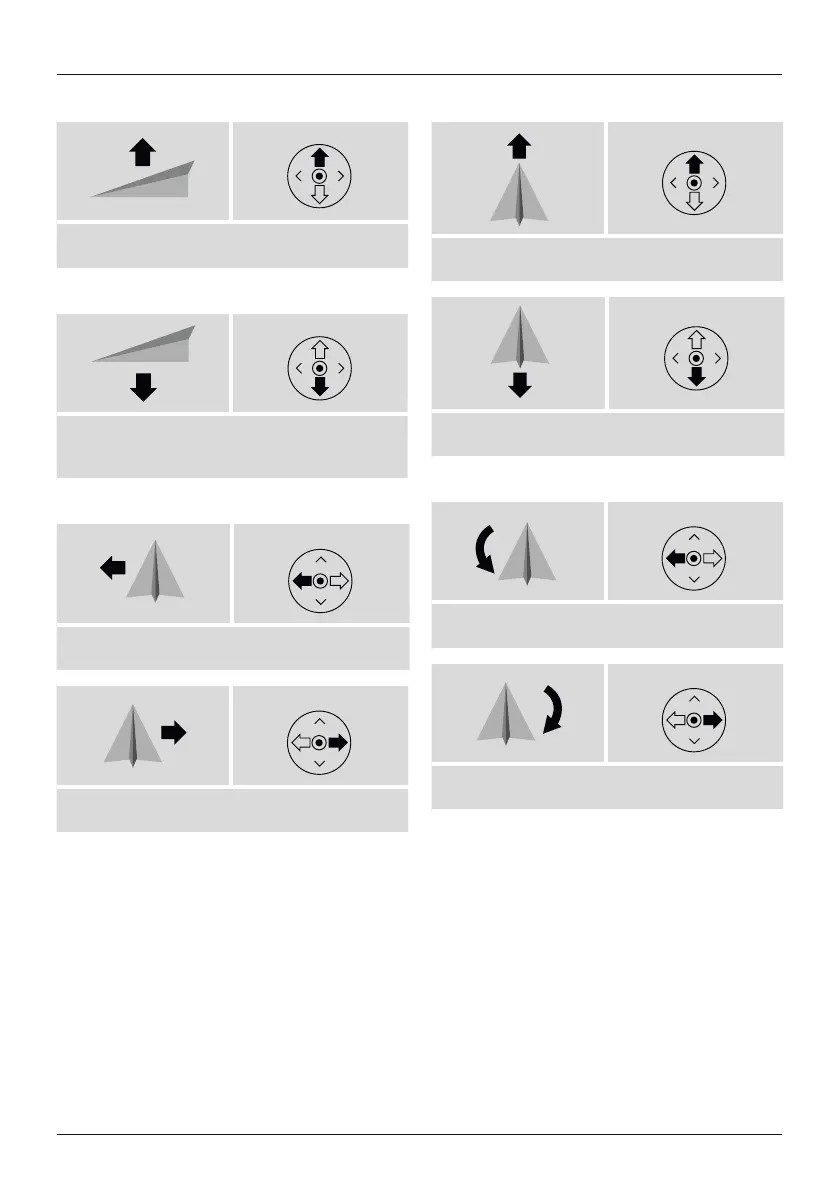
Taking off and climbing
Left control
• To launch your drone or to gain altitude, move the left
control lever (2) on the remote control upwards.
Landing and descending
Left control
• To land the drone or to descend to alower altitude,
move the left control lever (2) on the remote control
downwards.
Flying left and right
Right control
• To y the drone left, move the right control lever (9)
on the remote control to the left.
Right control
• To y the drone right, move the right control lever (9)
on the remote control to the right.
Flying forwards and backwards
Right control
• To y the drone forwards, move the right control lever
(9) on the remote control upwards.
Right control
• To y the drone backwards, move the right control
lever (9) on the remote control downwards.
Turning left or right
Left control
• To turn the drone left, move the left control lever (2)
on the remote control to the left.
Left control
• To turn the drone right, move the left control lever (2)
on the remote control to the right.


 To Next Page