8
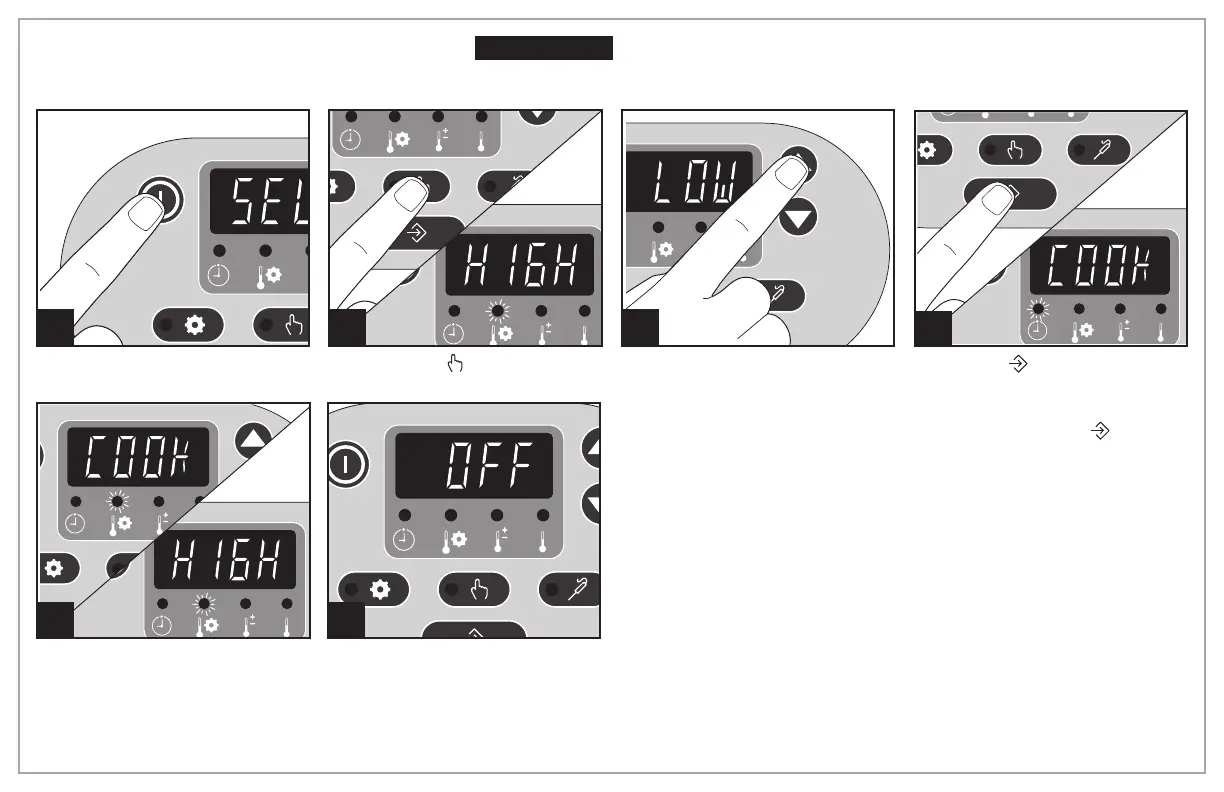
Manual Mode
1 2 3
Press ON (I).
Press Manual
( ). Heat setting
will illuminate.
Press arrows to select heat setting.
NOTE: Do not use Warm setting
to cook food.
Press Enter (
) to start and a 3 sec-
ond beep will sound.
NOTE: Unit will automatically start
in 20 seconds if Enter (
) is not
pressed.
4
5
The display will alternate between
COOK and heat setting (if HIGH or
LOW is selected). If using Warm
setting, display will remain on
WARM.
6
The unit will turn off and display
OFF after a total of 14 hours.
Before First Use: Wash glass lid and crock in hot, soapy water. Rinse and dry.
Electrical Shock Hazard. To reduce the risk of electrical shock, do not
immerse base in water.
w WARNING



 To Next Page