7
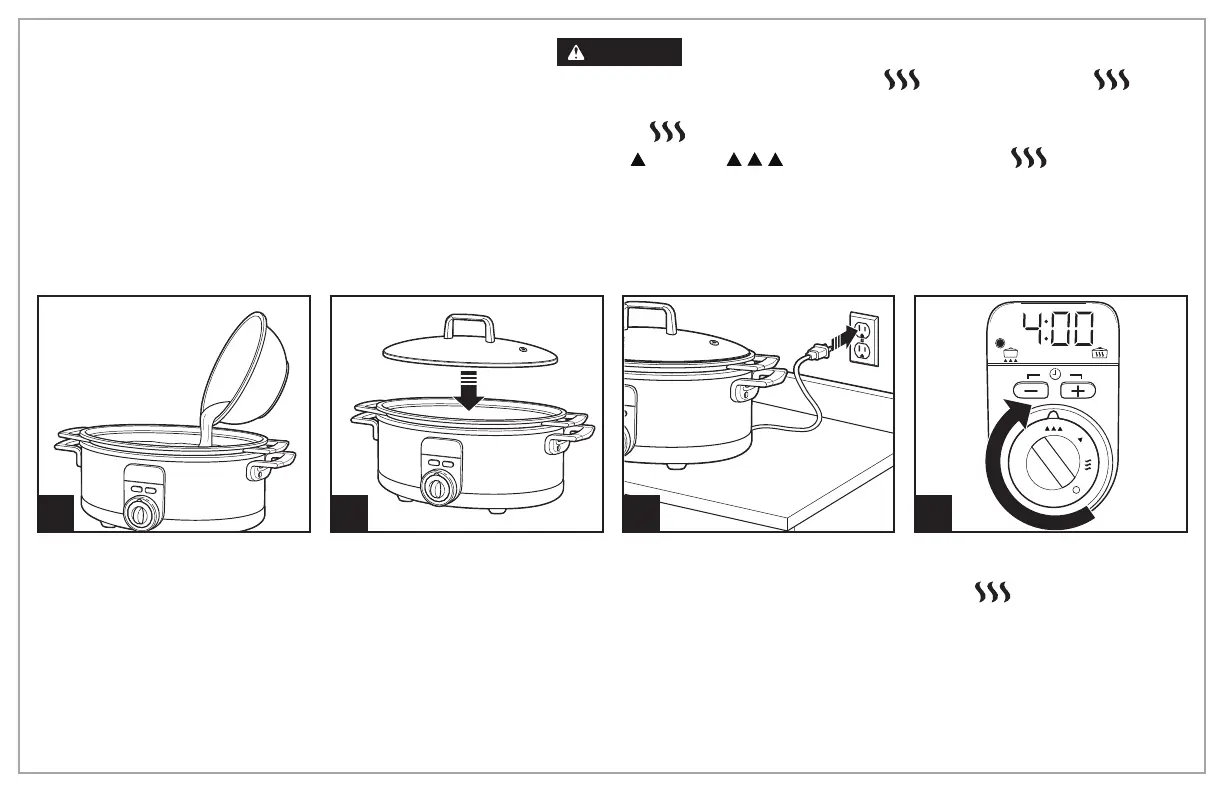
How to Slow Cook
2 31
NOTE: Lid vent hole will not
affect cooking time.
Turn control knob to desired heat
setting to cook. Do not cook on
WARM (
).
NOTE: Display will show default
cook time.
4
BEFORE FIRST USE: Wash lid and stovetop-safe cookware
in hot, soapy water. Rinse and dry.
NOTE:
• Do not use metal utensils when placing food in and removing food from stovetop-safe cookware.
•
Display does not show any text other than “Err” and “00:00.” When control knob is set, display will show set cook time and the cooking LED
light blinks before cooking starts. After cooking starts, display will show remaining cook time and the cooking LED light will remain lit.
WARNING
Food Safety Hazard.
Food must be hot enough to prevent
bacterial growth before using the WARM (
) setting. The WARM ( ) setting
should only be used after a recipe has been thoroughly cooked. Do not reheat food
on WARM (
) setting. If food has been cooked and then refrigerated, reheat it
on LOW (
) or HIGH ( ) and then switch to WARM ( ).



 To Next Page