8
SETTING
A setting example of the SK2
UPPER
PEDAL
LOWER
NUMBER NAME
PATC H
ENTER
VA L U E
MENU/
EXIT
PLAY
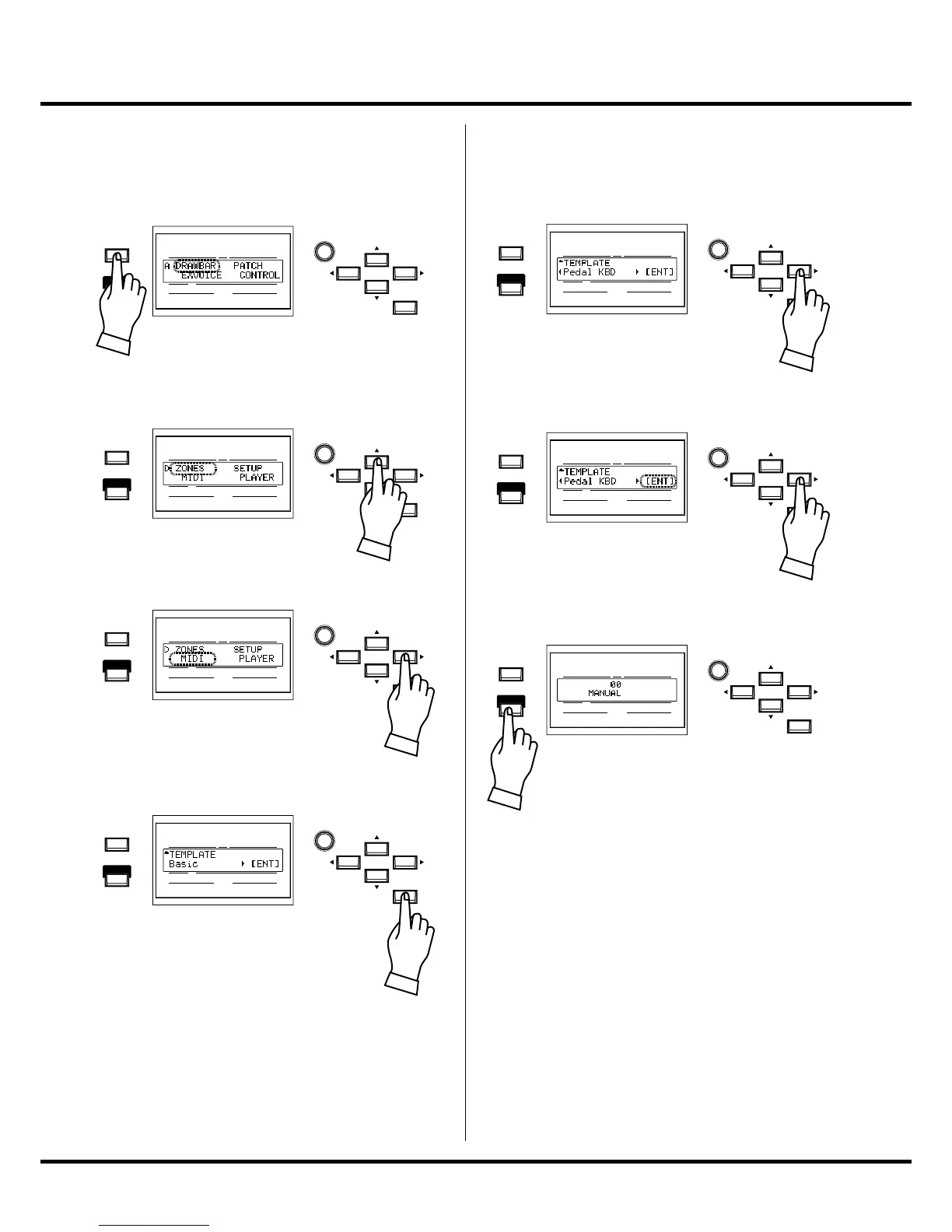
Press the [MENU/EXIT] to display the MENU.
UPPER
PEDAL
LOWER
NUMBER NAME
PATC H
ENTER
VA L U E
MENU/
EXIT
PLAY
Select page D by button [].
UPPER
PEDAL
LOWER
NUMBER NAME
PATC H
ENTER
VA L U E
MENU/
EXIT
PLAY
Move the cursor on “MIDI” by button [].
UPPER
PEDAL
LOWER
NUMBER NAME
PATC H
ENTER
VA L U E
MENU/
EXIT
PLAY
Enter the MIDI function mode by [ENTER].
e MIDI template “Basic” will displayed.
UPPER
PEDAL
LOWER
NUMBER NAME
PATC H
ENTER
VA L U E
MENU/
EXIT
PLAY
Press the button [] to locate the “Pedal KBD”
page.
UPPER
PEDAL
LOWER
NUMBER NAME
PATC H
ENTER
VA L U E
MENU/
EXIT
PLAY
Press the [ENTER] to recall the MIDI template
for using the MIDI pedalboard. e “[ENT]”
will blink while the [ENTER] button is hold.
UPPER
PEDAL
LOWER
NUMBER NAME
PATC H
ENTER
VA L U E
MENU/
EXIT
PLAY
Press the [PLAY] to back to the PLAY mode.
is completes the setting.
is setting is memorized, even
a er the power is switched o .


 To Next Page