EasyManua.ls Logo

HAMPTON BAY 1006 787 899 - User Manual

HAMPTON BAY 1006 787 899
20 pages
Print Icon
To Next Page IconTo Next Page
Loading...
THANK YOU
We appreciate the trust and condence you have placed in Hampton Bay through the purchase of this string light. We strive to continually
create quality products designed to enhance your home. Visit us online to see our full line of products available for your home improvement
needs. Thank you for choosing Hampton Bay!
USE AND CARE GUIDE
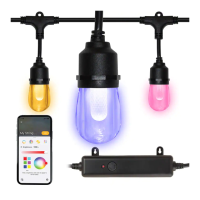
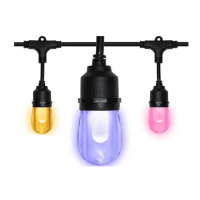
12-LIGHT INDOOR/OUTDOOR 24 FT. RGBW LED SMART HUBSPACE
CAFE STRING LIGHT
Questions, problems, missing parts? Before returning to the store,
call Hampton Bay Customer Service
8 a.m. - 7 p.m., EST, Monday – Friday, 9 a.m. – 6 p.m., EST, Saturday
1-877-592-5233
HOMEDEPOT.COM/HUBSPACE
Item #1006 787 899
Model #HB-10521-HS

Questions and Answers

  • C
    Charles RobinsonAug 21, 2025
    How to fix HAMPTON BAY Lighting Equipment when the entire string light will not turn ON?
    • C
      Christopher CollinsAug 21, 2025
      If your HAMPTON BAY Lighting Equipment string light isn't turning on, here are a few potential causes and solutions: * First, check that the power source is active and the AC plug is properly connected. * Also, make sure the string is properly connected to the controller. Ensure the connection is tight and secure by pressing the connections together and threading the connector cap of the string light clockwise onto the controller connection. * If there is damage to the controller or its electrical connection, stop using the string light and call the Customer Care Service Team at 1-877-592-5233.
  • M
    Matthew HamiltonAug 28, 2025
    Why does the circuit breaker trip when HAMPTON BAY 1006 787 899 Lighting Equipment is turned ON?
    • P
      Patrick FreemanAug 28, 2025
      If the circuit breaker trips when you turn on your HAMPTON BAY Lighting Equipment, it could be because the power wire is grounded out, or there's another electrical fault at the AC plug. Stop using the string light, check the wire connections, and contact a qualified electrician or call the Customer Care Service Team at 1-877-592-5233.
  • A
    Anthony JacksonSep 2, 2025
    What to do if one or more LED ‘bulbs’ are not working on HAMPTON BAY 1006 787 899?
    • M
      megan72Sep 2, 2025
      If one or more LED 'bulbs' are not working on your HAMPTON BAY Lighting Equipment, it might be due to the following reasons: * The LED 'bulb' might be loosely fitted in the socket. Ensure that the LED 'bulb' is properly installed in the socket. See Installation instructions. * The LED 'bulb' might be damaged. In this case, discontinue use of the string light and call the Customer Care Service Team at 1-877-592-5233.
  • E
    Eric ReyesNov 9, 2025
    Why is my HAMPTON BAY 1006 787 899 Lighting Equipment having difficulties connecting to the Hubspace app?
    • E
      Eddie DeckerNov 9, 2025
      If you're having trouble connecting your HAMPTON BAY Lighting Equipment to the Hubspace app, here are a few things to check: * First, ensure your device is connected to a power source and that your internet connection and Wi-Fi network are working correctly. * If your device can't find any Wi-Fi networks, verify that you have a 2.4GHz Wi-Fi network within range. * If you are in a location without Wi-Fi, you can still use the Hubspace app with a phone that has an internet connection like LTE, as long as the phone is within Bluetooth range of your device and Bluetooth is enabled. * If you can't find the QR code, look on the underside of the controller, opposite the button and indicator light. * If the QR code is damaged, you can manually enter the numbers located underneath the co...
  • J
    Jorge GentryNov 15, 2025
    What to do if HAMPTON BAY 1006 787 899 is having difficulties connecting to the Hubspace app?
    • J
      Jerry BlackburnNov 15, 2025
      If you're still facing issues connecting your HAMPTON BAY Lighting Equipment to the Hubspace app, consider these solutions: * If you lost your QR code, ensure the device is powered on. In the Hubspace app, tap the + icon, then Add Device. On the Scan Device screen, tap the Search button in the lower right corner and follow the on-screen instructions. * To transfer a device from another account, scan the QR code to transfer it to your account. * If your device frequently goes offline, ensure your Wi-Fi signal strength is adequate. You might need to relocate your router or use mesh Wi-Fi or Wi-Fi extenders. * If the app can't connect after scanning the QR code, try turning Bluetooth off and then on again on your phone, then rescan the QR code. If the problem persists, restart your p...

Summary

Safety Information

Important Safety Instructions

Basic precautions for using electrical products, including connection to GFCI outlets and avoiding damage.

Warranty Details

What is Covered

Details manufacturer's warranty for fixture and bulbs against defects in materials and workmanship.

What is Not Covered

Excludes consequential/incidental damages, fitness for a particular purpose, and normal wear and tear.

Pre-Installation Guide

Planning Installation Steps

Instructions on planning installation, including inspecting wires and noting support cable is not included.

Package Contents Overview

Lists the items included in the package: wire socket, controller, and guides.

Installation Instructions

Preparing for Installation

Steps to prepare for installation: disconnect power, use 120V AC, and inspect bulbs/sockets.

Attaching the Controller

Guide to connecting the controller to the string light and plugging into a GFCI outlet.

Suspending the Light String

Instructions on securely attaching the string, maximum span distance, and bulb orientation.

Operation

Using the Controller Button

How to turn lights on/off and cycle through settings using the controller's button.

Connecting to the Hubspace App

Steps to download, set up the Hubspace app, and connect the smart string lights.

Care and Cleaning

Troubleshooting

String Light Not Turning On

Troubleshoots power issues, connection problems, and damaged controllers.

Circuit Breaker Tripping

Addresses issues related to grounded wires or electrical faults at the AC plug.

Hubspace App Connection Issues

Guides on Wi-Fi connectivity, app connection, and finding QR codes.

LED Bulbs Not Working

Troubleshoots loosely fitted or damaged LED bulbs and provides contact information.

HAMPTON BAY 1006 787 899 Specifications

General IconGeneral
Model Number1006 787 899
BrandHampton Bay
CategoryLighting Equipment
Light Bulb Base CodeE26
Maximum Bulb Wattage60 W
Power SourceHardwired
Hardware IncludedYes
Certifications and ListingsETL Listed

Related product manuals