10
5
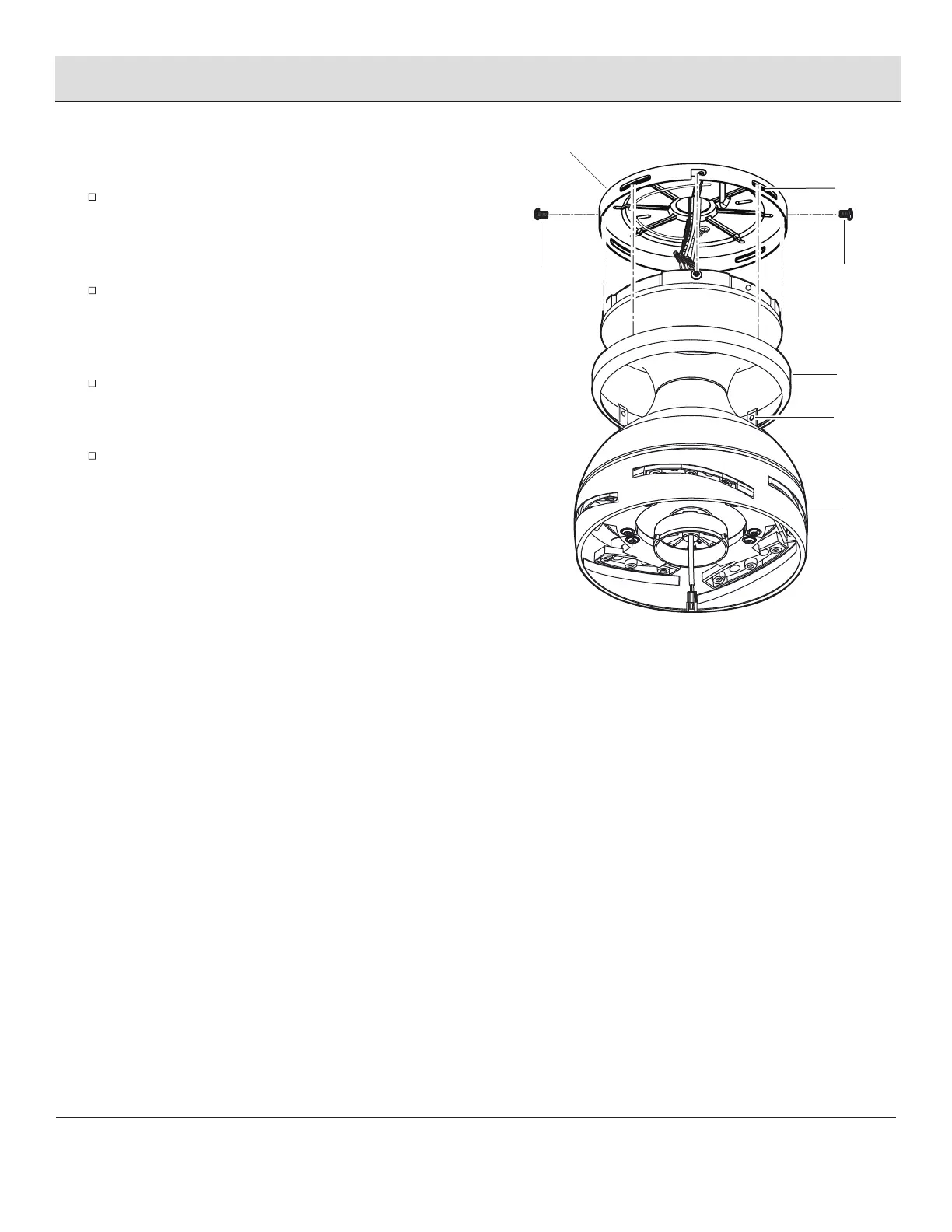
Attaching the fan motor assembly
to the mounting plate
Remove two of the four motor mounting screws with
lock washers (GG) from the motor assembly (E) and
loosen the other two screws with lock washers (GG).
(Do not remove.)
Remove the fan motor assembly (E) from the mounting
plate hook (EE), and engage the key holes on the mounting
plate (A) with the two motor mounting screws with lock
washers (GG) previously loosened.
Install the two motor mounting screws with lock washers
(GG) previously removed, and tighten all four motor
mounting screws with lock washers (GG).
Raise up canopy ring (B) and line up the four tabs (HH) with
the four grooves (II) on the mounting plate (A). Once lined
up, slide the canopy ring (B) up to the mounting plate (A)
until snug.
Assembly — Hanging the Fan (continued)
E
B
A
GG
HH
GG
II



 To Next Page