16 Mini Maxx Installation Manual • www.hsperformance.com
SECTION 3: EXPLORING THE MAIN SCREEN
The Main Screen is where you view all of the vehicle activity. In this section you will learn how to navigate
the Main Screen and learn about all of the dierent parts of the Main Screen.
MAIN SCREEN NAVIGATION
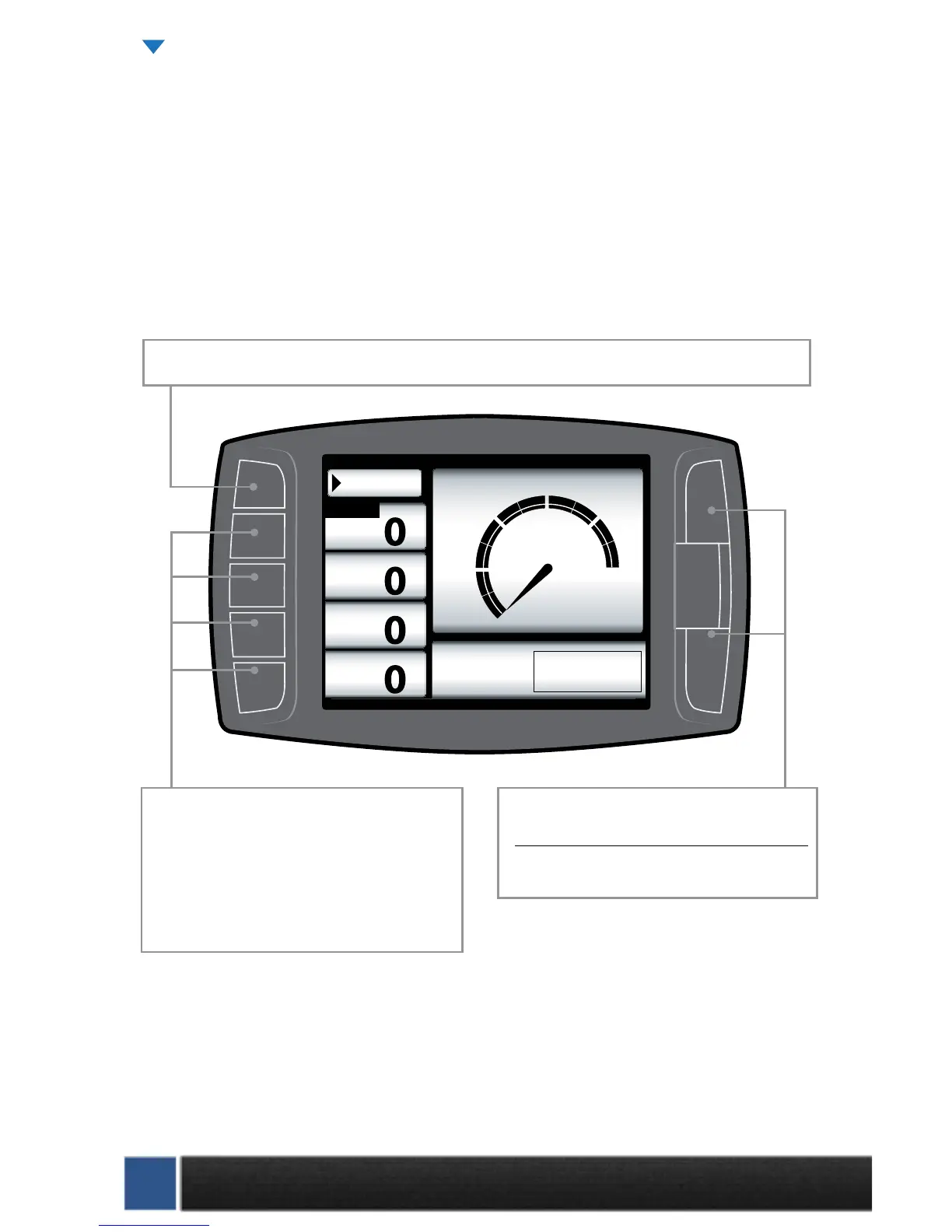
Below are descriptions of how all of the Mini Maxx buttons work and what they do while in the Main
Screen. The buttons perform dierent functions while in a menu or submenu.
Speed
MPH
RPM
RPM
Coolant
ºF
Throttle
X
Menu
MPH
0
30
60 120
90
Power Level Setting
not available until
download is installed.
Press any of the four buttons on the left that
coincide with the four vehicle parameters to
display that particular vehicle parameter on the
large gauge in the upper right side of the screen.
Hold a button down to view the dierent graph
types for the large gauge.
Power Level Up
Power Level Down
Use the power level buttons to control power
levels on-the-y only while in the main screen
Press the top left button to enter the Main Menu, also use this button to exit menus.
Mini Maxx OPERATION CONTINUED


 To Next Page