EasyManua.ls Logo

Hanna Instruments Checker HI718 - User Manual

Hanna Instruments Checker HI718
2 pages
Print Icon
To Next Page IconTo Next Page
Loading...
HI718
Iodine
INSTRUCTION MANUAL
Before using Hanna Instruments products, make sure that they are entirely suitable for
your specific application and for the environment in which they are used. Operation of
these instruments may cause unacceptable interferences to other electronic equipment, thus
requiring the operator to take all necessary steps to correct such interferences. Any variation
introduced by the user to the supplied equipment may degrade the instrument’s EMC
performance. To avoid damages or burns, do not put the instrument in microwave oven. For
yours and the instrument safety do not use or store the instrument in hazardous environments.
Recommendations for Users
Accessories
Reagent Sets
HI718-25 Reagents for 25 Iodine tests
Other Accessories
HI718-11 Iodine Certified Standard Kit
HI731225 Cuvette Black Cap for Checker
®
HC Colorimeters (4 pcs.)
HI731318 Cloth for wiping cuvettes (4 pcs.)
HI731321 Glass cuvettes and Seal Cap for Checker
®
HC Colorimeters (4 pcs.)
HI731353 Cuvette Seal Cap for Checker
®
HC Colorimeters (4 pcs.)
HI740028P 1.5V AAA batteries (12 pcs.)
HI93703-50 Cuvette cleaning solution (230 mL)
IST718 05/18
HI718 is warranted for a period of one year after date of purchase against defects in
workmanship and materials when used for their intended purpose and maintained according
to instructions. This warranty is limited to repair or replacement free of charge. Damage due
to accidents, misuse, tampering or lack of prescribed maintenance is not covered. If service
is required, contact your local Hanna Instruments Office. If under warranty, report the model
number, date of purchase, serial number and the nature of the problem. If the repair is not
covered by the warranty, you will be notified of the charges incurred. If the instrument is to
be returned to Hanna Instruments, first obtain a Return Goods Authorization number from the
Technical Service department and then send it with shipping costs prepaid. When shipping any
instrument, make sure it is properly packed for complete protection.
Warranty
• It is important that the sample does not contain any debris.
Whenever the cuvette is placed into the measurement cell, it
must be dry outside, and completely free of fingerprints, oil and
dirt. Wipe it thoroughly with HI731318 or a lint-free cloth prior
to insertion.
Shaking the cuvette can generate bubbles, causing higher
readings. To obtain accurate measurements, remove such bubbles
by swirling or by gently tapping the cuvette.
Do not let the reacted sample stand for too long after reagent
is added, as accuracy will be affected.
After the reading it is important to immediately discard the
sample, otherwise the glass might become permanently stained.
Tips for an Accurate Measurement
To save the battery, the instrument shuts down after 2 minutes of non-use.
One fresh battery lasts for a minimum of 5000 measurements. When the battery is dead the
instrument will display “bAd” then ”bAt” for 1 second and then turns off.
To restart the instrument, the battery must be replaced with a new one.
To replace the instrument’s battery:
Turn the instrument off by holding the button until the meter shuts off.
Turn the instrument upside down and remove the battery cover with a screwdriver.
Remove the battery from its location and replace it with a new one, inserting the negative
end first.
Insert the battery cover and replace the screw with a screwdriver.
Battery Management
Question and Answer IconNeed help?

Do you have a question about the Hanna Instruments Checker HI718 and is the answer not in the manual?

Summary

Tips for an Accurate Measurement

Battery Management

Errors and Warnings

Measurement Procedure

Summary

Tips for an Accurate Measurement

Battery Management

Errors and Warnings

Measurement Procedure

Overview

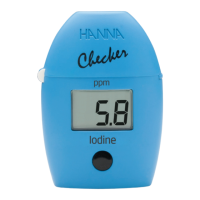
The Hanna Instruments HI718 Checker is a portable colorimeter designed for the measurement of iodine concentration. This device is specifically engineered for ease of use and accuracy in various environments, from field testing to laboratory applications.

Function Description

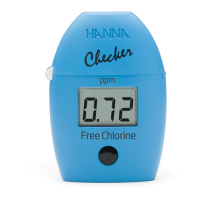
The HI718 Checker operates by measuring the color intensity of a reacted sample. The device features a cover, a cuvette with a cap, a cuvette holder, an LCD Liquid Crystal Display, and an operation button. The measurement process involves a periodate method, where the reaction between iodine and a specific reagent (HI718-0) causes a pink tint in the sample. The intensity of this tint is then measured by a light-emitting diode (LED) at 525 nm and detected by a silicon photocell, which correlates to the iodine concentration displayed in parts per million (ppm).

Important Technical Specifications

  • Range: 0.0 to 12.5 ppm
  • Resolution: 0.1 ppm
  • Accuracy: ±0.1 ppm ±5% of reading @25 °C/77 °F
  • Light Source: Light Emitting Diode @525 nm
  • Light Detector: Silicon Photocell
  • Method: Adaptation of the Standard Methods for the Examination of Water and Wastewater, 18th edition, Periodate method.
  • Environment: 0 to 50 °C (32 to 122 °F); max 95% RH non-condensing
  • Battery Type: 1.5V AAA (1 pc.)
  • Auto-Shut off: After 2 minutes of non-use
  • Dimensions: 86.0 x 61.0 x 37.5 mm (3.4 x 2.4 x 1.5″)
  • Weight: 52 g (1.84 oz.)

Usage Features

The HI718 Checker is designed for straightforward operation:

  1. Power On: Turn the meter on by pressing the button. The display will show "Add", "C.1" with "Press" blinking, indicating readiness.
  2. Zeroing the Meter: Fill a cuvette with 10 mL of unreacted sample and cap it. Place the cuvette into the meter and close the cap. Press the button to zero the meter; the display will show "Add", "C.2" with "Press" blinking.
  3. Sample Reaction: Remove the cuvette, unscrew the cap, and add the content of one packet of HI718-0 reagent. Replace the cap and shake gently for 20 seconds to ensure proper mixing and reaction. Place the reacted cuvette back into the meter.
  4. Measurement: Press and hold the button until a timer is displayed on the LCD, or wait for 2 minutes and 30 seconds, then press the button. The instrument will then display the iodine concentration in ppm.
  5. Automatic Shut-off: The meter automatically turns off after 2 minutes of inactivity to conserve battery life.

Tips for Accurate Measurement:

  • Ensure the sample is free of debris.
  • Wipe the cuvette thoroughly with a lint-free cloth (e.g., HI731318) to remove fingerprints, oil, and dirt before insertion.
  • Remove any bubbles from the sample by swirling or gently tapping the cuvette, as bubbles can lead to higher readings.
  • Do not let the reacted sample stand for too long after reagent addition, as this can affect accuracy.
  • Discard the sample immediately after reading to prevent permanent staining of the glass cuvette.

Error and Warning Messages:

  • L.H. (Light High): Too much light to perform a measurement. Check the preparation of the zero cuvette.
  • L.L.O. (Light Low): Not enough light to perform a measurement. Check the preparation of the zero cuvette.
  • Inu (Inverted Cuvettes): The sample and zero cuvette are inverted.
  • 0.0 (Under Range): Blinking "0.0" indicates the sample absorbs less light than the zero reference. Verify the procedure and ensure the same cuvette is used for both zero and measurement.
  • 12.5 (Over Range): A flashing value of the maximum concentration indicates an over-range condition. Dilute the sample and re-run the test.
  • bAt (Battery Low): The battery needs to be replaced soon.
  • bAd (Dead Battery): The battery is dead and must be replaced. Normal operation is interrupted.

Maintenance Features

Battery Management:

  • A fresh 1.5V AAA battery provides a minimum of 5000 measurements.
  • When the battery is dead, the instrument displays "bAd" then "bAt" for 1 second before turning off.
  • To replace the battery:
    1. Turn the instrument off by holding the button until it shuts off.
    2. Turn the instrument upside down and remove the battery cover with a screwdriver.
    3. Remove the old battery and insert a new 1.5V AAA battery, ensuring the negative end is inserted first.
    4. Replace the battery cover and secure it with the screw.

Accessories:

  • Reagent Sets: HI718-25 (Reagents for 25 Iodine tests)
  • Other Accessories:
    • HI718-11: Iodine Certified Standard Kit
    • HI731225: Cuvette Black Cap for Checker® HC Colorimeters (4 pcs.)
    • HI731318: Cloth for wiping cuvettes (4 pcs.)
    • HI731321: Glass cuvettes and Seal Cap for Checker® HC Colorimeters (4 pcs.)
    • HI731353: Cuvette Seal Cap for Checker® HC Colorimeters (4 pcs.)
    • HI740028P: 1.5V AAA batteries (12 pcs.)
    • HI93703-50: Cuvette cleaning solution (230 mL)

Warranty:

The HI718 is warranted for one year from the date of purchase against defects in workmanship and materials, provided it is used for its intended purpose and maintained according to instructions. This warranty covers repair or replacement free of charge. Damage due to accidents, misuse, tampering, or lack of prescribed maintenance is not covered. For service, contact your local Hanna Instruments Office, providing the model number, date of purchase, serial number, and a description of the problem. If the repair is not covered by warranty, charges will be incurred. Instruments returned for service must have a Return Goods Authorization number and be shipped prepaid, properly packed for protection.

Recommendations for Users:

  • Ensure the product is suitable for your specific application and environment.
  • Be aware that operation may cause interferences with other electronic equipment; take necessary steps to correct such interferences.
  • Avoid user modifications that could degrade EMC performance.
  • Do not place the instrument in a microwave oven.
  • Do not use or store the instrument in hazardous environments.

Hanna Instruments Checker HI718 Specifications

General IconGeneral
BrandHanna Instruments
ModelChecker HI718
CategoryMeasuring Instruments
LanguageEnglish

Related product manuals