8
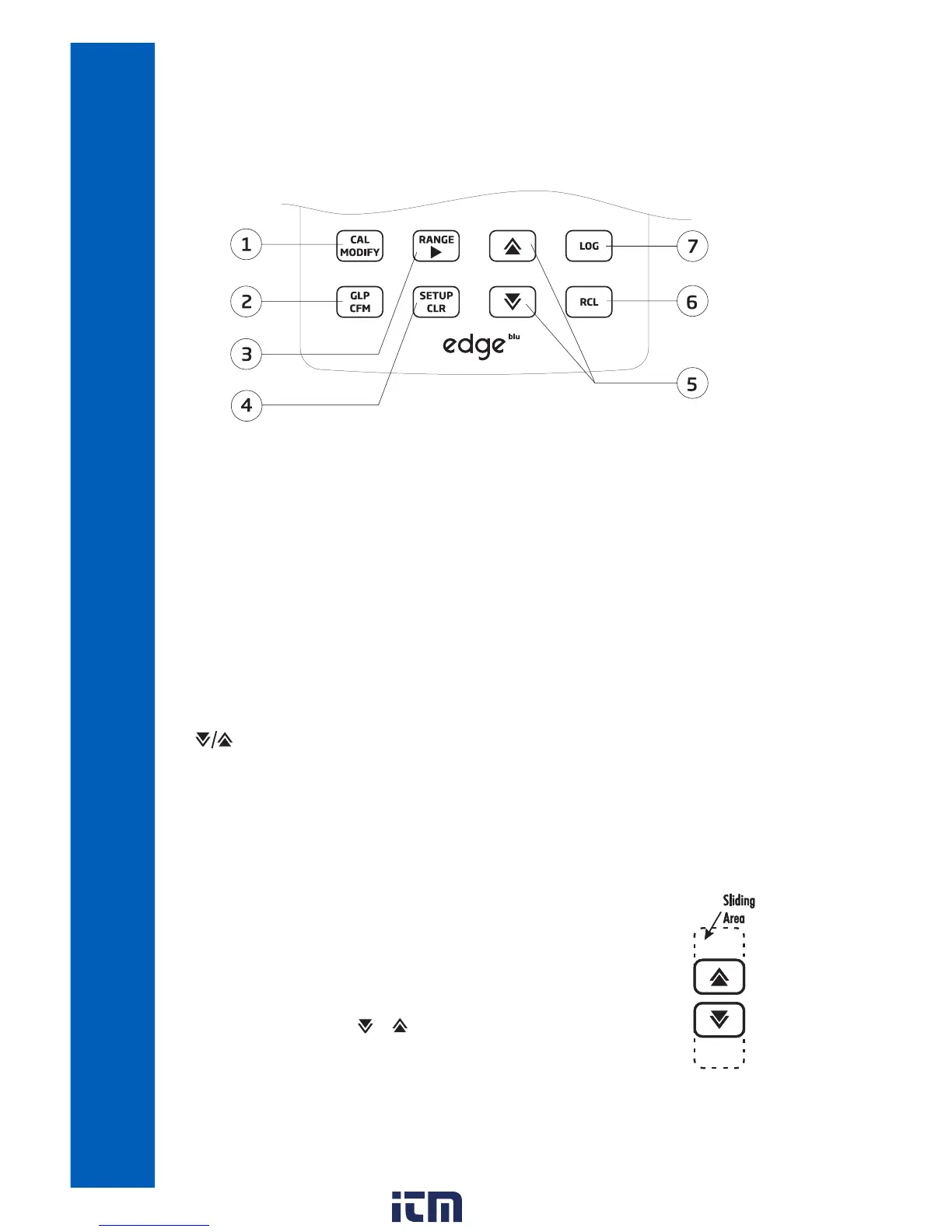
KEYPAD FUNCTION
1.CAL/MODIFY ‑ Used to enter and exit calibration mode. In SETUP, used to initiate changes of a
configuration setting.
2.GLP/CFM
‑ Used to display GLP calibration information. In SETUP, used to confirm change made.
In calibration, used to accept calibration points.
3. RANGE/
u ‑ Used in main screen to switch between pH display, mV display or MTC value edit
(only for electrodes without temperature sensor e.g. HI10832). In SETUP, used to move to right in
pick list. In log RCL, used to view GLP data for a data point.
4.SETUP/CLR
‑ Used to enter/exit SETUP mode. During calibration, used to clear previous calibration
data. In log RCL, used to clear log records.
5. ‑Used to scroll through SETUP menu. Used to change selection when modifying a parameter
in SETUP. Used to access Bluetooth Functions in measurement.
6.RCL (Recall)
‑ Used to view logged records or view % log memory used.
7.LOG ‑ Used to log data by manual log on demand or manual log on stability or to start/stop
interval logging.
Note: Log can also be initiated or terminated by depressing the Operation button
on probe.
You can increase/decrease the speed to change the value of a parameter.
Proceed as follows:
Press and hold down the or key, then slide the finger toward the double
apex to increase the rate of value changes.
DIAGRAM
w ww . . co m
information@itm.com1.800.561.8187


 To Next Page