Need help?
Do you have a question about the Hannlomax HX-321CD and is the answer not in the manual?
Details the function and location of all buttons, slots, jacks, and indicators on the boombox.
Covers warnings related to water, ventilation, heat sources, power cords, and proper plug usage.
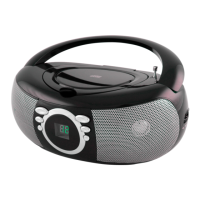
The HANNLOMAX HX-321CD is a versatile CD/MP3 Boombox designed for audio playback with AM/FM radio, USB, and Bluetooth streaming capabilities. This device offers a range of functions for various listening preferences, from traditional radio and CD playback to modern digital audio streaming.
The core functionality of the HX-321CD revolves around its ability to play audio from multiple sources. It features a CD/MP3 player that supports standard audio CDs and MP3 files, allowing users to enjoy their physical music collection. For digital music, a USB slot is provided for playing MP3 files directly from a USB device. The integrated AM/FM radio allows access to local broadcasts, with a radio band switch to select between AM and FM frequencies and a tuning control for precise station selection.
One of the key modern features is Bluetooth streaming, enabling wireless connection to Bluetooth-enabled devices such as smartphones or tablets. This allows users to stream audio files directly from their personal devices to the boombox. An Aux-in jack further expands connectivity, allowing wired connection to external audio players like MP3 players using a 3.5mm stereo audio cable. For private listening, a headphone jack is included, which automatically disconnects the speakers when headphones are plugged in.
The device is powered by either AC current (120V ~ 60Hz) or DC 9V using six UM-2 "C" size batteries, offering portability for use in various locations.
Operating the HANNLOMAX HX-321CD is designed to be straightforward. The Function Switch allows users to easily select between different modes: RADIO, CD/USB/AUX, or BT (Bluetooth).
For AC operation, simply connect the power plug to the unit's AC socket and a standard outlet. It's important to handle the power cable with dry hands and disconnect it from the wall outlet when not in use for extended periods to prevent damage and ensure safety.
For battery operation, the AC cord set must be completely disconnected. The battery compartment, located at the back of the unit, opens to insert six "C" size batteries, ensuring correct polarity as indicated inside the compartment.
Radio operation involves sliding the Function Switch to RADIO, selecting the desired band (AM or FM) with the Radio Band Switch, and then using the Radio tuning control to find a station. The FM antenna should be fully extended for optimal FM reception, while for AM reception, the unit's built-in antenna requires turning the entire unit for best reception. Volume is adjusted via the Volume Control.
CD/MP3 disc function requires sliding the Function Switch to CD/USB/AUX. After inserting a CD/MP3 disc with the printed side facing up and closing the CD door, the unit automatically begins playback. The PLAY/PAUSE button controls playback interruption and resumption, while the STOP button halts playback.
Playing MP3 files with a USB device also starts by setting the Function Switch to CD/USB/AUX. The CD/USB button is then pressed to select USB mode, indicated by 'USB' on the LCD display. Once a USB device is plugged into the USB port, the unit will read and play the files automatically. Playback is controlled using the PLAY/PAUSE and STOP buttons.
Bluetooth operation is initiated by sliding the Function Switch to BT. The 'bt' and Bluetooth logo will blink on the LCD display, indicating pairing mode. Users then enable Bluetooth on their device, search for "HX-321CD HANNLOMAX," and connect (using "0000" if a password is required). Once connected, the Bluetooth logo stops blinking, and audio can be streamed from the paired device. The SKIP+ and SKIP- buttons allow navigation between tracks. The unit also features auto-pairing, meaning once a device has been paired, it will automatically reconnect the next time both devices are turned on.
MP3/Aux In connection involves inserting a 3.5mm stereo audio cable (not supplied) from the external MP3 player's line-out or phones jack to the unit's Aux-in jack. The Function Switch is set to CD/USB/AUX, and playback is controlled via the external MP3 player and the unit's Volume Control.
Skip mode allows users to navigate between tracks using the SKIP+ (next track) and SKIP- (previous track) buttons during play or pause. If MP3 discs or USB devices contain folders, the FOLDER+ button can be used to select the next desired folder.
Repeat modes offer various playback options, accessible by repeatedly pressing the MODE button. For audio CDs, options include Repeat One (repeats the current track), Repeat All (repeats all tracks), and Normal (plays tracks in sequence). For MP3 files, additional options include Repeat FOLDER (repeats all tracks within the current folder). The LCD display provides visual cues for the active repeat mode.
Programming tracks allows users to create a custom playlist. In STOP mode, pressing the PROGRAM button initiates the programming sequence. Users can select desired tracks using the SKIP+ or SKIP- buttons (and FOLDER+ for folder navigation on storage devices), then press PROG again to store them. Up to 20 tracks can be programmed for CDs and 99 for MP3s. Once programmed, pressing PLAY/PAUSE starts playback in the custom order. The program list can be canceled by pressing STOP twice or by opening the CD compartment door or setting the Function Switch to OFF.
The HANNLOMAX HX-321CD requires minimal maintenance. It is recommended to clean the unit only with a dry cloth. Users should avoid blocking ventilation openings to prevent overheating and ensure reliable operation. The device should not be placed near heat sources or in built-in installations without proper ventilation.
Safety instructions emphasize protecting the power cord from being walked on or pinched, especially at plugs and where it exits the apparatus. Servicing should only be performed by qualified personnel, particularly if the apparatus has been damaged, exposed to liquids, or is not operating normally. The safety purpose of polarized or grounding-type plugs should not be defeated. The apparatus should not be exposed to rain, moisture, dripping, or splashing, and no objects filled with liquids, such as vases, should be placed on it.
 General
| Type | Portable Stereo System |
|---|---|
| Supported radio bands | FM |
| Number of batteries supported | 6 |
| Playable media | CD, USB |
| Power source | AC |
| Battery type | C |

 To Next Page