DG3 Controller – Installation and Operation
Manual
540846-3 page 13 of 64 25/09/2015
At present, the variants are as follows:
base build with standard features
as base build plus RTC, secondary USB, power over USB, digital O/P and isolated digital I/P
as base build plus RTC, secondary USB, power over USB, digital O/P, isolated digital I/P and
Ethernet interface
terminal mode (for connecting to HTC)
Controller overview
Front view
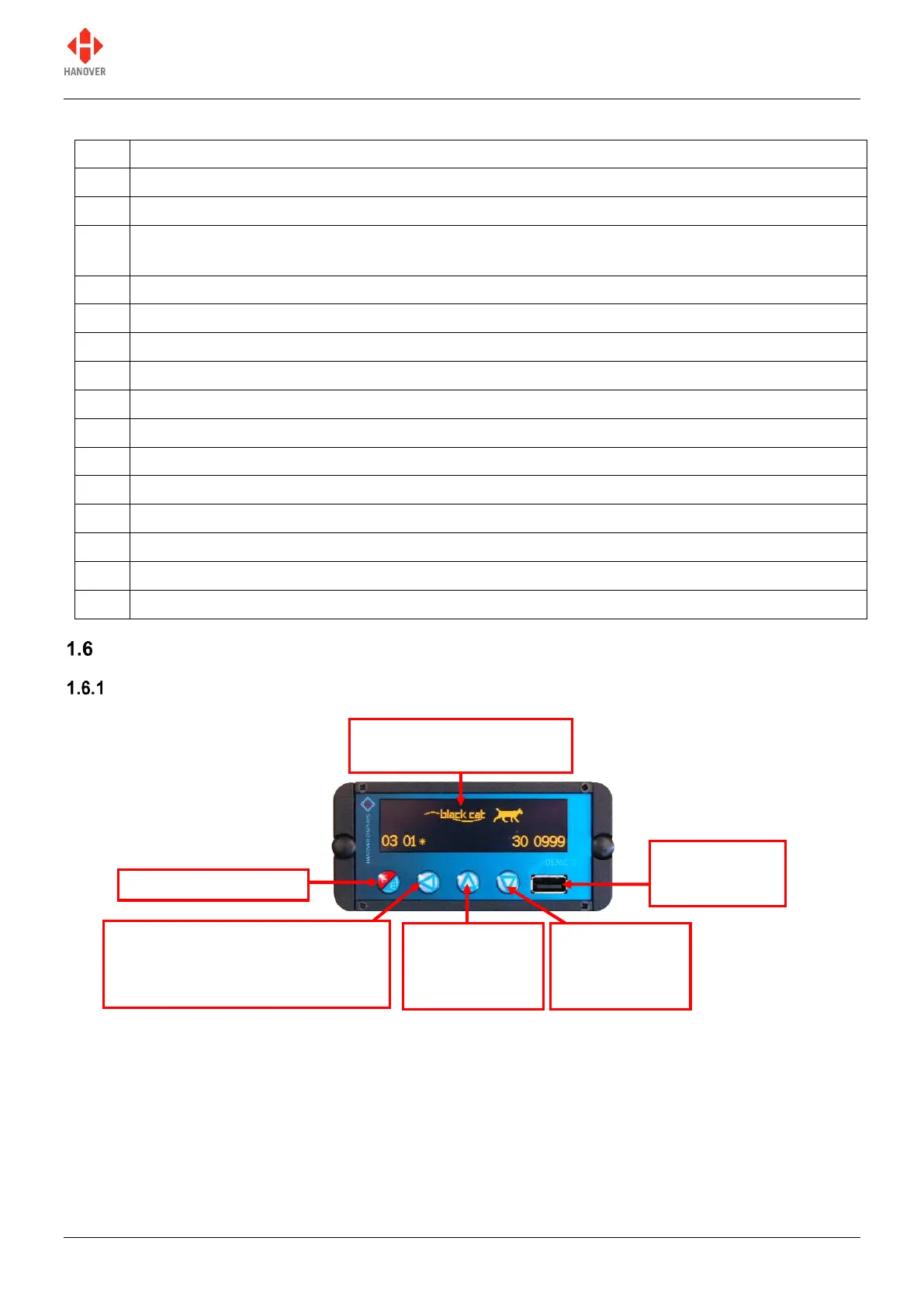
Figure 4 - diagram showing the front side of the controller
Notes:
Auto-screen dimming to reduce driver glare and prolong unit life. The dimming feature activates
automatically a few seconds after the unit has been left idle.
High-lighting of selected function helps the operator to select the required option with ease.
8Mb internal flash memory ensuring it is capable of meeting the future requirements of the transport
industry, with the ability to store large lists alongside complex firmware.
Organic LED display: high
contrast, wide viewing angle
USB socket:
for loading data
and firmware
Left key:
- for selecting the next entry digit
- back button when selecting options
behind the lock code
Up key:
increases the
digit value by 1
Down key:
decreases the
digit value by 1


 To Next Page
 Loading...