DG3 Controller – Installation and Operation
Manual
540846-3 page 20 of 64 25/09/2015
Click Close on the original formatting
window as shown in step 2. The USB
stick is now formatted to FAT32 and is
ready for use.
Configuring the USB stick for loading
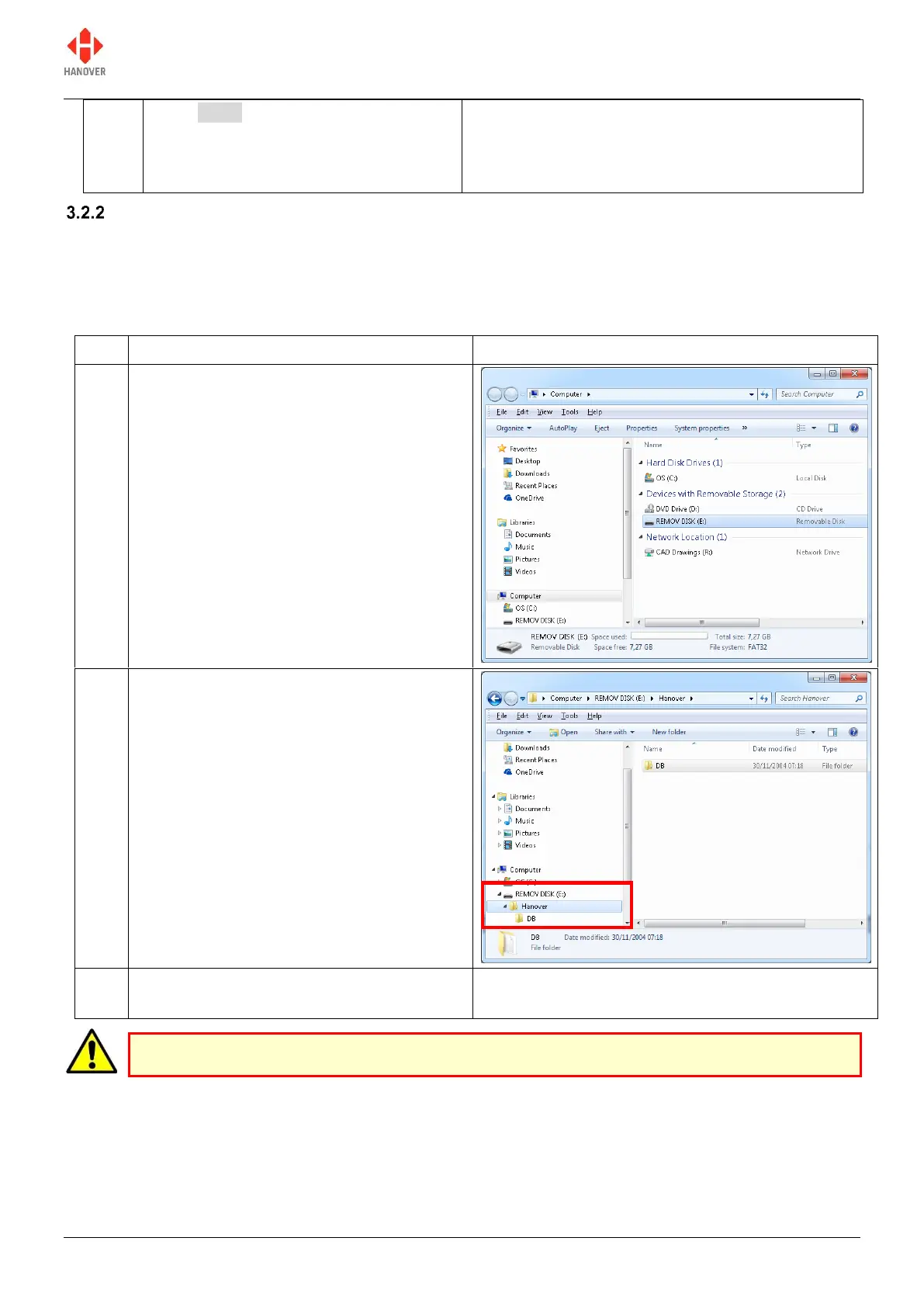
To ensure the correct data is loaded, an Eric.BIN file is saved on the USB stick using the directory structure
X:\Hanover\DB\ (where X is the drive allocated by the PC to the USB stick).
The table shows how to configure the USB stick:
Insert the USB stick into the PC and locate
it. In our case, it appears as REMOV DISK
(E:).
Note: The name and drive letter are
variable and in this case, the drive letter
allocated to the USB stick by the PC is 'E:'.
On the USB drive, create a folder called
'Hanover'. Open this folder and create
another folder within it and name it 'DB'.
Note: 'DB' stands for DataBase.
The USB drive is now set up to download
any ERIC.BIN file into the ‘DB’ folder.
USB sticks sometimes fail: try another stick before assuming the problem lies elsewhere.


 To Next Page
 Loading...