DG3 Controller – Installation and Operation
Manual
540846-3 page 21 of 64 25/09/2015
Transferring the database to the USB stick using Helen
To load the database to the USB stick using Helen, please ensure the USB drive is connected to the PC.
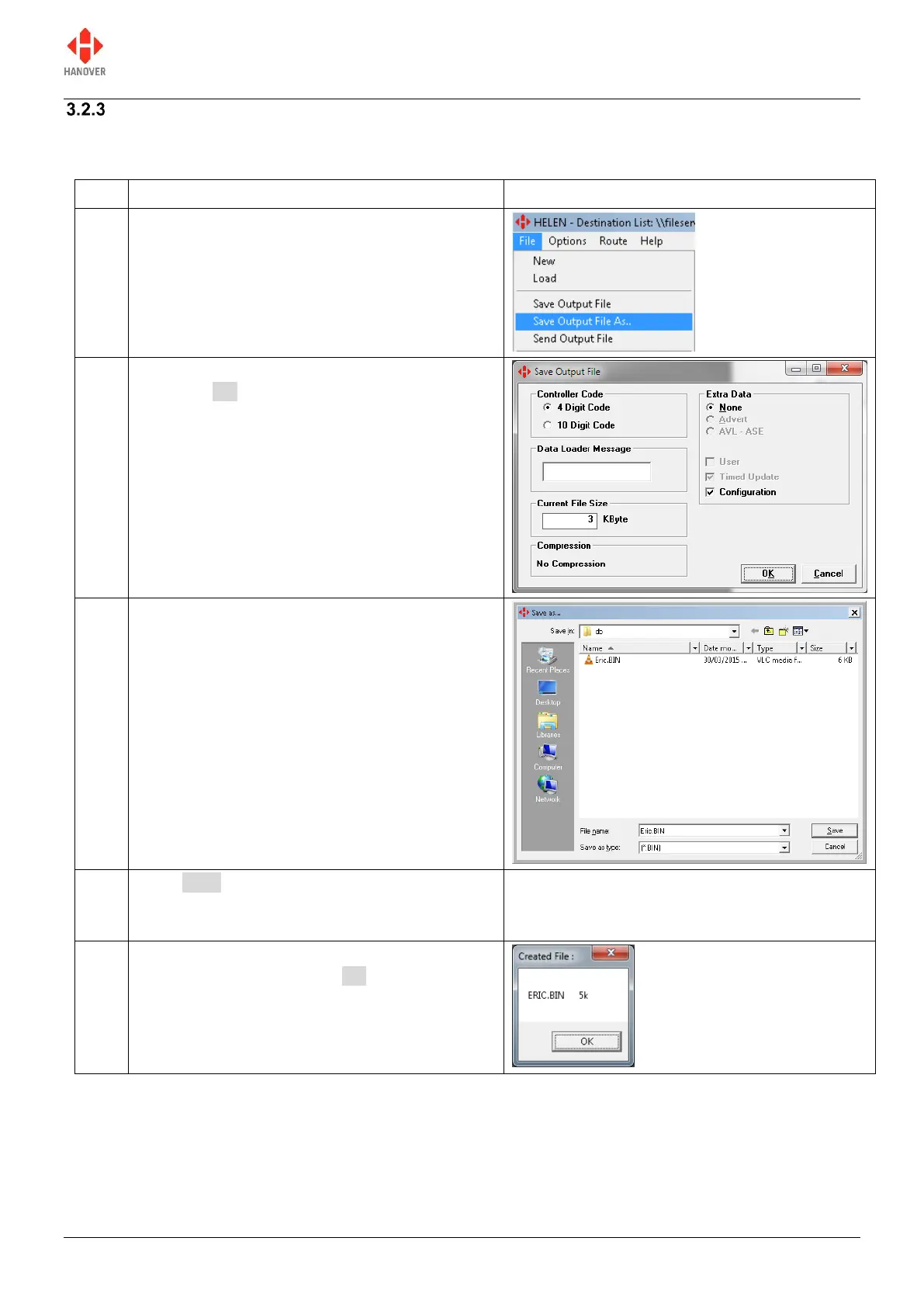
In the main Helen window, click File Save
Output File As.. as shown.
Verify that the options selected are correct and
then click OK.
For more details, refer to Helen display-editing
software operating manual (ref. 540125).
The ‘Save As…’ window will appear as shown
(it may be necessary to browse to the USB
folder Hanover folder DB folder). Ensure
the text in the 'File name:' box is Eric (or
Eric.BIN) and that the ‘Save as type:’ box has
[*.BIN] in it.
Click Save. Note that subsequent downloads
will already have a file called Eric.BIN shown in
this window: it will be overwritten.
The database has been saved to the USB stick
inside the DB folder. Click OK.


 To Next Page
 Loading...