28 29
jazz ST and jazz ST only:
Easy telephone
Your hearing aids may also have a telephone
feature, which automatically switches to a
dedicated telephone program when a receiver
is brought close to one of your hearing aids. You
will hear a short melody when you switch to
the easy telephone program. When the receiver
is moved away from the hearing aid it will
automatically return to the previous listening
program.
Wireless synchronization
(jazz ST Dir W only)
When you change the volume or program
settings on one hearing aid, the other one
changes as well. Wireless synchronization
works for both the push button and the rotary
dial.
For example, if your push button is congured
as a program control, when you push the
button on one hearing aid, the program will
change on both hearing aids.
14. Flight mode jazz ST Dir W
Your hearing aids operate between 2.4 GHz–
2.48 GHz frequency range. When flying, some
operators require all devices to be switched
into flight mode. Entering flight mode will not
disable normal hearing aid functionality, only
the Bluetooth connectivity functions.
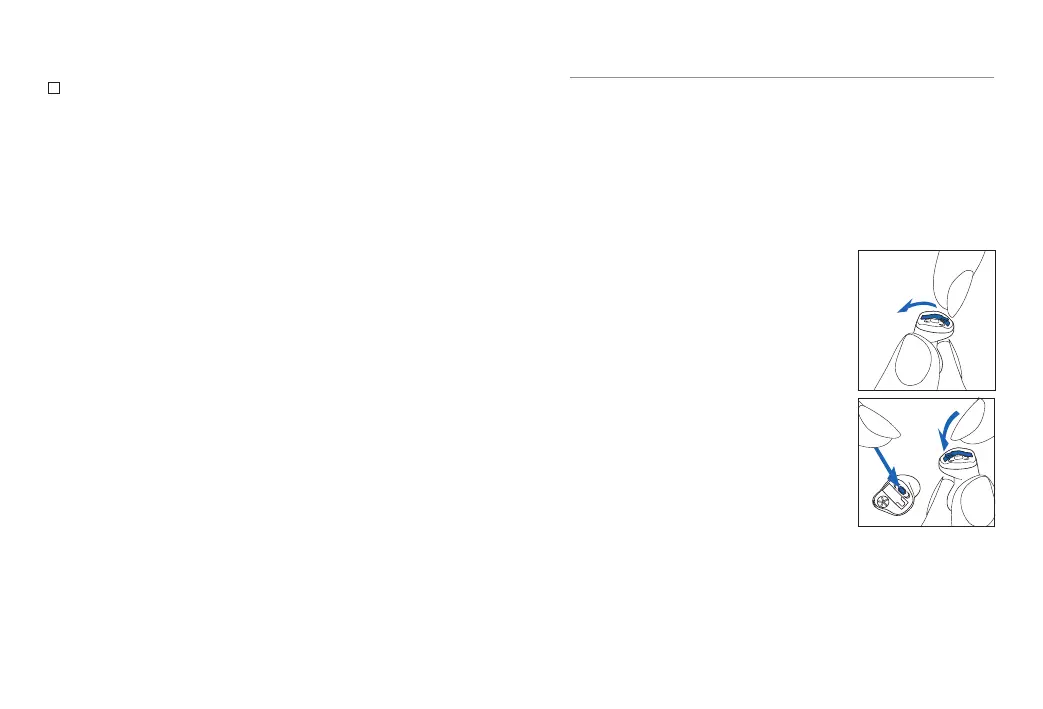
Enter flight mode
To disable the wireless function
and enter flight mode in each
hearing aid:
1. Open battery door.
2. Hold down the push button
on the hearing aid for 7
seconds while closing the
battery door.
In flight mode, your hearing aid cannot connect
directly to your phone.


 To Next Page