Color Monitor
7
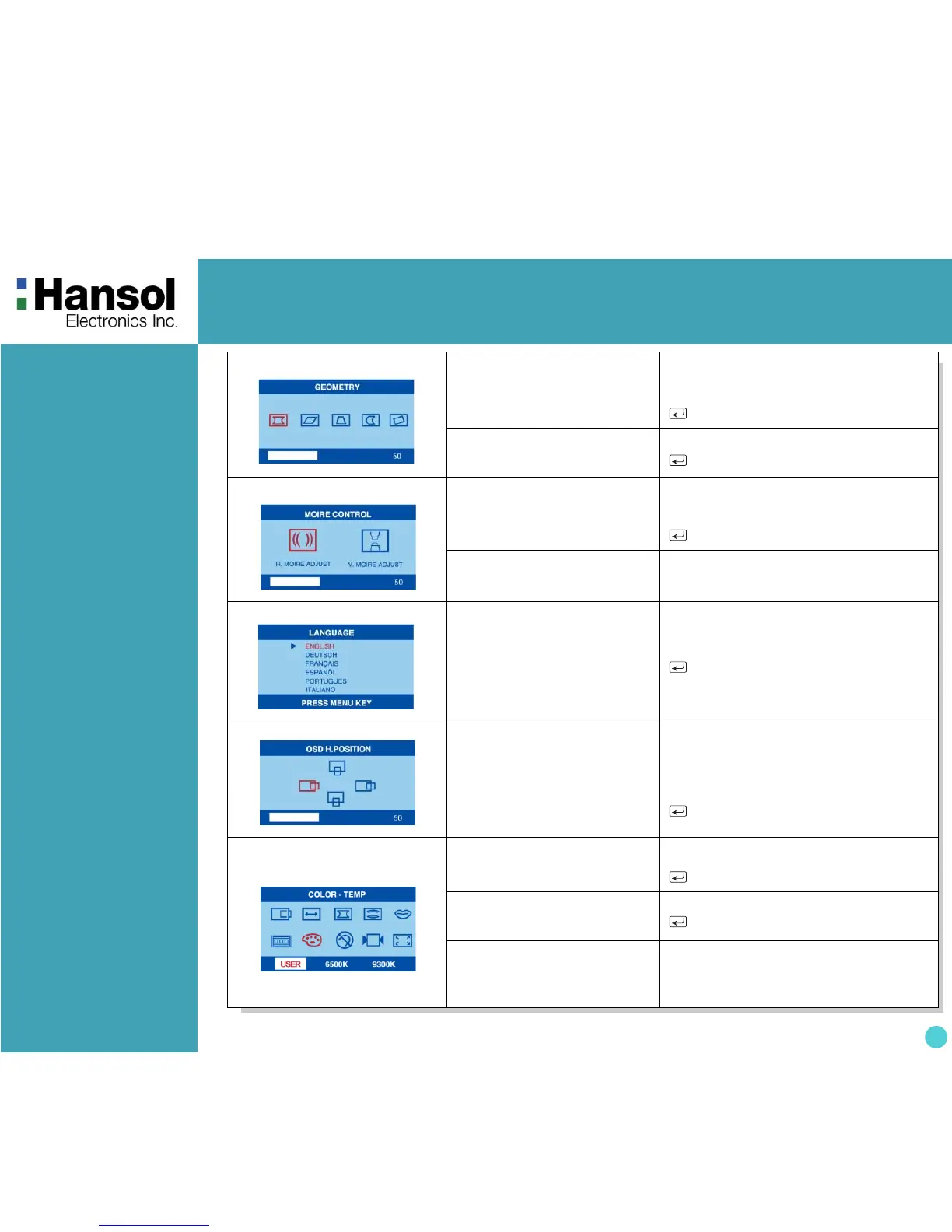
7. GEOMETRY
Odd press
: Selects and blinks the function
with RED ICON.
- + Controls the amount of the Selected
function. (Refer to Geometry
controls menu in detail)
Exit to No.2
Even press
: Stops blinking and ready to
move function you want.
- + Moves to function you want.
Exit to No.2
8. MOIRE
Odd press
: Selects and blinks the function
with RED ICON.
- + Controls the Amount of the seleccted
function
. Please control these key
inorder the image not to shiver.
Exit to No.2
Even press
: Stops blinking and ready to
move function you want.
- + Moves to function you want.
9. LANGUAGE
Selects the languages with
RED ICON and Exit to No.2.
- + Moves to language you want.
Exit to No.2
10. OSD POSITION
Toggles OSD position
horizontally or vertically.
- Moves the OSD menu left or down in
the selected function.
+ Moves the OSD menu right or up
in the selected function.
Exit to No.2
11. COLOR MODE
Odd press
: Blinks the RED ICON
- color menu ICON.
- + Moves to color mode you want and
the selected “color mode” will blink.
Exit to No.1
Even press
: Stops blinking and ready to
move function you want.
- + Moves to function you want.
Exit to No.1
When the color mode ICON
isblinking in user mode, press,
then go to color adjust mode
No.12.
-


 To Next Page