Color Monitor
6
Controls
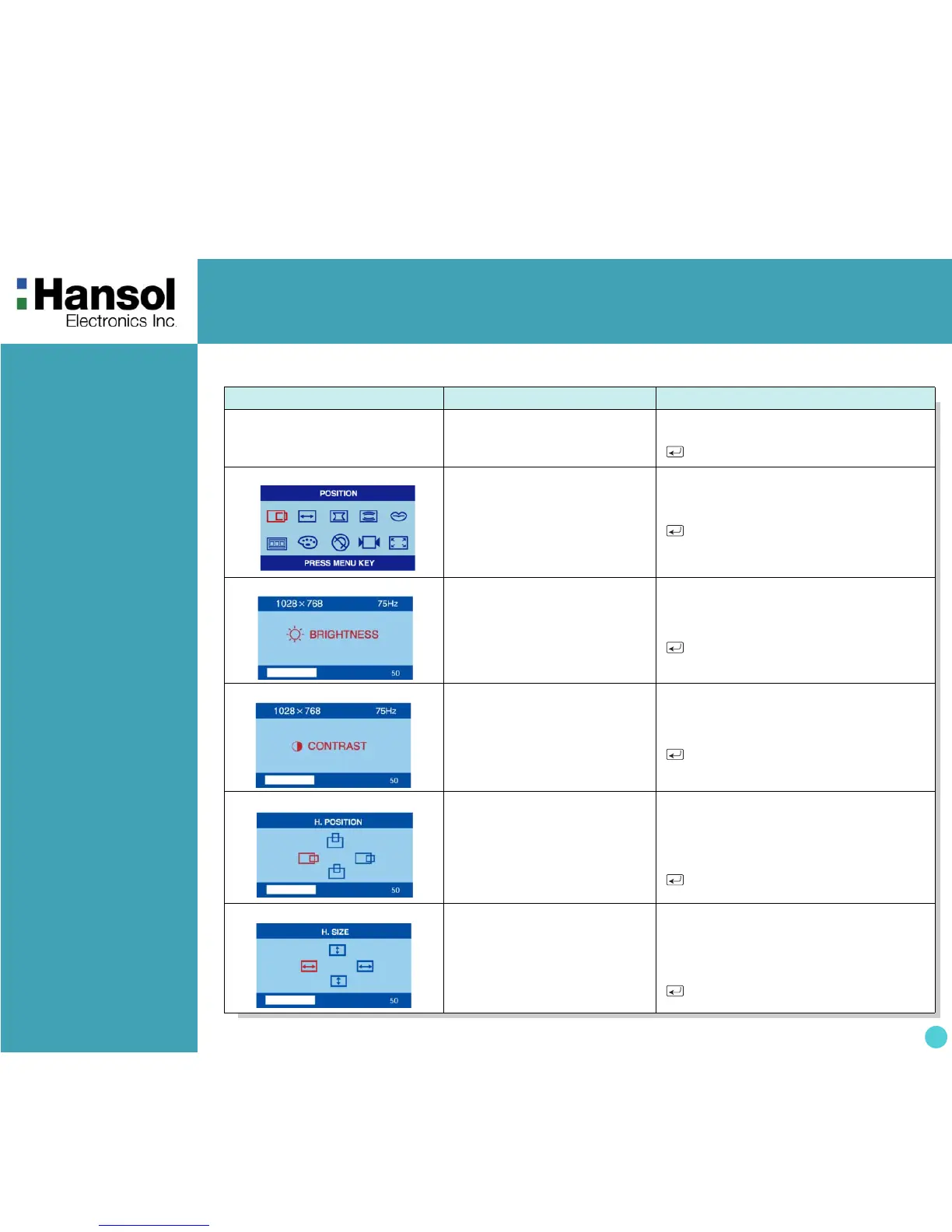
OSD MENU MENU CONTROL
1. NO OSD Proceeds to NO.2
- Proceeds to NO.3
+ Proceeds to NO.4
No meaning
2. MAIN MENU
The function with RED ICON is
- Performed : Recall, Degauss
- Selected and blinked :
Color Adjust, Zoom
- Proceeded : Others
- + Moves to function you want.
Exit to No.1
3. BRIGHTNESS
Moves to No.2
- Decreases the brightness
+ Increases the brightness
Exit to No.1
4. CONTRAST
Moves to No.2
- Decreases the contrast
+ Increases the contrast
Exit to No.1
5. H/V-POSITION
Toggles horizontal or
vertical position
- Moves the image down or left in the
selected function.
+ Moves the image up or right in the
selected function.
Exit to No.2
6. H/V-SIZE
Toggles horizontal or
vertical size
- Shrinks the image in the selected
function.
+ Expands the image in the selected
function.
Exit to No.2
- OSD Menu


 To Next Page